Skip to Main Content Skip to Search
File Exchange
MATLAB Newsgroup
Link Exchange
  Blogs  
 Contest 
MathWorks.com

Ken & Mike on the MATLAB Desktop

September 10th, 2007

Pretty printing

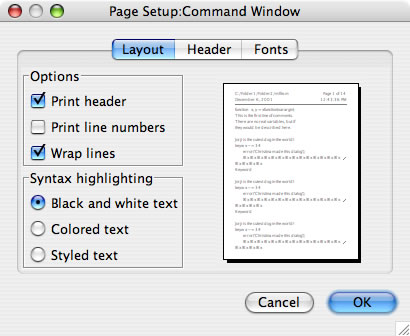
If you are tired of printing black and white files from the Editor, try setting some pretty printing options. To print the Editor or the Command Window with full color and headers, select the File menu, Page Setup menuitem. The following dialog comes up and provides a lot of options. This first pane provides options for printing in color, printing a header, printing line numbers, and whether to wrap lines in the printout.
pagesetup1.jpg

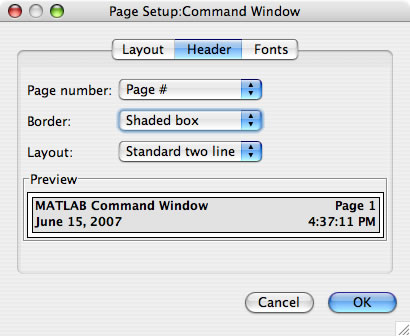
The second pane is the Header setup pane. On this pane you can choose how you want the header to look including the format of the line numbers.
pagesetup2.jpg

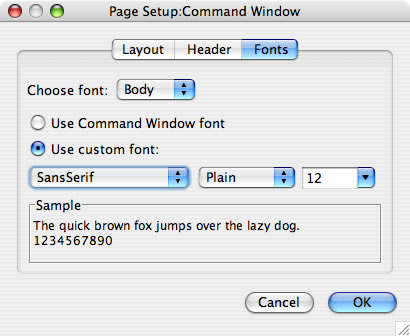
In the final pane, you can even select to print in a font that is not currently displayed in the Command Window or Editor.
pagesetup3.jpg

Now, go print stuff!

4 Responses to “Pretty printing”

  1. Gaurav replied on :

    It will be nice if you can post screenshots from Windows machines too (sometimes if not always). It will make following the steps you list far more easier.

    Thanks.

  2. kena replied on :

    Thanks for the feedback, we’ll definitely include more Windows screenshots. The prevalence of Mac screenshots is not by explicit intent, but is due to the reality that our most passionate desktop bloggers are Mac devotees. Whether this speaks to the general mindset of the Macintosh community, or is pure coincidence, is a thought exercise left to the reader. :)

    KEN

  3. Gaurav replied on :

    Thank you.

    I just hope the Mac ‘devotees’ at Mathworks don’t turn fanatics and suddenly stop making good software for Windows users.

    Or are Mathworks developers planning to only cater to the “Mac experience”?

  4. jayhawkbabe replied on :

    @Gaurav,
    Your comments seem a bit unwarranted given that supporting Matlab on Windows requires a great deal of OS-specific development (every *other* operating system supports X11) and that a number of toolboxes are even exclusive to Windows (Excel link, Builder for Excel, and Builder for .NET).

    In response to your original post, the differences between the Mac and Windows GUIs really aren’t that significant–I use the Mac version daily and am forced to use the Windows version at least once a week. Certainly someone who is capable of using the Editor should be able to extrapolate from the screenshots provided to the appropriate version of Matlab.

Leave a Reply


Ken & Mike work on the MATLAB Desktop team.
  • Peter Brady: Hi Ken, Thanks for the heads up on this one but I hope there is a resolution soon. The editor is now...
  • Ken: Hi Ian, Can you be more specific about where you see performance differences? We are aware of some bottlenecks...
  • Ian: More importantly, what are you going to do about the abysmal performance of Matlab on Leopard. Many of my...
  • din: hello…may i know about matlab command(absolute command)….i aready has the prog…but they use...
  • Ken: Hi Rich, We have a bug report on the first issue you mention. As for the Command Window time-stamp format,...
  • Rich Messeder: I have a few comments that I’m trying to find the right place for. One is that when I press the...
  • Steve Eddins: Stephen—You can extend your R2008b Prerelease license by choosing the Help -> Licensing ->...
  • Mike: Stephen, We cannot give an exact date as to when the next version of MATLAB will be released.
  • Stephen Colona: Do you think the new release will come out before the PreRelease expires? Thanks.
  • Mike: Nasir, Thank you for your feedback, it helps us refine the desktop and ultimately make it easier to use....

These postings are the author's and don't necessarily represent the opinions of The MathWorks.

Related Topics