Ken & Mike on the MATLAB Desktop

September 24th, 2007

Hanging out at the Document Bar

When you have multiple documents (M-Files in the Editor, variables in the Array Editor, docked Figures, etc) open within a MATLAB desktop tool there is an activation button corresponding to each document. The area where these buttons appear is referred to as the “Document Bar”. The document bar is in some respects similar to the Windows Task Bar, except it’s embedded within a MATLAB desktop tool and its scope is limited to the documents docked within that tool.
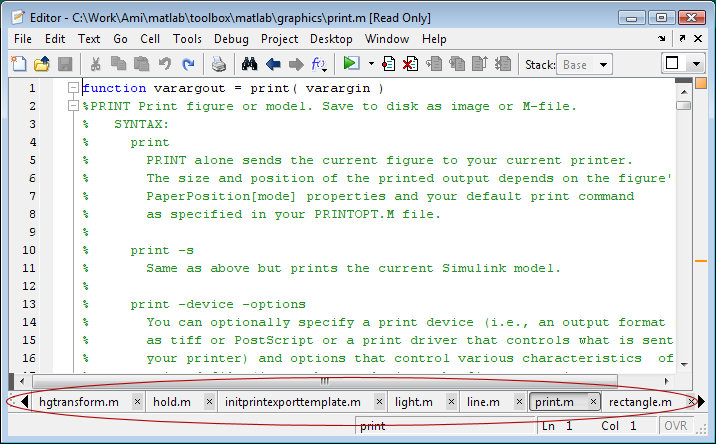
Document Bar

Like the Windows task bar, the document bar can be positioned along any edge of the containing tool. An easy way to change the document bar’s location is to mouse down on its grip or any empty bar area and drag toward to edge where you want it to appear. You can also set the document bar position via the Desktop->Document Bar->Bar Position menu. When the document bar appears at the left or right (as shown below) instead of the bottom or top, it can provide access to a larger number of documents without requiring scrolling.
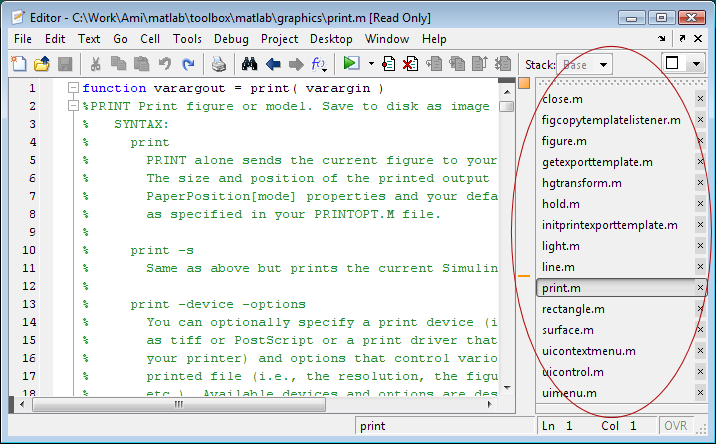
Document Bar at Right

The long file names in the above screen shot cause the document bar to be rather wide. If you have a wide-screen monitor this may be perfectly fine. If not, you can drag the edge of the bar to reduce its width. The file names are truncated to fit within the allotted width.
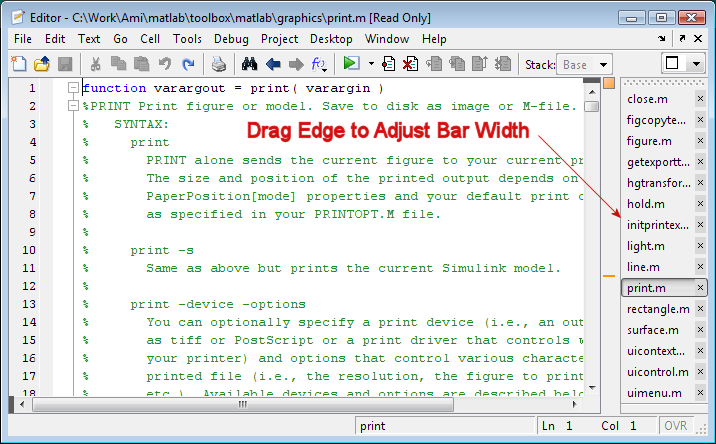
Narrowed Document Bar

If you now move the bar back to the top or the bottom you’ll notice that the buttons are still narrowed. With the bar in this position you can adjust the width of its buttons by dragging the separators between them. You may find that simply adjusting the button width on the horizontal bar provides space for an adequate number of buttons.
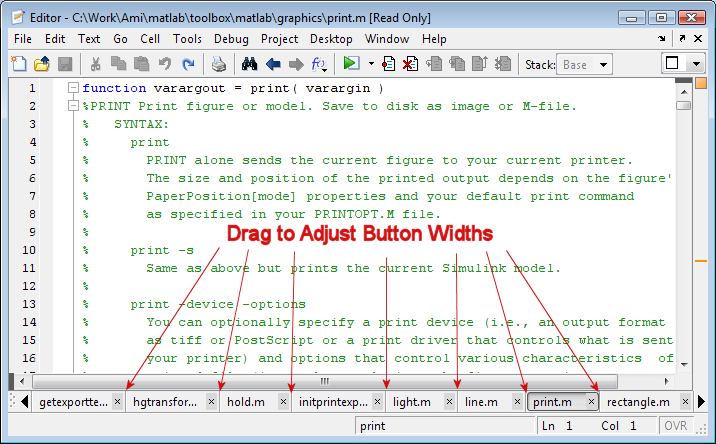
Adjusting Button Widths with Bar at Bottom

By default document bar buttons appear in the order in which the corresponding documents were opened. Alternatively you can choose to have the buttons appear alphabetically (choose Desktop->Document Bar->Alphabetize or choose Alphabetize from the document bar context menu). You can also reorder the buttons arbitrarily by dragging along the bar or using the Desktop->Document Bar->Move menu.
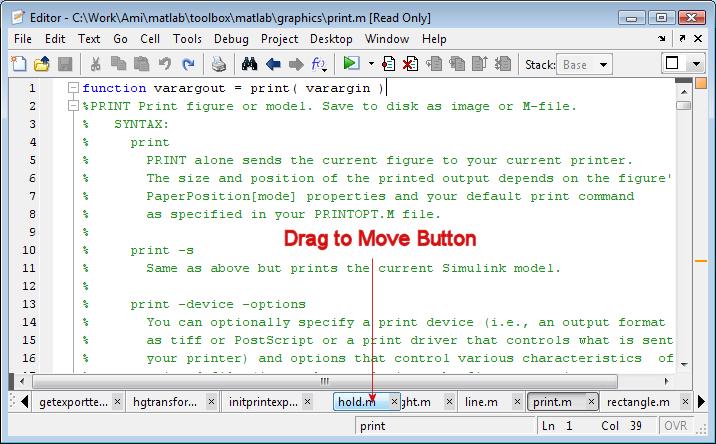
Moving a Button on the Document Bar

If after learning about all these features you decide you are simply not a bar fly then you can hide the document bar (Desktop->Document Bar->Bar Position->Hide) and recoup the real-estate. The Window menu and the Ctrl-PageDown, Ctrl-PageUp key bindings will then be your bar refugee friends as you access the documents within a tool.

2 Responses to “Hanging out at the Document Bar”

  1. tyson Aflalo replied on :

    I end up working on several projects at once and for each project I will have 10+ functions that I am working on. I don’t like the Document Bar to be too clustered so I normally try to only have the function of the current project open. It would be great if there was some way of quickly saving out and being able to re-access a group of functions at a time. eg one could imagine right clicking the document bar and getting the option of saving out this list of funcitons or loading a previously saved list of functions.

  2. Ken replied on :

    Hey Tyson,

    I too like an uncluttered work area, so I definitely identify with your pain! We’re currently working on a feature that would support working in this project-centric manner, where files can be grouped by you, inferring some relation among them.

    Most IDEs offer some sort of project facility - in fact, most IDEs force you to have a project. MATLAB has been different in that many people want to simply explore their data without having to deal with the overhead of a project mechanism. But, there are equally many people now who wish to use MATLAB in a more structured form.

    Your point is well received Tyson!

    -Ken

Leave a Reply

Wrap code fragments inside <pre> tags, like this:

<pre class="code">
a = magic(3);
sum(a)
</pre>

If you have a "<" character in your code, either follow it with a space or replace it with "&lt;" (including the semicolon).


Ken & Mike work on the MATLAB Desktop team.
  • DP: Hi i have a problem with ezplot3, i want to plot more than i curve in the same graph but hold on command...
  • Ken: Hi Arsalan, Unfortunately there is no way to get the new Editor API in older versions of MATLAB. -Ken
  • Arsalan: Hi, I am very excited about the MATLAB API for editor because right now i am working on a project and i need...
  • Johannes: Since I started using matlab-emacs some days ago I never experienced Emacslink. But I experienced some...
  • Francisco J. Beron-Vera: Hi all, I have recently learned about ViEmu (http://www.vimemu.c om) which, for Vi/Vim...
  • OysterEngineer: When I first learned of the Publish feature in MatLab, I thought it might be useful to help to...
  • Ken: Hi Herve, I’m not quite sure what you mean by “stand-alone&# 8221; mode? -Ken
  • Herve: I wonder when the publish fonction will be supported in standalone mode.
  • Mike: Ravi, What you described should work as far I understand it. Please follow up with technical support. With a...
  • Mike: @Daniel, Thanks for that note.

These postings are the author's and don't necessarily represent the opinions of The MathWorks.