Ken & Mike on the MATLAB Desktop

January 28th, 2008

Exploring your data with datatips

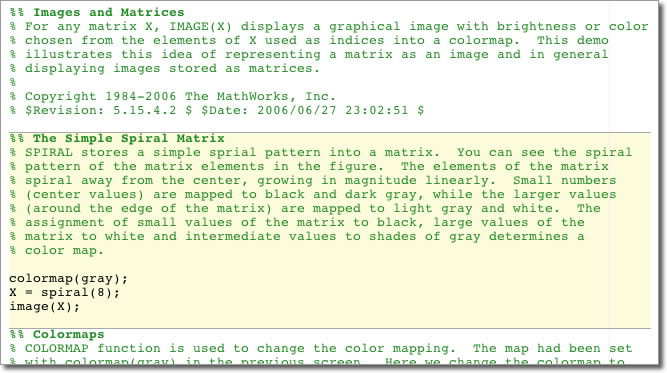
In the spirit of encouraging you to try out cell mode, lets look at a feature that will help you keep your focus in the editor while crafting your cells.

As I mentioned in an a previous blog entry (Running functions with input from the Editor in R2007b) I find it extremely useful to access all the information I need for a particular task from one location. This is less disruptive to my workflow, which means less context switching - and that means I get more work done!

We’ve already seen how MATLAB’s cell mode lets you group sections of code and then interactively run them each in any sequence you choose. (I’ve got something to cell you). This is really helpful when experimenting with your code - but there’s still an unnecessary step in your workflow. After each run of the cell, you have to switch focus over to the Workspace Browser and inspect your variables to ensure everything is in good order. You can eliminate that context switch by turning on datatips.

Datatips allow you to mouse over any variable defined in the base workspace and view its contents. In fact, if you do much debugging, you may have already noticed this feature as it gets turned on during debug sessions.

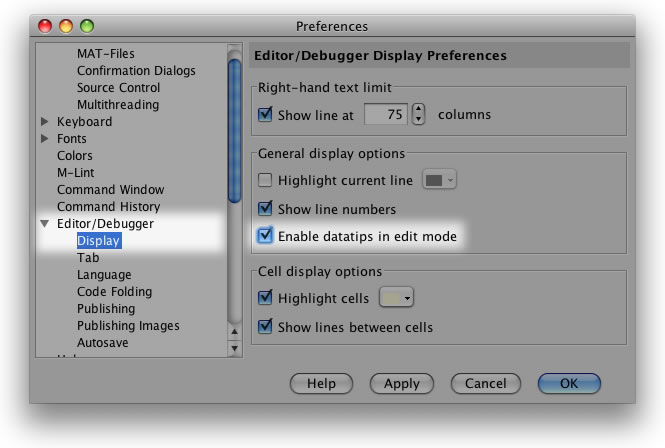
To turn on datatips in edit mode, goto Preferences -> Editor/Debugger -> Display and select Enable datatips in edit mode.
Now when a variable is defined in your workspace, you can mouse over it in the editor and view its contents like this:
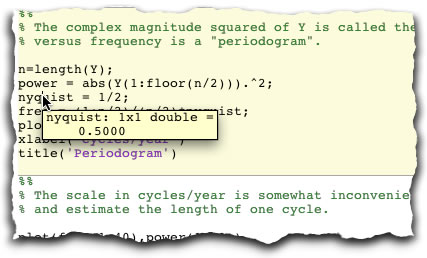
Note also that with datatips-in-edit-mode turned on, datatips will popup in any M-file your editing (not just those using cells).

Explore your data!

4 Responses to “Exploring your data with datatips”

  1. quan replied on :

    Very useful tip. I’m always typing “whos” into the command prompt to view the variables, but this way is much more efficient.

  2. Ken replied on :

    Thanks Quan. In addition to providing all the information whos supplies, datatips offers up the value of the variable as well…even if its an array.

    -Ken

  3. Eric Magee replied on :

    I like this feature in the debug mode, but I had to turn it off in the editor because it can be very distracting. There are times, however, when it would be handy, like the example you give with evaluating cells. It would be nice if there were (or maybe there is) a shortcut key combination to toggle this feature. What I currently do is highlight the variable in question and hit F9 to evaluate in the workspace.

  4. Ken replied on :

    Thanks for the feedback Eric. I agree that it could potentially be disrupting to have datatips on all the time. There is currently an open feature request to add quite a bit more customizability to datatips, and I’ve added your request for a toolbar button and/or shortcut key to toggle this feature to that request.

    Note also that there is a MATLAB function that displays similar information to the datatips feature, aptly named datatipinfo. Maybe someone can come up with a creative solution using this function?

    -Ken

Leave a Reply

Wrap code fragments inside <pre> tags, like this:

<pre class="code">
a = magic(3);
sum(a)
</pre>

If you have a "<" character in your code, either follow it with a space or replace it with "&lt;" (including the semicolon).


Ken & Mike work on the MATLAB Desktop team.
  • DP: Hi i have a problem with ezplot3, i want to plot more than i curve in the same graph but hold on command...
  • Ken: Hi Arsalan, Unfortunately there is no way to get the new Editor API in older versions of MATLAB. -Ken
  • Arsalan: Hi, I am very excited about the MATLAB API for editor because right now i am working on a project and i need...
  • Johannes: Since I started using matlab-emacs some days ago I never experienced Emacslink. But I experienced some...
  • Francisco J. Beron-Vera: Hi all, I have recently learned about ViEmu (http://www.vimemu.c om) which, for Vi/Vim...
  • OysterEngineer: When I first learned of the Publish feature in MatLab, I thought it might be useful to help to...
  • Ken: Hi Herve, I’m not quite sure what you mean by “stand-alone&# 8221; mode? -Ken
  • Herve: I wonder when the publish fonction will be supported in standalone mode.
  • Mike: Ravi, What you described should work as far I understand it. Please follow up with technical support. With a...
  • Mike: @Daniel, Thanks for that note.

These postings are the author's and don't necessarily represent the opinions of The MathWorks.