
What’s on my TODO list?
Oftentimes in the course of coding, I find myself with little bits that I don’t want to deal with right away–things that I would like to come back to them later. Like most IDEs, MATLAB allows you to drop annotations which indicate things to do, fix, or otherwise note for later.
By adding a comment with the text: “TODO” or “FIXME” in a MATLAB file, you automatically sign up for this feature. You can then use the TODO/FIXME report to scan all the files in a given directory for these tags, which presents the results to you in the web browser.
You can get to this report using the directory reports-drop down in the Current Directory Browser:
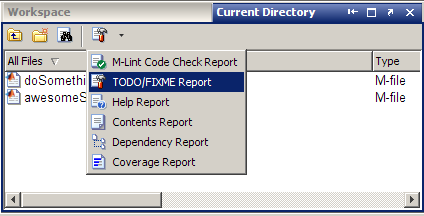
Clicking on the TODO/FIXME report button will cause MATLAB to scan all the files in the current directory, and display each line in the files that have one of the keywords. For example, in my directory I have two files with applicable markers:

You’ll notice that the report also picked up a line with a “NOTE” in it. As an added bonus, we can find up to one additional comment tag, “NOTE” by default, but you can enter whatever regular expression you desire. To specify your own custom tag, replace the text in the text field that reads “NOTE” in the TODO/FIXME report web page (see above screen shot) with your own regular expression.
In general, I recommend using these comments as quick reminders for changes you really, really will work on in the near future. I’ve found such notes lose meaning when viewed by others or even yourself when revisiting the code after it is no longer fresh.
- Category:
- Current Directory,
- Editor




Comments
To leave a comment, please click here to sign in to your MathWorks Account or create a new one.