Ken & Mike on the MATLAB Desktop
April 28th, 2008
Code Folding Update in R2008a
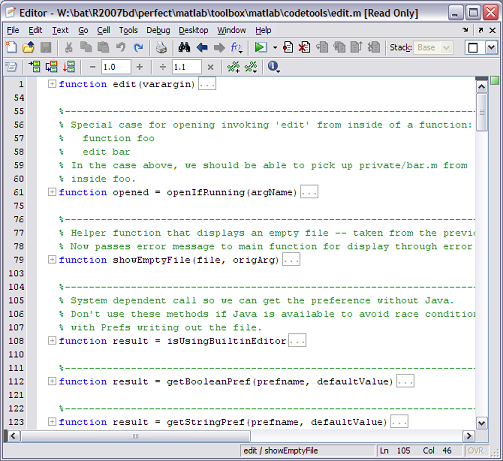
We heard your requests, and have added 12 more foldable constructs, including full support for the new MATLAB class system. We introduced code folding back in R2007b (check out the blog entry on it here), and quickly heard that folding only functions and function help was not enough. This is a great example of how your feedback really can affect things.
All these new foldable constructs can really help to hide detail that you may not always need to see (possibly the internals of a switch/case block). This is especially useful if your working on two non-contiguous areas in a file. Normally, this would require lots of scrolling, but with code folding, you can just collapse all the constructs between the two areas (you could also use split screen, but I prefer the folding technique).
Here’s a look at edit.m, the same file Christina showed back in November 2007, only now there are a lot more foldable regions:
And the new code folding preferences page:
Just as with the original two foldable constructs, you can choose which constructs you’d like to be folded by default. So if you want switch/case blocks to be folded whenever you open a file, select Fold Initially next to Switch/case blocks in the Editor/Debugger -> Code Folding preferences pane.
Also note that once you’ve opened a a file and tweaked what’s folded and what’s expanded, the MATLAB Editor will remember the fold state of that file even after you’ve closed it. So the next time you open your file, everything will be just as you left it.
If there are things you think should be foldable, that we’re not folding, leave us a comment here.
By
Ken Orr
Ken is a developer on the MATLAB Desktop team. He loves the art of graphic design as well as developing visually pleasing user interfaces - he's one of those 'crazy' Mac guys!
06:11 UTC |
Posted in Editor, Preferences |
Permalink |
You can follow any responses to this entry through the RSS 2.0 feed.
You can skip to the end and leave a response. Pinging is currently not allowed.
Leave a Reply
|
Hello Ken,
how about introducing the “region” concept as used in the Visual Studio Environment?
This enables the user to introduce his own “folding blocks”.
For more info please look at
http://msdn.microsoft.com/en-us/library/9a1ybwek(VS.71).aspx
Hi Han,
Thats an interesting idea, one also present in Xcode via the #pragma mark token. There’s a school of thought that says you shouldn’t dirty your code in an effort to accommodate your IDE (check out Jeff Atwood’s article on code folding), though I’m not quite sure where I stand on the issue yet. I will submit an enhancement request though!
-Ken
why not make single “else”s foldable. You could work on one case, without being botherd with what happens in the other cases, but being able to see the conditions of the other cases/elses.
Hi Kay,
We decided that an if block including all it’s elseif and else statements is a single logical entity, and should be folded as such. To get the behavior you’re after, I’d encourage you to break out the internals of your if/elseblocks into sub-functions or inner functions, each of which are foldable.
-Ken
We should be able to fold whatever we want. Not just those listed above. I should be able to highlight a few lines, and hide them .. sometimes I don’t want to see huge blocks of code that are irrelavent to the current situation, and these blocks of code are not appropriate to incorporate into functions.
Whether or not it’s considered “dirty” or “sloppy” programming style, I like programming in a certain way, and I’m the only one using my programs, so I should be allowed to do what I want!
In Maple I can hide whatever I want, why not in MATLAB ??
Hi Juliette,
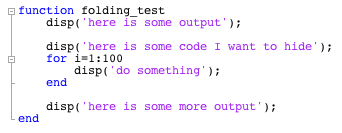
Note that you could use cells in order to fold chunks of code you don’t want to see. While this isn’t the selection based folding your asking for, it is a reasonable workaround. To fold a block of code, you could insert cell markers like this:
%% cell start
% code to fold
%% cell end
-Ken