Ken & Mike on the MATLAB Desktop
May 5th, 2008
File and Folder Comparison Tool Update in R2008a
I’d like to welcome guest blogger Malcolm Wood from the Simulink Model Management team. Malcolm will occasionally be blogging here on the Inside the MATLAB Desktop blog.
For many years the MATLAB Desktop has included a simple tool for comparing text files. You may have used it from the MATLAB Editor to see the changes you have made to your M-file since you last saved it, or you may have used it from the Directory Browser to compare two files on disk.
In R2008a we extended the capabilities of this tool to compare files which aren’t just plain text. You can now use it to compare the variables in MAT-files. It will tell you the names of the variables which are in each file, and for the variables which appear in both files it will tell you whether their values are the same or not:
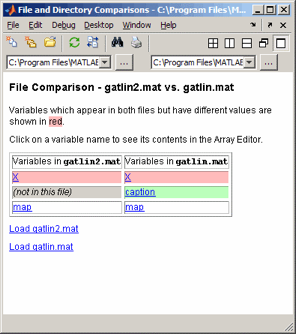
And if you want to see exactly what’s different about these two variables called “X”, then clicking on either one will open it in the Variable Editor so that you can take a closer look.
For other types of binary file, the MATLAB will scan the two files and simply tell you whether their contents are the same or not.
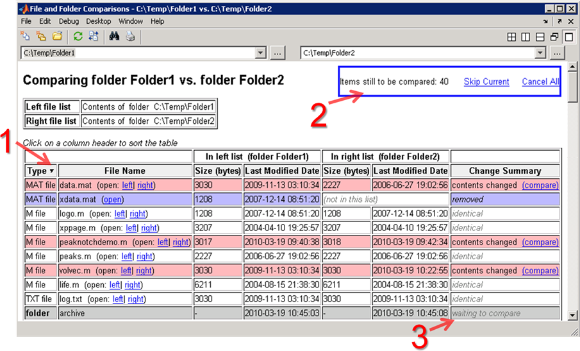
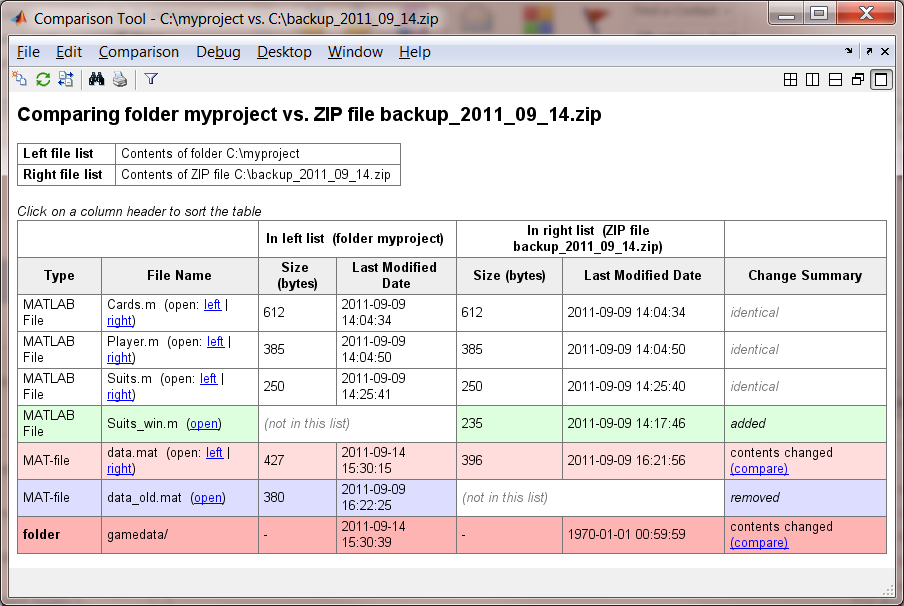
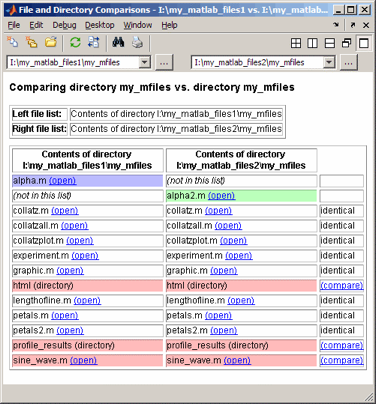
You might have noticed from the screenshot above that the title is “File and Directory Comparisons”, namely because another new feature is the ability to compare entire directories. We think this sort of thing is useful for cases where you’ve taken a copy of some files and made some changes to get them to work for you. By comparing the two directories you can quickly review all the changes you made without leaving MATLAB.
This tool is available from the Directory Browser: just right-click on a directory and choose “Compare Against…”.
If the two directories you compare contain files of the same name, MATLAB will scan those files to determine whether their contents are the same or not. If they’re not, you’ll see a hyperlink to compare the files in detail.
If there are sub-directories with the same name but different time-stamps, there will be a hyperlink to let you compare the contents of those too.
We hope you’ll find these new features useful. And if there are changes you think we should make, leave us a comment to let us know!
-by Malcolm Wood, The MathWorks
By
Ken Orr
Ken is a developer on the MATLAB Desktop team. He loves the art of graphic design as well as developing visually pleasing user interfaces - he's one of those 'crazy' Mac guys!
07:20 UTC |
Posted in Current Directory, Editor |
Permalink |
You can follow any responses to this entry through the RSS 2.0 feed.
You can skip to the end and leave a response. Pinging is currently not allowed.
Leave a Reply
|
I would suggest a better user interface, just like in the TotalCommander file manager, where you can compare by content and also easily select what kind of synchronization should be made.
Hi.
Is it just me, or will we very soon se an integrated CVS/SVN client in matlab? I personally use version controll for all projects, even the very small ones. I have to admit, though, that as nice as these new features are, they can’t even compare to a proper version control system.
Beautiful, just beautiful. Worthy of a poetic thanks:
Marcelo,
Thank you for the feedback, we will take that under consideration.
Daniel,
MATLAB does provide source control integration. Take a look at the documentation page for that: Source Control Interface.
Tim,
creative poems
provide great feedback for us
we work hard for you
Is there a way to ignore variations in white space? Can comments be ignored? That way, if I put a block of code inside an “if”, and indent it properly, not all of the code will be flagged as different. These would be useful options if you want to look at core code differences and ignore syntactical massaging.
Tim,
The comparison is just a simple text diff. It would be neat if there was a syntax-aware mode. I’ll pass that along to the developer. Thanks.
p.s. In case the reader missed the allusion … “I came upon a source code dark” is an allusion to Dante’s Inferno, the first 3 lines of which are:
Also … a low rank update to the poem above. The line
would sound better as:
Keep up the hard work! :-)
Dear Malcolm,
are there any plans in the pipeline to provide the missing Simulink model comparison tool?
Best Regards
Georg
Hello Ken/Malcolm,
I found that when comparing files with itself (so binary identical) however differences are found.
The contents of that specific file are all Simulink.Parameter data objects. When using “ordinary” scalars of vectors the problem doesnt exist and the variables are marked as identical by the compare tool.
Are you aware of such an issue?
kind regards, Han
Han,
The MAT-file differencing mechanism uses the MATLAB “==” operator, but for Simulink.Parameter objects this operator asks “are these the same object?”, which is not the right question. For example:
>> x1 = Simulink.Parameter
>> x2 = Simulink.Parameter
>> x1==x2
ans =
0
For these objects, it turns out that the “isContentEqual” method is the right one to use:
>> isContentEqual(x1,x2)
ans =
1
But that’s probably not true for other types of object. Java programmers will be familiar with this sort of problem. I’ll look into whether there’s a general solution to it here.
Malcolm
Is there any tool (either matlab/third party) that compares two matlab models and give graphaic view of the diffrence? I am talking about model .mdl file
That’s a great idea.
I would like to compare two (or more) large parameter definition m files. The files can grow large. So does the report, also when there are only a few lines with differences.
Therefore I would fancy a report option which only lists the differences and leaves out the rest (equal etc).
Likewise differences with only blancs should be optionally ignored.
The report should be storable as a file.
Preferably, this whole procedure should be runable from a script of function.
Koos,
Thank you for those suggestions.
Wonderful tool. But is there a function I can call to generate the same output (e.g. the comparison of two M-files) rather than using the desktop tool?
Hi Rishab,
There’s no function that will give you diff output in the Command Window, but you can call visdiff from the command line, which will bring up the visual tool.
-Ken
Restatiting Georg’s question, is there a simulink model comparison tool existing or in-work? I and my colleagues would be very interested in a simulink model comparison tool that would pick up substantive changes. Existing text comparison tools pick up changes such as block size/location, etc.
Hi Joe,
I’m not sure, but I’ll forward this question over to Seth.
-Ken
@Joe Kelly - I’m not sure which version you are using, but since the web release of R2008b we have introduced an XML text comparing capability that you may be interested in evaluating. MATLAB Report Generator has the capability to create a comparison report for a pair of XML text files. In addition, Simulink Report Generator can use that capability to create a comparison report for pairs of XML text files, including an option to compare XML files exported from Simulink models. The XML comparison report can then display highlighted results in the original models. Please evaluate these new features in MATLAB Report Generator and Simulink Report Generator.
All of these features are available through the file and directory comparison tool. You can even compare Simulink manifests which is extremely helpful if your Simulink models depend on many libraries and reference models.