Ken & Mike on the MATLAB Desktop

October 20th, 2008

Function Hints

In MATLAB R2008b, your command line just got a heck of a lot smarter. We now have autocompletion for function parameters, which we call Function Hints. It’s simple to explain, and easy to use. If you typed “plot(” at the command line and waited a short time, you’d see the following:
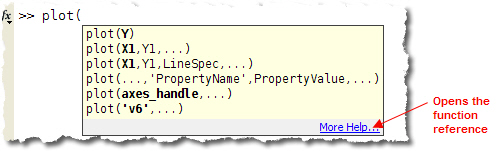
MATLAB function hints for PLOT

Function Hints will show you which parameter you are currently editing in bold. The list of function signatures narrows as you type to exclude non-matching signatures.

This feature works with all our supplied functions as well as any you write. You get this feature automatically when your function is on the MATLAB path. The picture below is from myfun.m that has the following signature:
function myfun(x,y)
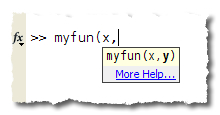
MATLAB function hints for a custom function

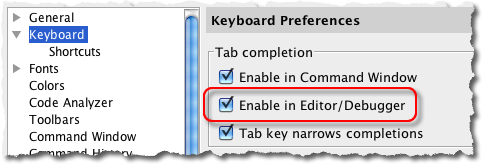
Function Hints is available in both the Command Window and the Editor, and can be turned off in the Preferences (File > Preferences > Keyboard).

This has been an oft-requested feature, and we’re really proud that we can finally share it with you.

7 Responses to “Function Hints”

  1. Ryan Gray replied on :

    I’m noticing this only is working for functions that have the function signature as the first line of the file. I guess I’ve been wrongly putting the function help text first? Would be very nice to know how to put hints for alternate syntax into my functions.

  2. Aurélien Queffurust replied on :

    Hi Mike,
    These features are very helpul. It would be great to have the same functionnality in the Interactive Parrallel Command Window ;-)

    PS: I understand better why it was difficult to reach MATLAB Central this morning. The new design of the webpage is really good!

    Aurélien

  3. Mike replied on :

    @Ryan,

    So it is. I will let the developer know about the first line thing. As for the alternate syntax, I will create an enhancement request for that.

    @Aurélien,
    I will create an enhancment request for those developers. Thanks.

  4. Daniel Armyr replied on :

    Now that I have been using Amtlab with function hints for a few months, I have to say that they have proven to be much less usefull than I had hoped.

    I find them far too slow to pop up and far to fragile once they have popped up.

    It would be nice to have a button one could press to force the function hints to appear, similar to the way pressing tab makes the tab completion popup appear.

  5. Mike replied on :

    Daniel,

    Thanks for the suggestion, it certainly would be handy.

  6. Jon Nazemi replied on :

    Hi, two questions:
    1. How can I create a custom list of function hints?
    2. How can I get some function hints to list when there is a varargin input?
    for example, if I have a function:
    function output = myfun(varargin)

    end

    function hints will not list when myfun is typed on the command line, but i would like to list some.
    Thanks!

  7. Mike replied on :

    Jon,
    We currently don’t have a way to specify custom (or even more than one) hint for a user function.

    I have reported the varargin issue to the developers.

    Thanks!

Leave a Reply

Wrap code fragments inside <pre> tags, like this:

<pre class="code">
a = magic(3);
sum(a)
</pre>

If you have a "<" character in your code, either follow it with a space or replace it with "&lt;" (including the semicolon).


Ken & Mike work on the MATLAB Desktop team.
  • Ori: The current folder shortcut used to be alt-y. Now it is alt-o. However, while in the editor window, alt-o opens...
  • Jose Miguel: Hi First of all, thanks for the post, it is really useful. I am trying to develop a Java GUI within...
  • Ken: Hi Siddharth, There isn’t currently any way to move the docking controls. Feel free to submit an...
  • Phil: I have the same problem as described above with UITable working fine in the Matlab environment but showing no...
  • Siddharth: Is there any way to move the position of the docking controls (or eliminate them through some...
  • Chris: Yes, it is a challenge to organize functions into categories, especially with so many functions. Ken and I...
  • Mike: Thanks for fielding that one, Yair.
  • Yair Altman: Jimmy - if you mean that you wish to include hyperlinks in your function’s help comment, that will...
  • OysterEngineer: Thanks for explaining the Function Browser. I fired it up and gave it a try. It appears that it has...
  • Jimmy: Is there any way to include hyperlinks in a comment, such as the standard help at the beginning of a function?

These postings are the author's and don't necessarily represent the opinions of The MathWorks.