Ken & Mike on the MATLAB Desktop
May 11th, 2009
Keep your code readable with smart indenting
The MATLAB Editor automatically indents your code for you as you enter it (if your haven’t turned the preference off). We call this smart indenting, and it makes reading code easier. Logical blocks like if/end and while/end have their content visually demarcated with white space, which helps you see the block of code as a single entity.
You do have some control over exactly how the Editor smart indents, but I think there is one option that results in more readable code. Here are the three options (my favorite is at the end):
Classic
In Classic mode, the function keyword does not cause indenting, so a lot of code is stuck against the left margin. I find this to indenting style to be the hardest to read because it’s hard to visually match an end to it’s start.
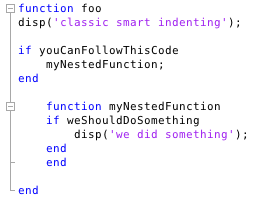
Indent nested functions
This mode is slightly better than Classic, in that nested functions are fully indented — I could deal with this mode if I had to.
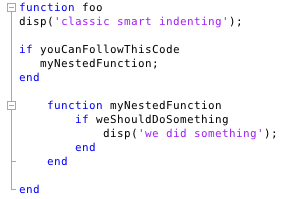
Indent all functions
This mode indents everything, including the content of top level functions, and is therefore my favorite indenting mode. I find the code to be more readable as it better matches it’s logical structure. I’m sure my preference is heavily influenced by my experience with Java.
If you want to play around with the various smart indenting options, go to Preferences -> Editor/Debugger -> Language, select MATLAB as the language, and then change the value in the Function indenting format combo box.
What indenting style do you prefer?
By
Ken Orr
Ken is a developer on the MATLAB Desktop team. He loves the art of graphic design as well as developing visually pleasing user interfaces - he's one of those 'crazy' Mac guys!
18:07 UTC |
Posted in Editor |
Permalink |
You can follow any responses to this entry through the RSS 2.0 feed.
You can skip to the end and leave a response. Pinging is currently not allowed.
Leave a Reply
|
Hi Ken,
I guess you opened a can of worms now…
My favorite indenting style, which I’ve used for decades, is close to your “Indent all functions”, but with one major difference: all “end” statements are indented one more step. I think this makes the code even more easy to read.
Your favourite style:
if ismorning
wakeup;
else
gotosleep;
end
while sunisshining
walkinthepark;
end
if hungry
eatsomething
end
My favourite:
if ismorning
wakeup;
else
gotosleep;
end
while sunisshining
walkinthepark;
end
if hungry
eatsomething
end
I think the latter version is much easier to read as the end-statements in the first version are clogging up the logical flow of the program. Yes, the end-statements does not line up with the intial “if” or “while”, but why should they?
Unfortunately, you (Mathworks) have made it really hard to use this indenting style, now that you have removed block indenting. Please revamp the code to be configurable!
Hey Jerker,
That is an interesting coding style. My initial reaction was a little skeptical, but as I look at it more I can see how each logical block having a single “outdented” line could be appealing.
Do you know where this style originated?
-Ken
Sorry Ken, I really can’t remember if I’ve seen it somewhere or if it’s a creation of my own, but whenever I get to decide formatting style, this is the choice for me.
Admittedly, we are not that many who have seen the light, but I do have convinced a few over the years to convert from the dark side :)
-Jerker
I would go with the indent all functions, but I am come from C/C++/Java origins.
@Jerker
Interesting notion. I am appalled, and at the same time strangely attracted to it.
I used a version of netbeans that insisted on Jerker’s style of indentation. This was about 11 years ago.
I myself much prefer the second of your three examples. While the third example does apply the general rule to all blocks, and is therefore more consistent in some sense, I am a stickler for not using continuation (…) and keeping each line of my code within the 76 column bar. It seems like the third example would have me using continuation way too often, or writing lines past the bar.
I prefer the slight inconsistency any day!
If you want to have a look at how my indenting style looks like in production code, you can download e.g. ANYMATE from FEX.
In that program you will also notice that I use a somewhat unorthodox way (again!) of formatting continuations, in that I consequently put the “next” operator at the beginning of each line, instead of hiding it at the end.
-Jerker
Speaking of indentation, is there a way for MATLAB to vertically align function arguments in a multi-line context?
For example, let’s say some_function() takes in three arguments:
some_function(’arg1′, ‘arg2′, ‘arg3′)
If I place each argument on their own line, smart indent indents by “one level” for each subsequent line instead of ensuring each argument is aligned vertically.
some_function(’arg1′, …
__indent__’arg2′, …
__indent__’arg3′);
This usually results in ‘arg1′ not lining up with the other arguments. My current workaround is to place even the first argument on it’s own line for readability/sanity.
some_function( …
__indent__’arg1′, …
__indent__’arg2′, …
__indent__’arg3′);
I’d love to learn of a way to correctly vertically align arguments like in emacs and vim. Unfortunately, I don’t know how to turn on M-lint in those editors!
V,
That’s a good suggestion. Of course you can imagine in addition to those two you might have:
or even,
and so on. Also if it’s property value pair as the input maybe you’d want:
Mike
Yep, your first and third examples are what I tried to convey without fixed width font. Apparently I missed the pre tag section for my last post!
Unfortunately, your response indicates that such automatic alignment isn’t possible yet :(
V,
That is correct, this auto-aligning is not possible. We just added the
preinstructions a few minutes ago. :)Somewhat related, it would be nice for multiline array or cell definitions if the 2nd and following lines were aligned with the first character of the first element instead of the bracket.
Right now you get this:
instead of this:
Also, would it be possible to allow multiline array and cell definitions to fold? That would be great! As an aside, why is an empty line after the
tag removed?
Oops, my last line was meant to read “As an aside, why is an empty line after the ‘closing pre’ tag removed?”
Eric,
Another interesting suggestion. I’ll look into the pre thing.
Indent can make the CODE more readable. The readbility of the comments is also very important, I think. For example,the ability to input equations with Greak symbols, make them look more like what we see on the textbook.
Junziyang,
You can put symbols in comments. The editor supports whatever you system character encoding is, and thus can display whatever your font supports for a particular char. For instance, this is from my windows xp R2009a MATLAB, using the windows-1252 encoding:
Alternatively you can use LaTeX in a comment and publish the file, which is ideal for sharing your code with students: http://www.mathworks.com/access/helpdesk/help/techdoc/matlab_env/f6-30186.html#brrnpjv-1
Thanks, Mike. Greak symbols can be entered using a softkeyboard.I want to know how you enter the superscript 2?
Further more, It would be great if the Editor can translate LATEX symbols in the comments directly, just like when we enter “\alpha” etc. in a Figure’s label.