
Getting a Response to Your Questions on Newsreader
As most of our readers know, MATLAB Central‘s Newreader application allows you to easily read and post from the comp.soft-sys.matlab Usenet newsgroup. About 100 questions are posted to the newsgroup each day. Community members from all over the world respond, helping each other to find new solutions for their MATLAB challenges.
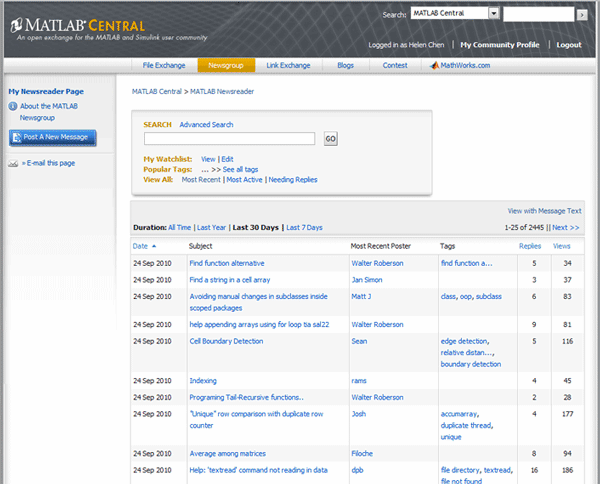
With so many questions being posted every day, not every question gets answered. You can increase the likelihood of getting an answer to your question by a few simple steps.
Before posting your question
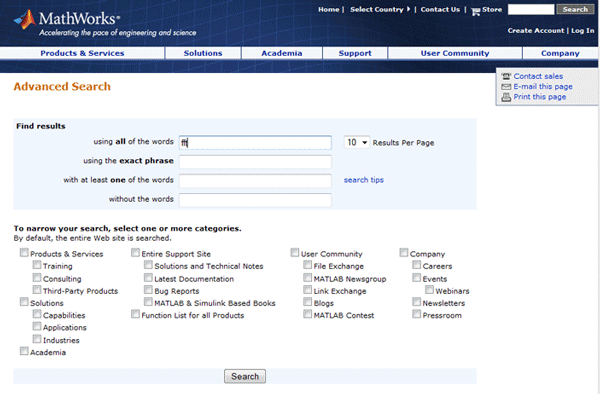
Before asking others for help, try looking for an answer online. There are many great resources available to you on MathWorks.com. MATLAB Documentation is a good place to start looking for an answer. Read more about that from Steve’s blog post Documentation for previous releases now available online. You can search product documentation from the current release back to R13SP1. MATLAB Central has lots of ideas. You can search through File Exchange, Newsreader, Link Exchange or the MATLAB blogs for ideas to solve your problem in previous conversations, or you may even find some code samples that relate to your problem. You can easily search MathWorks.com or MATLAB Central using site-wide search.
You can also use a search engine such as Google to look for answers to your question.
Homework questions
If you post a homework question, clearly indicate that it’s homework. Regular readers can recognize problems that look like homework assignments. Clearly show the effort you have put into solving the problem. In general, the regular readers are willing to offer suggestions and help to those who have tried to help themselves; they tend to be much less willing to help people who are looking for others to do their work for them.
Posting a good question
Once you have looked answers on your own, you can now post your question for the MATLAB Community. Just as you would do when asking a question of an instructor at school or a coworker in a work situation, always show respect other community members in your message tone and how you pose the question. Remember that community members are volunteers, helping you in their free time. So be polite when asking for help from others.
When writing your questions, here’s a quick checklist you can follow:
- Use a title that clearly defines your problem area: If others are reading questions, recognizing the area of MATLAB programming will encourage them to click through to your actual question. Titles like “Help needed” are not likely to get you the feedback you are looking for.
- State your question clearly, using reasonably good grammar so the actual problem can be understood. If people cannot understand what your problem is, they cannot help you.
- It’s ok if English is not your primary language. If you want, you can make a note in the beginning of your post so that others understand. Just try your best when writing your question.
- Abbreviations that you use when sending text/SMS messages do not qualify as a good writing style, so please don’t use them in your posts. Write out abbreviations used for clarity.

- Show the code that you have tried so far and any error messages that are generated when you run your code. If you think the problem is data-dependent, include a small dataset so others can reproduce the problem.
- If system configuration details are important, include them as it may help with problem solving. Examples could be MATLAB version, toolboxes installed, operating systems, etc.
After posting
Here are some tips on how to follow-up after you have posted your question.
- Be patient waiting for a response. Not everybody is in the same time zone. Double-posting your question within a short period of time will not get you an answer any faster. Steve Lord had a great post on this subject that is well worth a read.
- If there are clarifying questions from community members who are trying to help you, make sure you clearly respond to the questions asked.
- Show appreciation for those who reach out to help you. Saying thanks and if you have multiple response, letting them know which approach solves your problem, will encourage folks to respond if you post new questions in the future.
- Pay it forward. Become part of our community and join the conversation. Reach out to others who post questions and help them out with their MATLAB programming questions.
There are many references available if you want to read more on this topic – Netiquette by Virginia Shea might be a good place to start. Thanks to Steve Lord for his suggestions on content for this post!
As always, see you online soon!







Comments
To leave a comment, please click here to sign in to your MathWorks Account or create a new one.