
Throw Away Your Picasa, iPhoto, or Other Media Libraries
Image Preview in the Current Folder Browser is here! Steve, from Steve on Image Processing, recently reminded me about this new gem of a feature we haven’t covered yet. With MATLAB R2009b, the Current Folder Browser started previewing certain file types, such as MAT-files and MATLAB code files. Starting in R2010b, that preview functionality has been expanded to cover certain image types.
Here is an example of one of the files that comes with the Image Processing Toolbox. Who’s office is that? It’s certainly not mine!
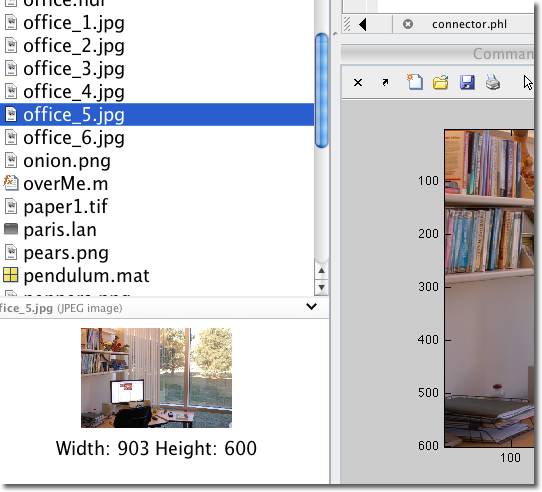
Despite the provocative title, this new feature is not meant to in any way replace an image organizer. Instead the point is to make it easy to see what is in a particular image file before importing it in to MATLAB. The preview is particularly handy for automatically named files, such as from screen-shots or cameras, where the name may not describe the contents. In addition to a thumbnail, the size of the image is also shown, which may make it easier to pick out the right image or reduce the chance of accidentally opening a large file.
There are some limitations to this feature. It does not preview all image files that MATLAB understands. Right now it only shows JPEG, JPG, BMP, WBMP, PNG, and GIF images. However, I think it’s a pretty good start.
- Category:
- Current Directory


See Also
-

imageSet Viewer
Blogs
-


Comments
To leave a comment, please click here to sign in to your MathWorks Account or create a new one.