Mike on the MATLAB Desktop

July 4th, 2011

New Features For MAT-file Comparisons and Merging in R2011a

In R2010b, we added the ability to see which variables changed in a MAT-file using the File Comparison tool. In R2011a, when comparing MAT-files, you now can view details of differences between variables to see which fields of a structure are different or view the differences between individual elements of an array. Additionally, you can now merge changes between files on a per-variable basis.

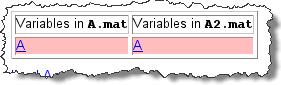
Here’s what our example report looks like:

MAT-file comparison by contents R2011a

You can see that each variable in the MAT files is listed. As before, additions, deletions, and changes are noted along with the size and type. New to R2011a is the ability to investigate the modifications and merge the changes. The merge is done by replacing one whole value with another, and does not yet let you merge by on a per-element basis.

Let us know how you’re enjoying the latest updates to the Comparison tool.

3 Responses to “New Features For MAT-file Comparisons and Merging in R2011a”

  1. Uwe replied on :

    Cool Feature !

    We have .fig files in our repository (bazaar) and have the problem, that we can not merge these. Are .fig files something like .mat files and we can merge them now ?

    Uwe

  2. Yair Altman replied on :

    @Uwe – FIG files are indeed supported by the Comparison Tool. Internally, they are simply MAT files that store a struct in a particular format, as explained in http://UndocumentedMatlab.com/blog/fig-files-format/

  3. Mark Shore replied on :

    When I try to run the comparison tool on a file folder and an external hard drive with the ‘include subfolders’ options checked, MATLAB 2011a (64-bit on Win7) hangs then crashes.

    Guess I’ll file a bug report.

Leave a Reply

Wrap code fragments inside <pre> tags, like this:

<pre class="code">
a = magic(3);
sum(a)
</pre>

If you have a "<" character in your code, either follow it with a space or replace it with "&lt;" (including the semicolon).


MathWorks
Mike works on the MATLAB Desktop team.

These postings are the author's and don't necessarily represent the opinions of The MathWorks.