Steve on Image Processing

January 31st, 2006

Spatial transformations: Terminology and notation

"Terminology and notation" - is there a more boring way to start a topic? Unfortunately it's necessary, because there is a lot of variation in terms and equations from book to book and paper to paper. Some of the "frequently-asked questions" arise from simple confusion over notations and conventions. Even the topic itself is a source of confusion. Start with either the word geometric or spatial, and then add one of these words: transform, transformation, or warp. The Image Processing Toolbox Users Guide uses spatial transformation, while Digital Image Processing Using MATLAB uses geometric transformation. I'll try to stick with spatial transformation.

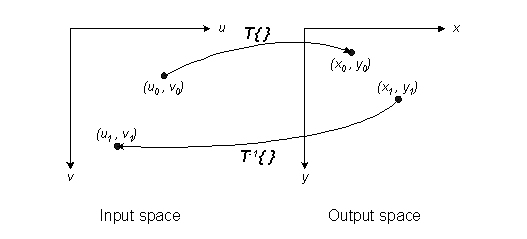
This picture shows several of the most important conceptual elements:
[Edited 31-Jan-2006 to fix typo in diagram]

There are two Cartesian coordinate systems, input space and output space. I'll consistently use (u,v) for input space and (x,y) for output space.

A forward transformation, shown as T{ }, maps a location in input space to a location in output space: (x0, y0) = T{ (u0, v0) }.

A inverse transformation, shown as T-1{ }, maps a location in output space to a location in input space: (u1, v1) = T-1{ (x1, y1) }.

It's important to refer to a diagram like this. It can help you remember:

  • Is an (x,y) location in input space or output space?
  • Is the u axis horizontal or vertical?
  • Does the vertical axis point up or down?

If you compare what the Image Processing Toolbox does, or what I write here, with another reference, be sure to determine exactly what the notational conventions are in the other reference. Figure out how they differ with the toolbox conventions. That'll help you figure out why your output image is upside down, or why it was stretched in the horizontal direction when you expected it to be stretched in the vertical direction.

Please note that Digital Image Processing Using MATLAB uses (w, z) instead of (u, v) for input-space coordinates. That's because (u, v) is used elsewhere in the book as frequency-domain coordinates.

6 Responses to “Spatial transformations: Terminology and notation”

  1. philip batchelor replied on :

    Oops, typo on the Output Space? Isn’t the (u1,v1) in the picture on the right meant to be (x1,y1)? ;)

  2. Steve replied on :

    Philip - Fixed the typo. Thanks!

  3. copi replied on :

    Hello,
    In first place congratulations for your blog, an the interesting topics you are teaching about.
    Is this choice of axis vey commom?

    If you are trying to reference an 50ge to ground coordinates
    the output space axis would not be adecuate for coordinates
    in any cartographic projection system.

    And what about the input space?
    Is (column, row) more commom than (row,column)?

  4. Steve replied on :

    copi - It’s hard for me to say what is “common.” I’ve seen a variety of coordinate system conventions in use in all kinds of sources. I have the impression that coordinate systems with the horizontal coordinate first are somewhat more common in computer graphics contexts. Our choice in the Image Processing Toolbox was strongly influenced by what happens in MATLAB when you say plot(x,y). My best advice is to make sure you know what convention is used by whatever system or source you are using.

    Secondly, I would regard the relationship between MATLAB’s default image coordinate system (pixel centers on an integer grid) and a physical coordinate system as simply another step in the spatial transformation. For example, two Cartesian coordinate systems whose axes are aligned are related by an affine transformation consisting of scale factors and translations. If they aren’t aligned, you can throw in a rotation.

    Later on, I’ll talk about how to define and perform spatial transformations on images that do not lie on the default integer grid.

  5. Muhmmad Hanif replied on :

    Hi,
    Intresting to learn online about image processing. This blog realy help in many issues. can you please also post some material about 2 view mapping. like 2 view image of same scene.
    if we have two views of a partical (suppose, side view and top view) in an image, then how can we associate the pixel in top view of the scene with the pixel of side view……
    Thanks,
    Have a Nice time!
    Enjoy

  6. Steve replied on :

    Muhmmad—Thanks for topic suggestion. I don’t know anything, however, about matching up pixels from a side view to pixels from a top view.

Leave a Reply

Wrap code fragments inside <pre> tags, like this:

<pre class="code">
a = magic(3);
sum(a)
</pre>

If you have a "<" character in your code, either follow it with a space or replace it with "&lt;" (including the semicolon).


Steve Eddins manages the Image & Geospatial development team at The MathWorks and coauthored Digital Image Processing Using MATLAB. He writes here about image processing concepts, algorithm implementations, and MATLAB.

  • Steve: Kezia—Try imrotate.
  • kezia: steve, how to perform rotation of structuring element by 15 degrees. kindly answer my question. thank u kezia...
  • Steve: Tasha—I only accept comments that are relevant to the particular blog post or are questions or comments...
  • Tasha: Steve,I send you a comment here but still didn’t get any reply yet.I did not see my comment posted here...
  • Steve: Carsten—Thanks for your input.
  • Carsten: Another vote for either imtranslate.m, or at least a blurb in the imtransform help why pure translation...
  • Loren Shure: If you look towards the end of the fftfilt program, you will see that there’s a check to see if...
  • Steve: Sonja—My imwritesize submission on the MATLAB Central File Exchange might be helpful. It was posted...
  • Steve: Grant—Sorry, but it won’t be for R2010a. That development deadline has already passed.
  • Sonja: My publisher is wanting images for a new book to be 300 dpi. Only 5 of the 19 images are 300, the rest are...

These postings are the author's and don't necessarily represent the opinions of The MathWorks.