The morphological operator dilation acts like a local maximum operator. Erosion acts like a local minimum operator. You can use them together to compute something called the morphological gradient.
Contents
Dilation
The basic form of grayscale image dilation computes, for each image pixel, the maximum value of its neighboring pixels. The neighborhood is defined by the structuring element. For example, this structuring element:
se1 = strel([1 1 1])
se1 =
Flat STREL object containing 3 neighbors.
Neighborhood:
1 1 1
defines a neighborhood consisting of the pixel itself, together with its left and right neighbors. Whereas this structuring element:
se2 = strel([1; 1; 1])
se2 =
Flat STREL object containing 3 neighbors.
Neighborhood:
1
1
1
defines a neighborhood consisting of the pixel itself, together with the pixels above and below it.
Let's try dilation on everyone's favorite sample MATLAB matrix, the magic square:
m5 = magic(5)
m5 =
17 24 1 8 15
23 5 7 14 16
4 6 13 20 22
10 12 19 21 3
11 18 25 2 9
d1 = imdilate(m5, se1)
d1 =
24 24 24 15 15
23 23 14 16 16
6 13 20 22 22
12 19 21 21 21
18 25 25 25 9
d1(3,3), which is 20, is the maximum of [m5(3,2), m5(3,3), m5(3,4)], or [6 13 20].
Dilating with se2 computes the 3-pixel local maximum vertically:
d2 = imdilate(m5, se2)
d2 =
23 24 7 14 16
23 24 13 20 22
23 12 19 21 22
11 18 25 21 22
11 18 25 21 9
d2(3,3) is the maximum of [m5(2,3), m5(3,3), m5(4,3)].
Erosion
Grayscale image erosion computes the minimum of each pixel's neighborhood.
e1 = imerode(m5, se1)
e1 =
17 1 1 1 8
5 5 5 7 14
4 4 6 13 20
10 10 12 3 3
11 11 2 2 2
e1(3,3) is the minimum of [m5(3,2), m5(3,3), m5(3,4)].
Morphological gradient
Dilation and erosion are often used in combination to produce a desired image processing effect. One simple combination is the morphological gradient. P. Soille, in section 3.8 of the second edition of Morphological Image Analysis: Principles and Applications, talks about three kinds of basic morphological gradients:
- dilated_image - eroded_image
- original_image - eroded_image
- dilated_image - original_image
Soille calls the first one the basic morphological gradient, and you compute it this way using MATLAB and the Image Processing Toolbox:
% Read in circuit board image, crop it so it's not too big for the blog % page, and convert it to grayscale: rgb = imread('board.tif'); I = rgb2gray(rgb(1:256,1:256,:)); se = strel(ones(3,3)); basic_gradient = imdilate(I, se) - imerode(I, se); subplot(1,2,1), imshow(I), imcredit('Image courtesy of Alexander V. Panasyuk') subplot(1,2,2), imshow(basic_gradient, [])
The second form is called the half-gradient by erosion or internal gradient.
internal_gradient = I - imerode(I, se); subplot(1,2,2), imshow(internal_gradient, [])
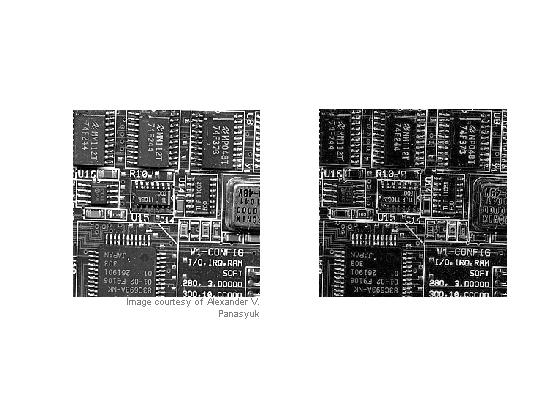
"The internal gradient enhances internal boundaries of objects brighter than their background and external boundaries of objects darker than their background. For binary images, the internal gradient generates a mask of the internal boundaries of the foreground image objects." [Soille, page 86]
The third form is called the half-gradient by dilation or external gradient:
external_gradient = imdilate(I, se) - I;
Direction gradients
By using line segments as structuring elements, you can compute directional gradients.
seh = strel([1 1 1]); sev = strel([1;1;1]); horizontal_gradient = imdilate(I,seh) - imerode(I,seh); vertical_gradient = imdilate(I,sev) - imerode(I,sev); subplot(1,2,1) imshow(horizontal_gradient, []), title('Horizontal gradient') subplot(1,2,2) imshow(vertical_gradient, []), title('Vertical gradient')
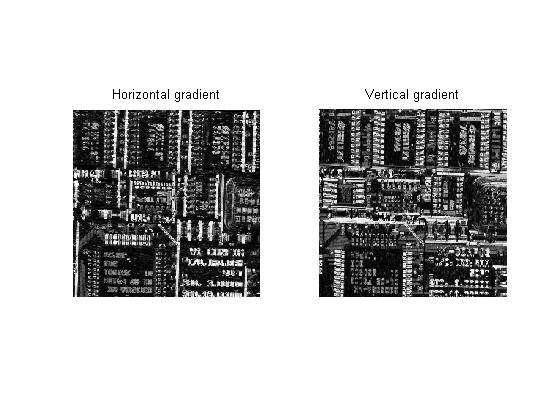
Try this on your own grayscale images. You can experiment with larger structuring elements, too, such as strel('disk',7).
I'll be covering ways to combine erosion, dilation, and other fundamental morphological operators in the near future.
Get
the MATLAB code
Published with MATLAB® 7.3

Can you please provide details of convex hull operation on an image.
Vihang - Are you talking about what regionprops does? For the ConvexHull option of regionprops, it first computes the perimeter pixels. Each perimeter has four corner points. regionprops calls convhull to compute the convex hull of the set of corner points of all the perimeter pixels. Does that help? See regionprops documentation for more information.
Would you please explain dilation and erosion with non-flat structuring elements on grayscale images? Thanks!
Sir i am working on plotting contours of back side of fingers and then find the length and width of finger. how should i find length and width of finger using matlab? i have tried doing it but problem is that image also contains some part of hand that is beneath fingers, so we have to make a reference point and thn only we can find the length. Can u please help me with it
Anubhav—Sounds like an interesting algorithm development problem, although maybe a little vague. But I don’t have any particular suggestions for you.
Sir,can u please explain how dilation and erosion done on grayscale images
Pramod—Oversimplifying a bit, dilation is a local max operator on some defined neighborhood of every pixel, and erosion is a local min operator. Sometimes there is also an additive offset applied to each pixel in the neighborhood before the max or min is computed. Details are plentiful in many image processing textbooks, as well as online.
We are processing holograms using your toolbox in our lab. Since holograms contain 3D information, it makes sense to do the image processing in 3D as well. The problem is that the 3D images matrices are huge, that the operations like imdilate and imerode take a long time and that it puts enormous demands on computer memory. The matrices contain however mainly zeros, so we decided to write some codes to do dilation and erosion based on the (x,y,z)-coordinates of the pixels. Our dilation code (fully vectorized) is faster than imdilate for small 3D structure elements, but is quickly outperformed by imdilate for larger ones. I’m now working on the (coordinate-based) erosion code, but I’m a bit clueless how to tackle it in preferably vectorized manner.
Although the concept of dilation and erosion is simple, I’m puzzled as to how MATLAB does this so efficiently. Could you please explain how MATLAB performs dilation and erosion? If you have any ideas about performing these tasks on pixel coordinates only; I’m all ears. Many thanks in advance for your answer.
Michel—I’ve had dilation and erosion algorithms on my blog topics list for a long time, but I’ve been procrastinating because it’s a complex story. There are several different algorithms used in a complementary way by imdilate and imerode: Structuring element decomposition, binary word packing, and a special method just for horizontal and vertical line structuring elements.
In your comparisons, are you using a rectangular structuring element? For that case, our combination of algorithms achieves a running time that is independent of the structuring element size.
For other shapes, you could be seeing the effects of our other structuring element decompositions.
Note also that there’s a lot C code underlying our morphology implementations. See the source code in toolbox/images/images/private/.
I am trying to use morphological operators for one dimensional signal (e.g. sinusoidal signal with random noise).
For the initial start, I am trying to visualize the process manually using a vector representing a signal (eg input signal, x=[1,1.3,1.6,1.4,1.6] and structuring element, g=[0,1,0]). I used the following expression for dilation.
dil(x)=max{x(n-m)+g(m)}, n-length of IP signal,m-length of SE
I get different result when I calculate it manually and when I use matlab to do so.
Is it possible to know how matlab handles this expression? Or what algorithm matlab uses?
Thanks in advance.
Suresh
Suresh—You didn’t say how you were computing the dilation in MATLAB, and your formula is incomplete, but I have a guess about what your problem might be. Perhaps you are using this syntax for imdilate:
With this syntax, the 2nd argument specifies the domain of a flat, zero-valued structuring element. Since only the center element of your domain is nonzero, your structuring element has only a single element in it, and the output is the same as the input.
To specify and use nonflat structuring element, you need to do this:
se = strel('arbitrary', [1 1 1], [0 1 0]); y = imdilate(x, se);Steve,
Thank you for the reply. I appreciate your help.
Your suggestion worked but I still get error in one of the element. Here is what I got using matlab,
>> x=[1,2,4,6,-20,3,1];
>> se = strel(’arbitrary’, [1 1 1], [0 1 0])
>> y = imdilate(x, se)
y =
2 4 6 7 6 4 3
But this is what I get manually,
y = [1 2 4 6 7 6 4]
The example quoted above (plus manual solution) is taken from a paper [X. Lin, H. Liu, H. Weng, P. Liu, B. Wang, and Z. Q. Bo, Senior Member, IEEE “A Dual-Window Transient Energy Ratio-Based Adaptive Single-Phase Reclosure Criterion for EHV Transmission Line”, IEEE Transactions on Power Delivery, Vol. 22, NO. 4, pp.2080-2086, October 2007].
Also I have some papers, (not quoted here to make shorter) which say that Structuring Elements can be semi-circular, triangular or even sinusoidal with real numbers as its element. But Matlab documentation says SE consists of only 0 and 1. Is there any way to deal with this case in matlab?
Thank you
Suresh
Suresh—It looks to me like your result is simply shifted by one position. Note that the Image Processing Toolbox is for the center of the neighborhood matrix is the origin. Your paper and your manual computations are probably using a different convention.
MATLAB documentation does not say that the structuring element consists of only 0s and 1s. The structuring element neighborhood (or domain) input is 0s and 1s. As I mentioned in my previous response, to create a nonflat structuring element you should use this syntax:
se = strel('arbitrary', nhood, height)Hello, Steve,
I tried to do binary expansion with bwmorph. The test.m file contains
mask = zeros(12, 12);
mask(5:7, 5:7) = 1;
mask = bwmorph(logical(mask), ‘dilate’);
It works well in matlab script. There was also no error when I compiled test.m with mcc -m -B sgl -T link:exe test.m. However, executing !test.exe yields
“Warning: Duplicate directory name: c:\matlab6p5\toolbox\matlab\iofun.
ERROR: Reference to unknown function ‘checknargin’ from FEVAL in stand-alone mode.
EXITING ”
Could you please advise how to resolve this problem?
Thanks a lot!
Alice
Alice—See this support note.
Thanks, Steve
Yes, it was the compiler’s problem. I have tried the solution on Matlab v7.1 R14 and it works!
Thanks for your help.
Alice
Sir, coulf you tell me about how erotion and dilation work in segmentation of an image??
I’m making a face detection and now I’ve segmented the RGB image using the intensity. I want to know what method you would like to recommended that gives optimum automated threshold value? is it using dilation/erotion, using Otsu,or something else?
Thank you so much..
Dewi—The function graythresh, which uses Otsu’s method, does a pretty good job of automated threshold selection.
Thank you so much Sir…
I’ll try the graythresh function.
