
Automating the Unpredictable: Buckeye AutoDrive’s Random Obstacle Trajectory Generation
Today we are joined by students from The Ohio State University’s SAE AutoDrive II team – Buckeye AutoDrive.
Representing the Center for Automotive Research (CAR) and the Ohio State Department of Electrical and Computer Engineering (ECE), the Senior Design Capstone Program has partnered with Buckeye AutoDrive to bridge the gap between theory and practice. The Capstone Program serves as a vital proving ground where ECE students transition from the classroom to solving complex, real-world engineering challenges. As a student-led team competing in the AutoDrive Challenge II, Buckeye AutoDrive brings together a multidisciplinary cohort of undergraduate and graduate students. Through this partnership, these two programs are working to shape the future engineering workforce.
In this post, we will highlight how the Buckeyes utilize both MATLAB and RoadRunner to support their goal of improving autonomous driving systems. Specifically, we will focus on how they automate random obstacle trajectory placements. This breakthrough bolsters software testing robustness and pinpoints critical “edge case” scenarios. Below, we will outline the motivation and methodology of this development. Enjoy and Go Bucks!
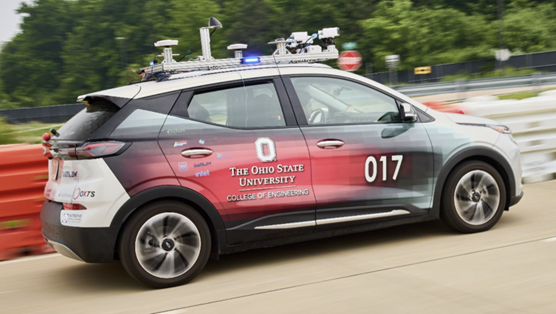
Figure 1. Buckeye AutoDrive Vehicle
Motivation
Simulation is the backbone of autonomous development, enabling rigorous software testing while eliminating the high costs and safety risks of physical trials. The Buckeye Simulation Team is dedicated to building an extensive collection of simulation tools that mirror the complexities of real-world driving. By prioritizing environmental diversity and data integrity, we empower the team to build safe, reliable software in a controlled, virtual environment.
The random obstacle trajectory generator was completed as part of the 2026 MathWorks Simulation Challenge for the SAE AutoDrive II Competition. While the challenge focused on complex scenarios, the team challenged themselves to think outside of the box and solve emerging testing struggles.
Designed with the demands of the autonomous vehicle industry in mind, this tool tackles the inherent unpredictability of the real world. By automating irregular obstacle placement, we allow developers to catch software “hiccups” in a safe, virtual space before the vehicle ever encounters them on the road.
Methodology
The team developed a streamlined workflow to bridge the gap between MATLAB and RoadRunner
Initializing and Software Feature Grouping
The first step in any RoadRunner project is establishing a seamless connection between the application and the project files. To streamline this, we developed an initialization Graphical User Interface (GUI) using the MATLAB App Designer application. Users declare the file paths for both the RoadRunner installation and the specific project folder. These selection tools can be seen in Figure 2 below.
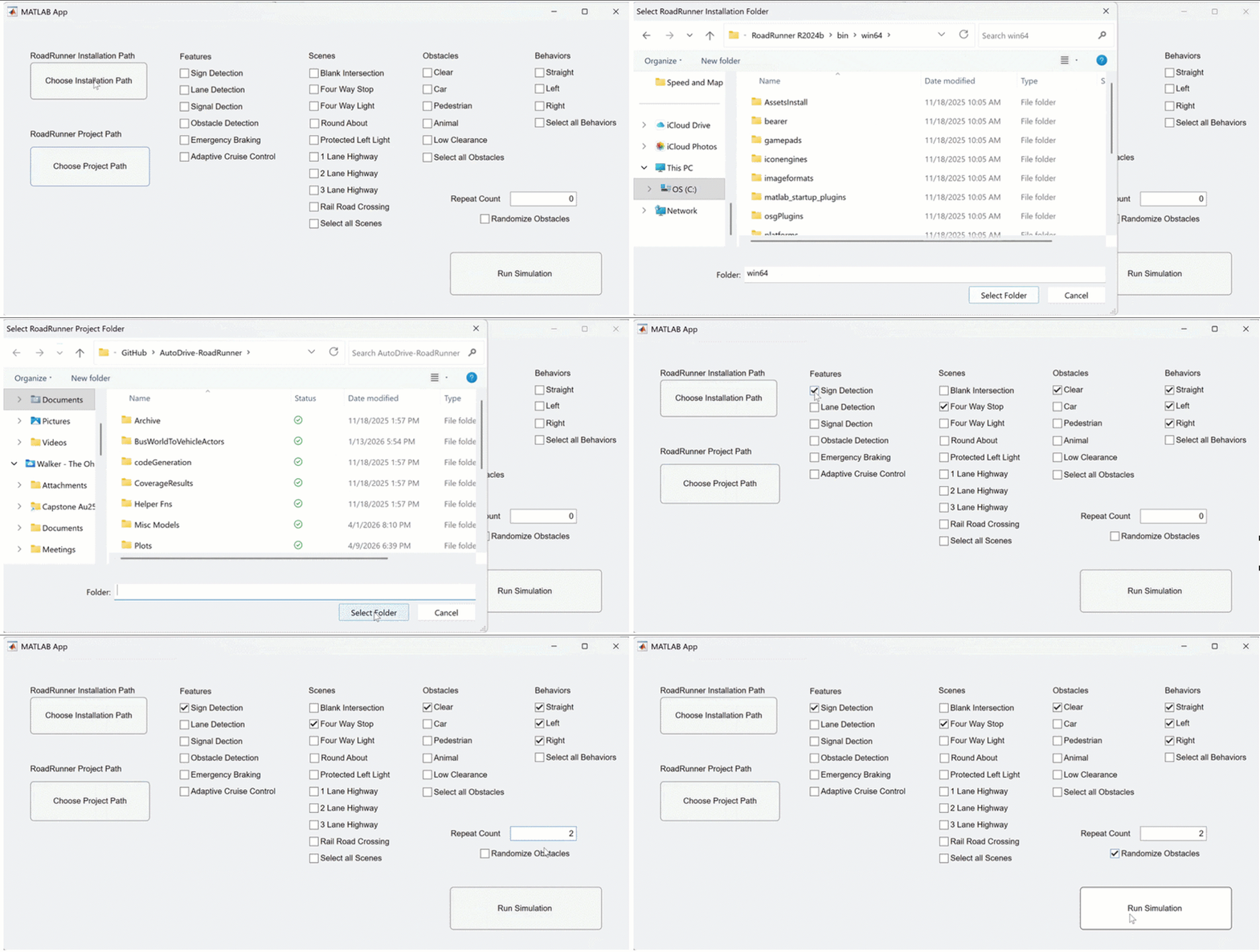
Figure 2. Initial Graphical User Interface (GUI) Utilization
Efficiency is key. Once the connection is live, users can choose their testing path:
- Predefined Feature Testing: Shortcuts based on specific software features (e.g., Sign Detection).
- Manual Selection: Allows developers to hand-pick scenarios for custom testing.
In Figure 2 above, a sample of a Sign Detection software feature is selected. The user has a diverse set of options that are constantly being expanded by the team as new features are developed and new scenarios are created.
RoadRunner Handshake
Once selected, MATLAB script then executes a “handshake,” calibrating the environment to the selected scenarios automatically. This script uses predefined functions from the Automated Driving Toolbox. A flow chart of this process is seen below in Figure 3.
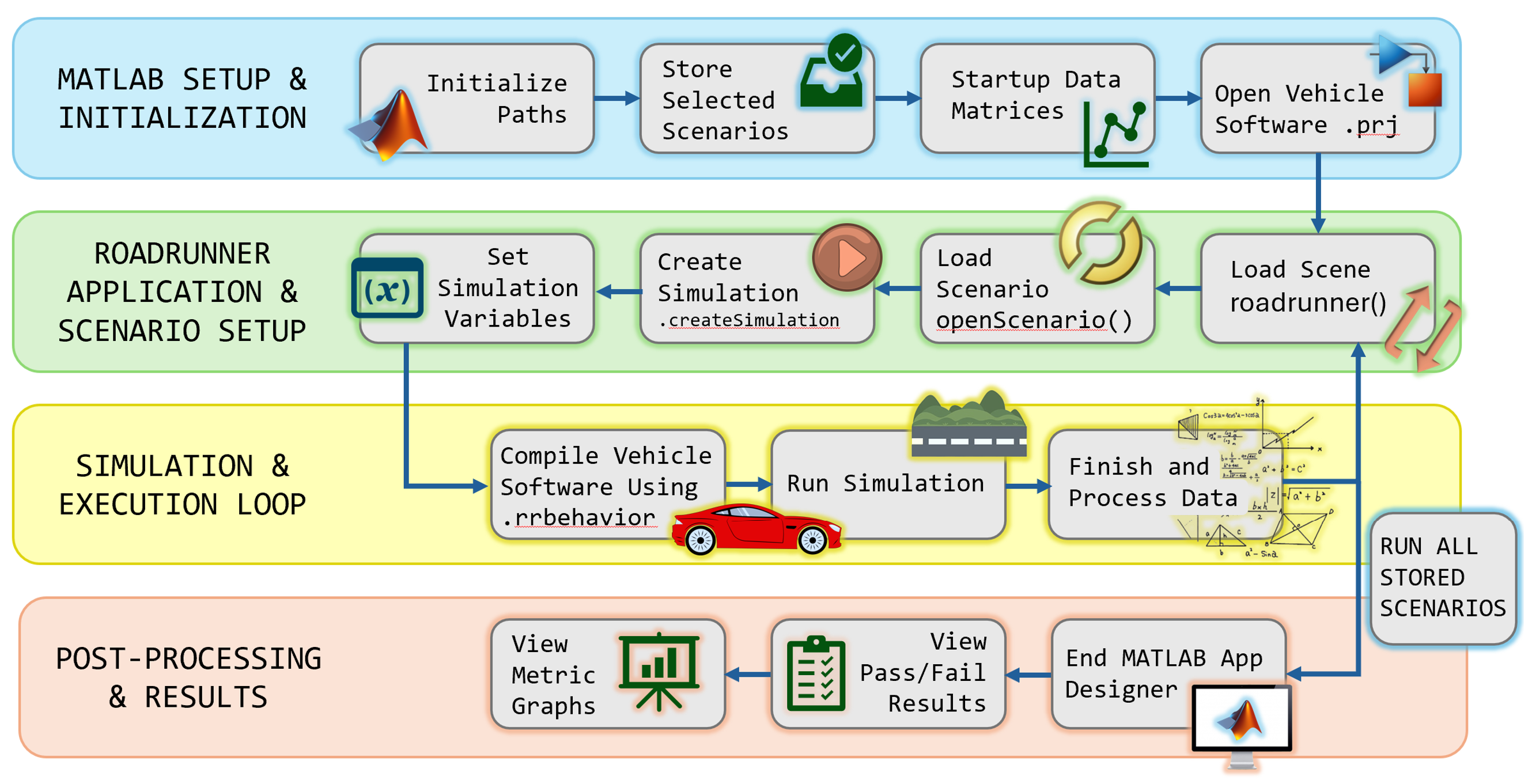
Figure 3. Software Feature
Using this handshake, the script will loop through every stored scenario selected earlier in the initialization GUI. During each run, the scene (e.g., Four Way Stop) will be loaded in RoadRunner. Into this environment, the scenario (e.g., Car Obstacle and Left Turn) will be loaded. After some parameter calibration in the script, the simulation will connect and compile the vehicle software using a .rrbehavior file connection. Examples of different simulations can be seen below in Figure 4.
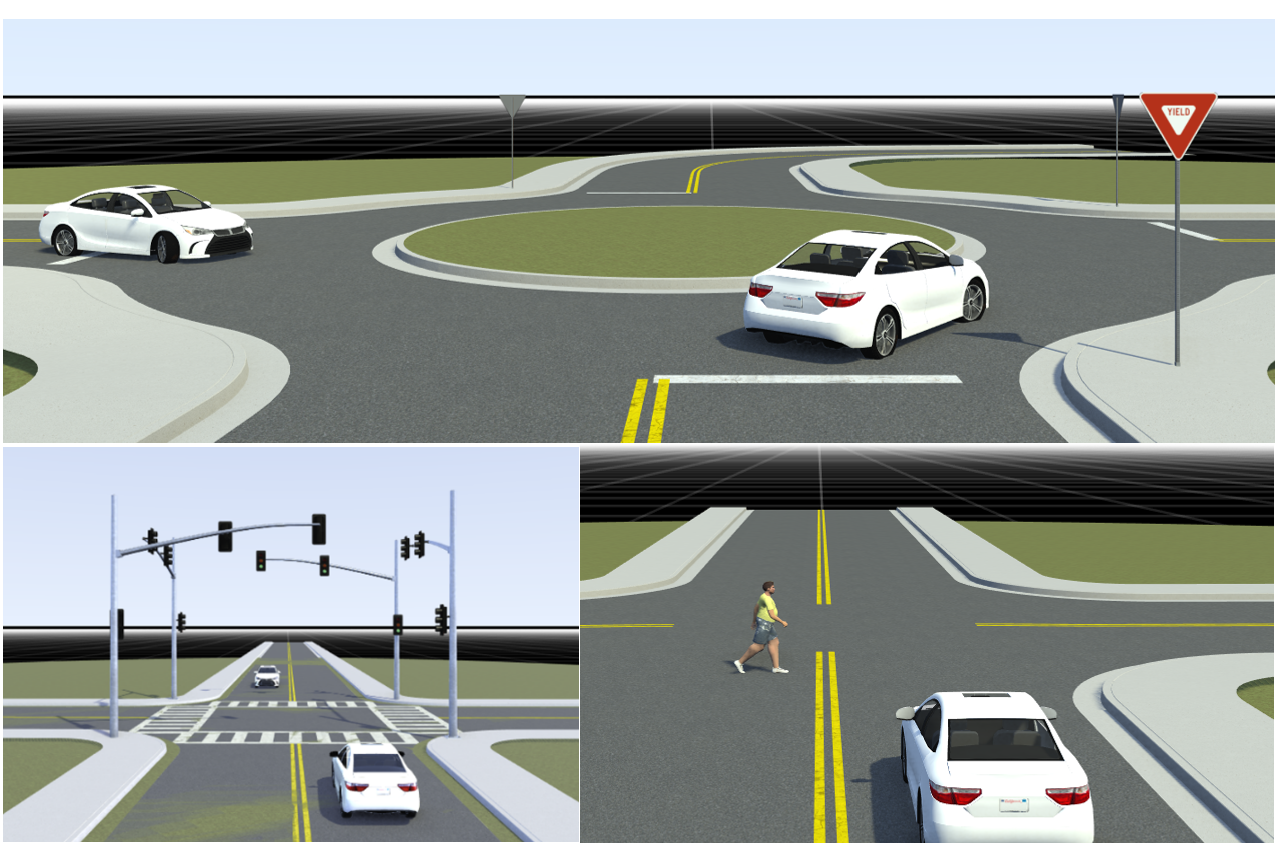
Figure 4. RoadRunner Scenarios with Various Obstacles and Traffic Patterns
Repetition and Data Analysis
Robustness requires repeatability and analysis. Our framework includes a repetition feature, allowing the same scenario to run multiple times to ensure the simulation – and the vehicle’s response – remains consistent under identical conditions before we introduce randomness.
After simulation runs, data from a stored .csv file is analyzed. The file includes time stamped positions of each actor with velocity vectors. This.csv is synthesized using secondary MATLAB scripts to generate a variety of metric data. This data is computed across the simulation and compared to safety and comfort thresholds to determine if the simulations passed or failed. Examples of this data can be seen in Figure 5.
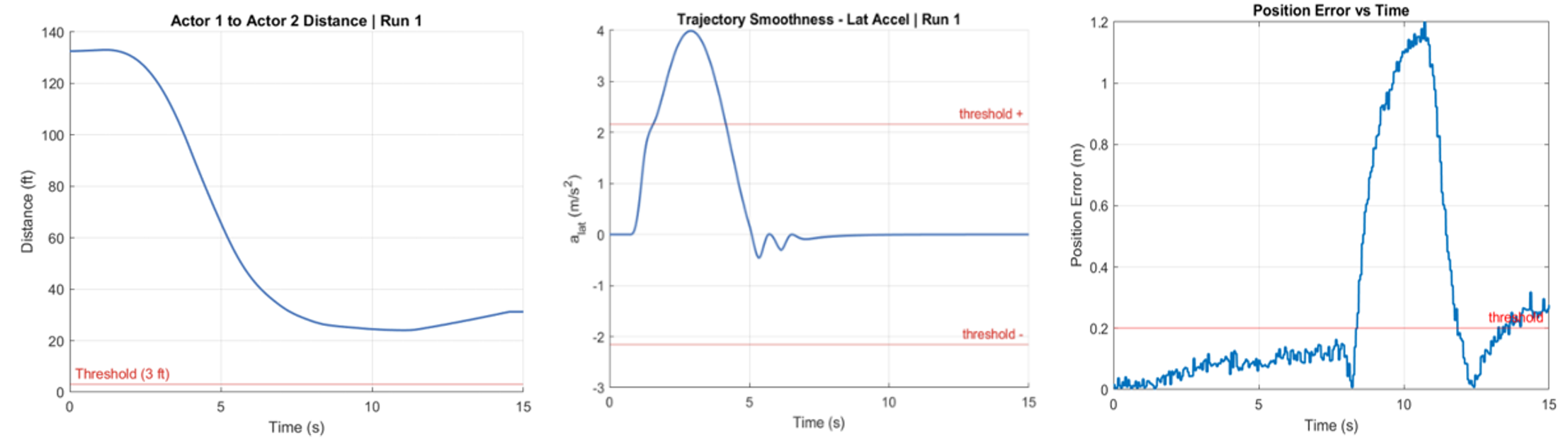
Figure 5. Examples of Data Metric Outputs with Pass/Fail Tolerance Thresholds
Random Obstacle Trajectory Generation
This is the core innovation. Rather than using static actor trajectories, the generator randomizes the starting point of obstacles (Actor 2). When this feature is active, the MATLAB script initializes a RoadRunner instance containing only the obstacle actors, excluding the Ego vehicle. The script then exports the scene into a structured code format, which is programmatically modified to assign new, randomized coordinates to the obstacles. Finally, this modified obstacle code is injected back into the primary simulation environment, overlaying the randomized actors onto the existing Ego vehicle scenario.
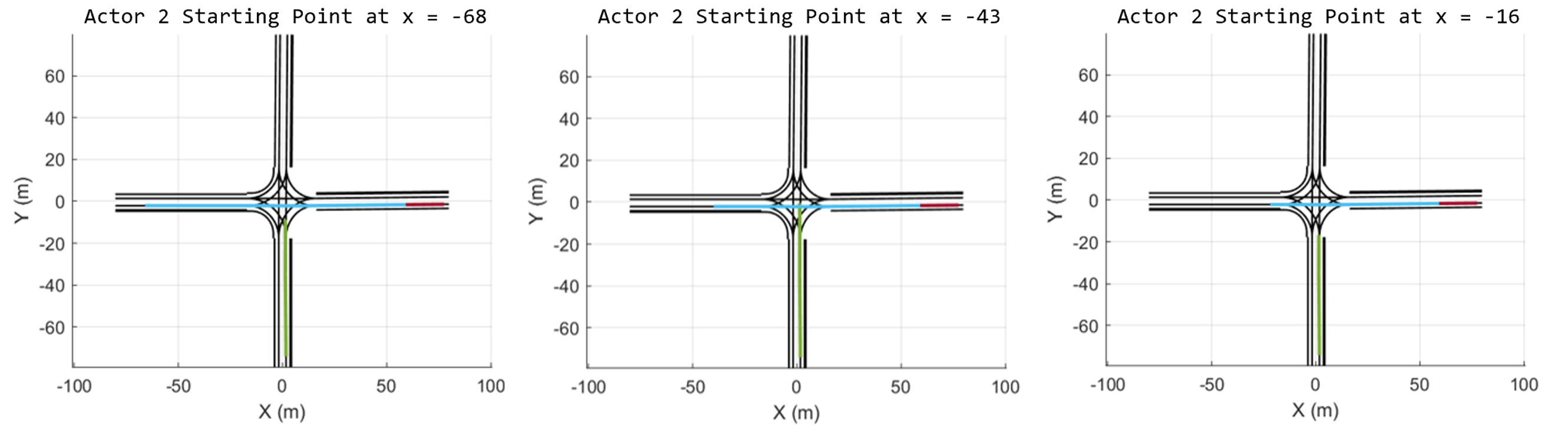
Figure 6. Random Obstacle Trajectory Generation Simulation Maps
As shown in Figure 6, the blue trajectory line for Actor 2 is an obstacle that starts at various points. This ensures:
- Variable Timing: By shifting the start point, the obstacle crosses the ego vehicle’s path at different intervals.
- Dynamic Response: This forces the software to detect and react to threats at unpredictable times, rather than relying on “pre-programmed” success at a specific waypoint.
By moving away from “predicted” obstacle points, our software can be tuned to detect and react at any moment. This level of thoroughness significantly increases the safety and reliability of our vehicle when it is eventually translated from the virtual world to the physical road.
Conclusion
By linking MATLAB and RoadRunner in a repeatable workflow, the Buckeye AutoDrive team generated randomized obstacle trajectories that added real-world unpredictability while exposing edge case scenarios that normal testing can miss, thereby strengthening safety and reliability before road testing.
- Category:
- Automotive




Comments
To leave a comment, please click here to sign in to your MathWorks Account or create a new one.