Skip to Main Content Skip to Search
File Exchange
MATLAB Newsgroup
Link Exchange
  Blogs  
 Contest 
MathWorks.com

Inside the MATLAB Desktop

March 23rd, 2007

Moving between functions within a file

When you’re writing a big M-file, you often end up with a large number of subfunctions or nested functions. Moving between them can be a pain though unless you know some tricks.

First, there is a function dropdown on the Editor’s toolbar. It shows the names of all functions (including subfunctions and nested functions) in alphabetical order, and you can click on a function name to jump to its declaration in the file.

FunctionDropdown.jpg

Next, you can use the Editor’s Go To dialog (accessible from the Go menu) to see all the functions in your file. Using the table, it is possible to sort the functions either by name or by line number.
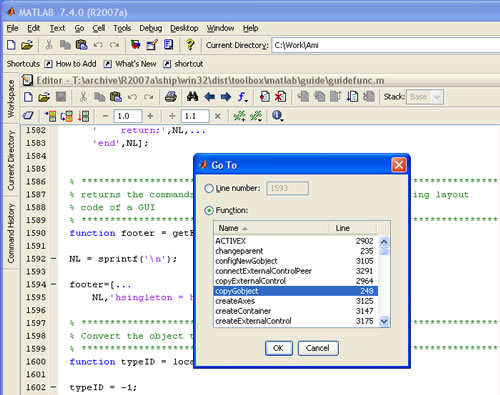
Editor Go To dialog

Finally, if you want to get more information about a function that you are calling in your code, you can use Open Selection (CTRL+D with Windows keybindings) to quickly jump to where the function is defined. You don’t actually need to select the function as long as your caret is within the function name, and Open Selection works even if the function lives in a separate file. Note that you can then use the Back button on the Editor toolbar to quickly jump back to the place in the code where the function is used!
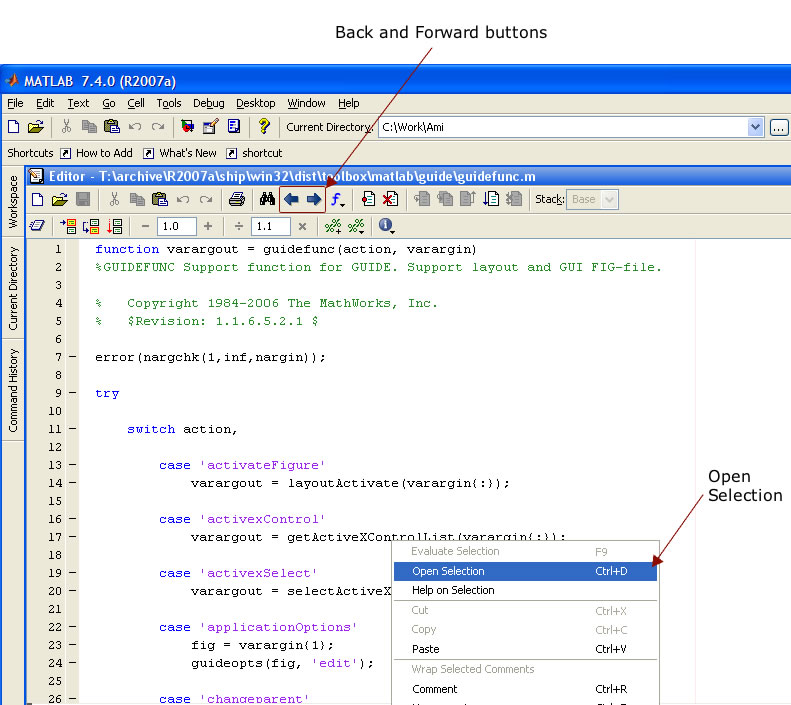
Using Open Selection

16 Responses to “Moving between functions within a file”

  1. bluemax replied on :

    Hi
    Good move creating the blog!,would definitely help people work ’smarter’.

    I prefer to use the incremental search (ctrl+shift+s) to locate my functions, along with (ctrl+s) for ‘find next’. Though I would really like the search to wrap around.

    Nice addition to ‘Ctrl+g’, I still have the old version with just the line number. However, being a keyboard maniac, I prefer using the mouse and would like more emacsy features.

  2. jewa replied on :

    I really would love to also have the Back button as a keyboard shortcut. As it is, I can use CTRL+D for viewing a function definition but have to use the mouse to go back. Having Back as a keyboard shortcut would enable me to go back even quicker.

  3. Kristin replied on :

    Hi Jewa,

    Thanks for the suggestion. We will consider this for a future release.

  4. John Reilly replied on :

    Hi. I’d love to see “Intellisense” and text completion like uSoft Visual Studio. When I type “ro” a context window pops up under the cursor that contains the function “round”. I can click or arrow to the choice I want and hit return to insert it. A *huge* help would be to include variables that are in scope and fields in a structure when I press “.”. Thanks. john.

  5. Kristin replied on :

    Hi John, that is something we will consider for a future release. Do you use tab completion in the Editor or Command Window? This will give you the variables in scope and fields in a structure.

  6. Jason replied on :

    Is there a keyboard shortcut to move between multiple files that are open in the editor?

  7. Kristin replied on :

    Jason,

    Funny that you ask, our post later this week will address that question. Ctrl+PageUp and Ctrl+PageDown should cycle between documents in the editor.

  8. Eric Magee replied on :

    I am sitting here working in MATLAB on a couple of difference projects and it occurs to me that it would be very nice if I could save the current state of open files in the editor and open a previously saved state - somewhat of a project listing much the same way that MATLAB remembers which files were open when exiting. I frequently switch from project to project and in order to keep the number of files open in the editor to a manageable number, I will close all of the files and start from scratch. If I could save the state before closing all files, I could easily revert back to that project without having to open each file individually.

  9. Om Oza replied on :

    use Ctrl + F6

  10. Kristin replied on :

    Thanks fot the suggestion Eric. We are looking into this type of functionality for a future release.

  11. Ullrich replied on :

    Hi,
    Adding to Eric’s comment:
    Yes, please put in a simple session manager that allows you to open files of the same project to be opened simultaneously! Eg like in KATE (KDE editor).

    Cheers
    UB

  12. Bryan replied on :

    Would it be possible to have the editor indicate which function is being edited?

  13. Christina replied on :

    Hi Bryan,

    I’m not sure what you are requesting. Can you give me an example? In the status bar, it does show you the name of the function or subfunction you are currently editing.

  14. per isakson replied on :

    Hi Christina

    That’s true for subfunctions (R2007a, WinXP), but not for nested function. When I edit nested functions the name of the main-or subfunction that includes the nested function is displayed in the status bar.

    /per

  15. Christina replied on :

    Yes, that is true. We are considering improving support for nested functions.

  16. Ehsan replied on :

    It would be great if MATLAB uses an IDE with common functionalities as other IDEs with similar shortcuts,…

Leave a Reply


Inside the MATLAB Desktop is written by the MATLAB Interface teams.

Team picture
  • Etienne: Hello, Is it possible to change the background color of a particular cell?
  • Ken: No problem Mark…glad to help. Enjoy your font!
  • Mark Andrews: Ken, thanks for replying @3 and giving such clear instructions on how to get this to work.
  • Steve Eddins: Hi Ken, Every year or so I try to find a programming font that would really make me happy. A couple of...
  • Ken: @Jiro: Andale Mono looks nice! I especially like the rendering of the letter “g”.
  • Ken: Hi Mark, The issue your referring to (see the bug report here) was fixed in version 7.5 (R2007b). The problem...
  • Jiro: Ken, That’s a nice font. I use “Andale Mono” which has a similar look. I also like the clear...
  • Queffurust: This is my “cleanup” ; shortcut clc % clear Command Window close all hidden % deletes all...
  • Mark Andrews: Ken, should this work with version 7.0 (R14) on Windows? My favorite font is Consolas, but MATLAB seems...
  • Mark Feldman: Like Bryan (#38) and Kim (#40), I strongly request that you add native vi key bindings to the MATLAB...

These postings are the author's and don't necessarily represent the opinions of The MathWorks.

Related Topics