Inside the MATLAB Desktop
May 11th, 2007
Setting up keybindings for the Command Window and Editor
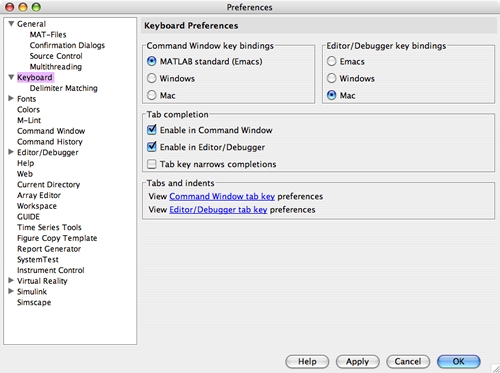
For purely historical reasons, the Command Window ships with its keybindings set to “MATLAB Classics (Emacs)”. We used to only have one set of keybindings for the Command Window and we didn’t want to change the behavior that people were used to. The Editor, however, uses the platform’s keybinding set as its default. This often causes confusion when a keybinding doesn’t work in the Command Window like expected. I quite often get requests from customers to hook up a keybinding that is already there. We will probably make changes in this area in a future release, but in the meantime check your keybinding preferences to make sure that they are set they way you want them.
If you are on a Mac, you will probably be much happier if you change the keybindings to the Mac set for the Command Window. Once you do this, command-a will select all and the navigational keystrokes work more like you would expect.
On Windows, if you set your keybindings to the Windows set, you will get the Windows keybindings that you expect. For instance, Ctrl-P will print instead of recalling the previous command history item.
So, if you haven’t done this before, take a look at your keybinding preferences (File->Preferences menuitem) and try changing the keybinding sets to the appropriate platform set and see if you like it:
By
Kristin Thomas
Kristin is a developer on the MATLAB Desktop team. She works primarily on the Command Window when she is not throwing herself down a mountain on her snowboard.
7:00 am |
Posted in Command Window, Editor |
Permalink |
You can follow any responses to this entry through the RSS 2.0 feed.
You can skip to the end and leave a response. Pinging is currently not allowed.
Leave a Reply
|
It would be great to see vim keybindings added to the editor.
Yes, it would be fantastic. I’m a rookie with matlab. The interface is quite powerful, making necessary to use the matlab editor. Tough task for a vim-addict developer…
Emacs user were considered, but unfortunately not vim users. Is it something that will be undertaken ?
At this time we do not have plans to add a new set of keybindings. We are considering other enhancements to the keybindings that will help ease some of this pain in the future.
Find it inconvenient that there are ctrl-left/right and ctrl-shift-left/right bindings (move/select word left/right) but not ctrl-backspace (delete word left). Even better, why not allow the user to map key-combination to action in a more flexible way? This is in addition to the existing Windows/Emacs/Mac “presets” - just add an “User” one I guess? Thanks.
Hi Ljubomir,
Thanks for your feedback. We know key-bindings are not very user-friendly right now. We’re currently doing some significant work on the desktop infrastructure to improve this situation.
-Ken
Thanks. More general note wrt the editor: why not get some known & tested editors in some shape or form in? Why reinvent the wheel? I understand the integration is an issue (the debug mode, etc), but surely there are IDE’s arround to give you some idea what works/doesn’t and where you should put your (always limited) resource. I must say the editor looks like v1. You will put lots of effort and the users will have to wait a few years till you get to v3 which I guess will the first one that will work for most of the people most of the time. I personally change between Matlab’s editor and vim. Fortunatelly “reload-if-changed” and detecting “changed-but-unsaved” seems to work fine in both directions for me, haven’t had a disaster (yet). Just yesterday I had to spent an hour hunting a bug I introduced when I renaming a variable - the editor seems to lack search&replace in a block or I haven’t found it. :-)
Hi Ljubomir,
Astute observations. Your absolutely right about not reinventing the wheel. My personal philosophy is to use 3rd party libraries whenever possible with the assumption that small focused libraries will be better written and tested than I could hope to do myself.
The MATLAB Editor does use some foundational libraries, so we certainly haven’t reinvented the wheel. Additionally, users of the MATLAB Desktop have a different workflow than users of traditional IDEs. Thus we must be careful not to unnecessarily constrain users because we’re based on incompatible (from a usability standpoint) technology.
Your right in that the MATLAB Editors appearance hasn’t changed a whole lot, and I assure you that we’re looking at ways of updating it in a way that also enhances usability. We’re also working on adding some re-factoring capabilities, which will make it much easier to rename variables.
I appreciate your candor Ljubomir. Its comments and suggestions such as yours that help us understand what customers are looking for.
-Ken
I realize it has already been said, but I too would like to see a vim key binding added.
Thanks for your two-cents Matt!
It has been said, but it is important to me so I’m adding the comment again. Once you’ve got used to vim you feel as if your fingers have been hacked off when using the matlab editor. On the other hand the commandline debug mode is not as comfortable as it should be (e.g. I always try to repeat e.g. dbstep by pressing return, because thats what I’m used to from gdb), so sometimes you have to use the GUI.
It would be great if matlab would export some kind of service to enable driving it from within vim. And if additionally the matlab lint would be an external program everything necessary could be accessed from within the comfortable vim ui.
But if all this is too much to hope for, then at least the most basic vim editing capabilities
- Vim Two-Mode Interface
- Vim Navigation
would already make me feel much more comfortable.
Brian
Hi Brian,
Thanks for your feedback - your suggestions are good. We’re doing some significant work in the Editor right now, that may make the things you ask for easier to support (though this is a large scale project and so it won’t be visible for quite a while).
It certainly makes a difference, when you, the users, convey what’s most important to you. So we do appreciate all these requests and suggestions.
Thanks,
-Ken
Brian,
You can also run M-Lint on a file from the MATLAB command line. It does not give you the nice colors, but it has all the pertinent information.
http://www.mathworks.com/access/helpdesk/help/techdoc/index.html?/access/helpdesk/help/techdoc/ref/mlint.html
First, I should say that I’ve been fairly impressed with the recent Matlab IDEs. I’m a die-hard command-line hacker, and I avoided the Matlab editor for a long time b/c I was much more comfortable with Emacs. Recently, however, I have been swayed and am getting much more into using your editor/debugger environment. Nice going.
I would second the request for fully user-configurable keybindings. (Even if you have to hide the full configuration fairly deep in prefs to not scare newbies.) I find that I want a sort-of hybrid, Frankenstein’s Monster sort of keybinding that is half Mac and half Emacs. (E.g., my fingers think “splat N” for new file and “splat F” for search, but “ctrl-e” for move-to-end-of-line.)
Other features that I would find useful in the IDE are:
- dynamic help for function calls in tooltips attached to mouse hover-over (or even on a quick keybinding), a la Eclipse
- function call, function argument, and variable completion. Tab completion sort-of gets there, but I find myself continually surprised by what it doesn’t complete.
- a “go to the declaration of the selected thing” widget. There seems to be one for function names, but not for general variables/arguments. I know that this might be hard b/c of Matlab’s effectively weak typing and lack of declarations (esp. for global vars, which don’t have a clearcut home), but it would be a big help when reading legacy code.
- Code templates for common idioms, again a la Eclipse. Especially for things I do a lot (like checking numbers, ranges, etc. of function arguments), it would be stellar to be able to fill in the function prototype, hit a key, and have it generate a default set of argument checks that I could then edit down to what I wanted.
Hi Terran,
All great ideas! You’ll be happy to know that most of them are already in the works.
Re. Customizable key bindings: We’re working on this. We’re not addressing the larger issue of Vim style key bindings right now, as that would be a much larger scope project (though based on the number of requests, we will certainly discuss it).
Re. Dynamic help: I think we have the feature you’re looking for - check out Help on Selection. This feature pops up up a light-weight help window when your cursor is on a function and you press F1.
Re. Better IntelliSense style completion: We’re working on it!
Re. Better “go to” support: This is actually part of a bigger picture, namely refactoring capabilities. We’re working on this too.
Re. Code templates: Working on it.
Thanks for all the great suggestions Terran.
-Ken
the new meditor features makes it a necessary tool for my productivity. a modal text editor with vim keybindings would greatly enhance my productivity even further. thanks for considering :)
Thanks for “weighing-in” Joshua!
-Ken
VIM!!!
Personally, I’m really tired of typing :w in my Matlab editor and having it result in a “:w” on the screen when I wanted to save. I love some of the Matlab editor features (like cell mode) and as a result I use it instead of vim (which I used to use for all my Matlab coding).
The problem is my fingers automatically type vim commands, *all the time*. I would love a vim-like editor in Matlab.
Just adding my $0.02… I really need VIM key bindings. Anyone who has really worked with VIM for any period of time knows how frustrating it is to work with ’simpler’ GUI/mouse based editors. However, the other features in the MATLAB IDE (which are way cool, btw) almost preclude using VIM to edit MATLAB files.
Duly noted. Thanks for the input David.
Please add VI or VIM key bindings as an option in the matlab preferences window. These key bindings are already present in most readline libraries (and often can be accessed by pressing M-C-j).
EMACS is not the only editor out there! :-)
Bart,
Thanks for the input. We understand the pain of switching between various programs. Personally, I did something very horrible in IntelliJ because I pressed the Eclipse keybinding. It’s awkward, and we’re working on it, but we can’t even give an estimate on when that will be available.
Thanks Mike, I am looking forward to seeing vi/vim key bindings enabled in a near-future version of MATLAB!
I am using MATLAB tool for our work.
Now I want to integrate matlab desktop (command window) in our C/C++ program.
We developed C/C++ GUI and it has interface with the MATLAB.
Our intention is not use in build MATLAB Desktop, It should come inside of the C/C++ GUI.
In Linux we have integrated as mentioned above (using matlab -nodesktop).
But the problem in Windows. There is no such type of command.
How we can start MATLAB in our C/C++ GUI in WINDOWS XP..?.
Please let me know any other option available in windows.
Also I would like to have -nodesktop option in windows..
@Biswanath Senapati
matlab -nodesktop is supported on Windows, too. This page explains how to do it: http://www.mathworks.com/support/solutions/data/1-19ZXU.html
If it’s not working for you, please contact technical support.
- scott