Ken & Mike on the MATLAB Desktop

February 4th, 2008

Exposing your dependencies

Most M-files you author probably depend on other files you’ve written, or maybe they depend on specialized toolboxes that you have installed. When you want to share your finely crafted code, you’re forced to remember or figure out which files you’ll need in order to run your main file. After you’ve figured that out, you probably zip up those files and ship them off to a colleague. If you’re like me, you’ll inevitably have forgotten a file.

This all feels a little non-deterministic to me and I really like predictability (I know, I’m so boring!). Enter, the MATLAB Dependency Report. This report will show you all the files that you’re dependent on. Though it will not show dependencies on base MATLAB, as those are considered implied (your colleagues will already have those files).

You’re only a couple clicks away from exposing your dependencies. First, open the file you want to generate the dependencies for in the MATLAB Editor. Next, goto the Tools menu and select Show Dependency Report.


You’ll be given an HTML report that looks something like this:
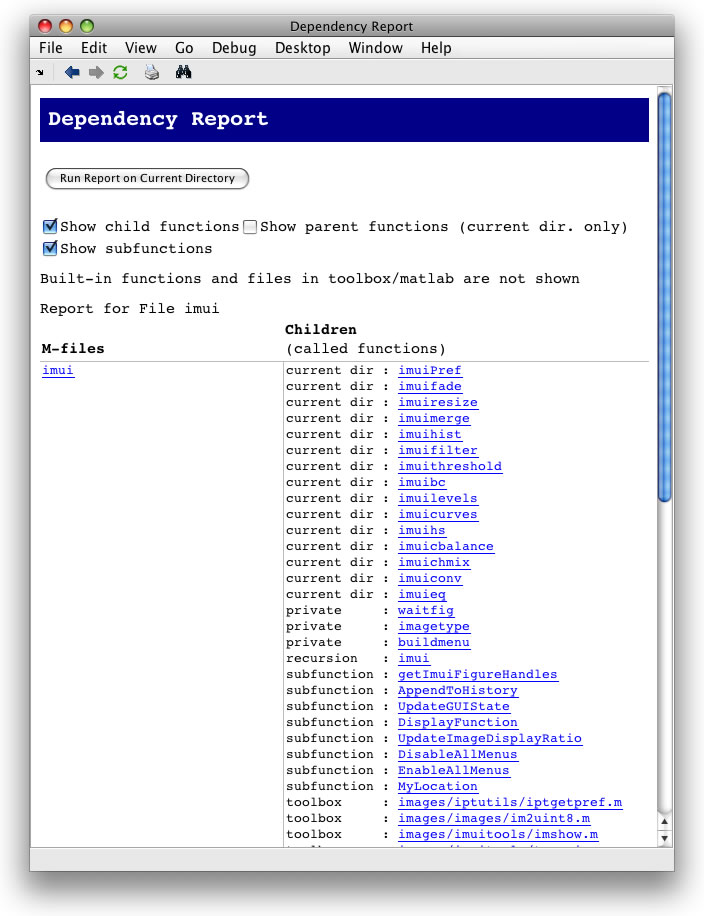
The above dependency report was run on the Image Processing Toolbox Utilities (IMUI) submission on MATLAB Central. The report shows all of the files in the IMUI toolset that imui.m is dependent on, as well as the dependenciees on files in the Image Processing Toolbox.

You can also run the dependency report on an entire directory. In the Current Directory Browser, select the directory you want to run the report on, then select the drop-down arrow on the reports button (see below) and select Dependency Report.

Now you can be sure that you’ve included all the necessary files when you share your code - predictability at its finest!

24 Responses to “Exposing your dependencies”

  1. jpaulr replied on :

    Is there any way to use the contents of the dependency report to generate a zip file automatically? Preferably this would be done from within the dependency report interface (a button, “Create Zip”,perhaps), but a text output may also be useful for a script to process.

  2. Ken replied on :

    There isn’t any direct support for this behavior (generating a zip file automatically). You could use the undocumented deprpt function, direct that output to a file using fprintf, and then compress that file using zip.

    Let me know if that helps.

    -Ken

  3. Mike replied on :

    There is no click of a button feature for M-files similar to PackNGo for Simulink models. However there a utilities on the file exchange.

    The first one I found is:
    http://www.mathworks.com/matlabcentral/fileexchange/loadFile.do?objectId=6148

    We’ll consider that functionality, though.

  4. Mark Andrews replied on :

    Ouch! Maybe this post was written in haste but these errors really detract from the pleasure of reading about this stuff:

    “your forced” -> “you’re forced”

    “your like me” -> “you’re like me”

    “your dependent on” -> “you’re dependent on”

    “you’re colleagues” -> “your colleagues”

    “show’s all” -> “shows all”

    Other than that, an interesting post! Thanks.

    Mark.

  5. quan replied on :

    Great tip. I always make the same mistake as you do, Ken, and mail off my m-files without realizing that I missed one of them. Great tips from the Mathworks crew. I feel like I’m learning new and interesting things from you, Loren, and Doug all the time. And if I did any image processing, I would also check Steve’s blog regularly. Keep up the simple/effective/time saving tips!

  6. Ken replied on :

    Thanks Quan! I’m glad to hear you find these tips useful. There’s a lot of good stuff in the Desktop - we want to try and expose some of the features in a way that streamlines your workflow.

    -Ken

  7. Patrick replied on :

    Thanks for the info - I hadn’t used this before. A couple of observations from my trials that surprised me:
    1) Nested functions are listed as unknown.
    2) The Matlab reshape function is listed as a java method.

    Also, is there any way to explicitly declare dependencies? I often use the eval function to select between several functions and/or generate custom argument lists.

    Thanks,
    Patrick.

  8. Ken replied on :

    Hi Patrick,

    Thanks for your feedback!

    Re. 1: Your right, nested functions aren’t really clearly identified in the report (though presumably dependencies on these functions don’t affect the portability of your code).

    Re. 2: I’m not sure which reshape function your referencing, as the built-in one (for matrices) won’t show up in the dependency report.

    There’s no way to explicitly set dependencies in MATLAB - dependencies are driven entirely by the path.

    -Ken

  9. per isakson replied on :

    Hi Patrik,

    This is my way to “explicitly declare dependencies”. I add a dummy subfunction.

    function dummy()
    myfoo1();
    myfoo2();
    end

    / per

  10. per isakson replied on :

    Anonymous functions offer a more compact way:

    @() { myfoo1(), myfoo2() }; % declaration of functions

    This line may be placed next to the command eval(’string’)

    / per

  11. Leena replied on :

    First file(test.txt)
    X Y Angle
    95 197 -2.62
    132 197 -0.52
    45 204 3.14
    163 205 2.62
    145 215 0.00
    83 216 0.52
    180 242 0.00
    229 245 -0.79

    Second file(test1.txt)
    X Y Angle
    102 158 2.62
    86 160 3.14
    177 163 -0.52
    116 171 -0.52
    198 171 2.36
    102 172 -2.62
    151 174 3.14
    85 176 0.00

    I am interested to compare two .txt file (i.e X with X1 & Y with Y1(set thresold))with angle ,if angle is same.

    And display result of maximum occurance.

    Kindly help me

  12. Ken replied on :

    Hi Leena,

    You can check out these tech notes on reading in data and this blog entry by Steve Eddins on counting occurrences of image colors, which you can tweak to find the values with the maximum number of occurences in your matrices.

    -Ken

  13. reema replied on :

    Hello Ken,

    I have read simple text file (two coloum)using following command,it can read value without using string(i.e X ,Y) and store it template file.
    How I can access X Y value using template .The code are :

    [templatefile , pathname]= uigetfile(’*.txt’,'Open An Fingerprint template file’);
    if templatefile ~= 0
    cd(pathname);
    template=load(char(templatefile))
    end;

  14. Ken replied on :

    Hi Reema,

    I think you want to do this:

    [x, y] = textread(’someFile’, ‘%f, %f’);

    This will read in two columns of floats from a file, into two variables, x and y. Check out the textread documentation for more info.

    -Ken

  15. Reema replied on :

    Hello Ken,

    Yes ,I want to read text file,
    [x, y] = textread(’.txt’,‘%f, %f’).But I want to select different text file and compare it.

  16. Ken replied on :

    Hi Reema,

    I’m not exactlly sure what your definition of “compare” is. Trying posting a detailed problem description to comp.soft-sys.matlab. You’ll find a lot of knowledgeable MATLAB users there, and you’ll usually get a response very quickly.

    -Ken

  17. reema replied on :

    Hello,

    I have used command textread and xlsread,to read values(X,Y,Angle) ,but it reads only predefined files.I want to read files on user interest,means user can select different (.txt ot .xls)files through GUI .

  18. Ravi replied on :

    I have a question about the variable editor.
    I would like to use the flexibility of the clipboard to selectively copy an array from a text file or excel and create a variable. This works directly for a numerical array with the variable editor. But not for a string array. I can , of course, use a command like textscan and read in a cell array.
    I would like to the same thing by simply pasting from the clipboard (where matlab recognises the contents as non-numerical data). Is it possible to do this presently? Or, will I have to settle for a submission as a proposal for a future matlab version.

  19. Bob Gilmore replied on :

    Ravi,
    I’m not quite sure what you’re looking for here. If you copy string data from another application, you can either select File > Import Data…, or paste the data into the Workspace browser. Either of those will open the Import Wizard, which will walk you through loading the clipboard contents into MATLAB.

    Is that what you’re looking for, or something else?

  20. Ravi replied on :

    Bob,
    Thanks to your pointing it out for me, I now know what I should do to copy a string array via the clipboard to the workspace. The mistake I did previously was to open a new variable from the workspace toolbar menu, and then in the variable editor, try to paste my data. Obviously, it was not possible to paste string data into a double array. I now know how I should do this. Thanks.

  21. Dirk replied on :

    Hello Ken,

    Thanks a lot for the useful post. Is there a way to find the dependencies of the dependencies? For example, if your main file calls “Hello.m”, which calls “World.m”, it looks like the dependency report only lists “Hello.m” as a dependency. Having a recursive dependency report would be quite useful. Please let me know if there is some way to do this.

    Thanks!
    Dirk.

  22. Mike replied on :

    Dirk,

    The Dependency Report has specifically narrow focus just to understand the interdependence of a directory as unit between its files and installed toolboxes.

    For a more in-depth view of a file, you’ll have to use the depfun function. This will do a recursive search on a M-file.

  23. David replied on :

    The Dependency Report I notice can be done en masse for all .m files in a directory — can it be similarly done for all .m files in each sub-directory of my current directory, or do I have to traverse the directory tree by hand?

  24. Mike replied on :

    The Dependency Report just works on one directory at a time, i.e. no recursive searches.

Leave a Reply


Ken & Mike work on the MATLAB Desktop team.
  • Ken: Hi Aurelien, This is an interesting idea! I’ll bounce it off of a few other MathWorkers. Applications in...
  • Aurélien Queffurust: Happy new year guys! Ok I have 2 ideas (which would’nt be a major enhancement!) 1) What...
  • Jody: I keep Matlab open for a while (good job on stability!) and can end up with 15 or 20 files, particularly if I...
  • Arthur: Another helpful tweak to the F1 documentation in the editor would be to open the documentation of the...
  • Mike: @Jveer, I’ve had the opportunity to talk to some MEX-heads here and they confirmed the point about...
  • Mike: @Naor, We’re glad you’re enjoying the function hints. Spell checking is something we’re...
  • Ken: @Naor, I too could use spell checking in the comments. @Jody, That’s a great request [an Emacs style...
  • Jveer: how about a proper and interactive way of setting up the compiler for xcode on the mac version? or at least a...
  • Jody: I like the hints as well. I’d really like to see a better buffer switching mechanism (to use the emacs...
  • Rick Candell: It is very desirable to be able to print colored text to the command window. Why has this feature not...

These postings are the author's and don't necessarily represent the opinions of The MathWorks.