Mike on the MATLAB Desktop

January 10th, 2011

Can MATLAB write MATLAB programs for you?

Today we welcome guest blogger, MATLAB Product Manager Scott Hirsch. 

Hi, I’m Scott Hirsch.  You may remember me from such blog posts as “Interactive Volume Visualization Tool” and “Default Docked Figures.”  I was Doug Hull’s partner on the original Pick of the Week blog from 2004-2006.

I’m excited to step back into the blogging world to chat with you occasionally about MATLAB.  As the product management lead for MATLAB, I spend my days working with the MATLAB development team to make sure that the MATLAB we build is the MATLAB that you all want to use.  This blog is a great way for you to let us know how we are doing.

Today’s topic is one of my favorite features of MATLAB – the automatic generation of MATLAB code from the MATLAB desktop and other interactive tools.  Have you noticed how the easiest way to learn how to do something in MATLAB is often to start from an example that is close to what you want to do?  Well, what if that example does EXACTLY what you want it to do?  This is one potential promise of automatically generated MATLAB code.  You use an interactive tool to say, fit a curve to some data, and you are handed the equivalent MATLAB code.  You can use the code as-is to automate the task that you just completed, but you can also dissect, study, and modify the code to learn how to apply it to other problems. This is particularly helpful for those of us who are newer to MATLAB or newer to programming in general.

Here are just a few examples of where MATLAB and Toolboxes will automatically generate code for you:

  • Fitting a curve or a surface.

The Curve Fitting Tool (cftool) and Surface Fitting Tool (sftool) in the Curve Fitting Toolbox will generate a function which generates a similar fit for new data.

  • Querying data from a database.

The Visual Query Builder (querybuilder) in the Database Toolbox will generate a script which can be used to re-run the query programmatically.

  • Importing data.

The Import Wizard (uiimport) will generate a function to import similarly structured data from a different file.

  • Customizing the appearance of a plot.

The Plot Tools (plottools) or plot edit mode will generate a function which reproduces the visualization with new data. (See Mike’s previous post).

  • Plotting data from the Workspace Browser.

The Plot Selector (video) will generate the single line of MATLAB code used to create the plot.

In most cases, you either generate code by selecting a checkbox on the GUI or selecting an option on the File menu as in this example with the Surface Fitting Tool:
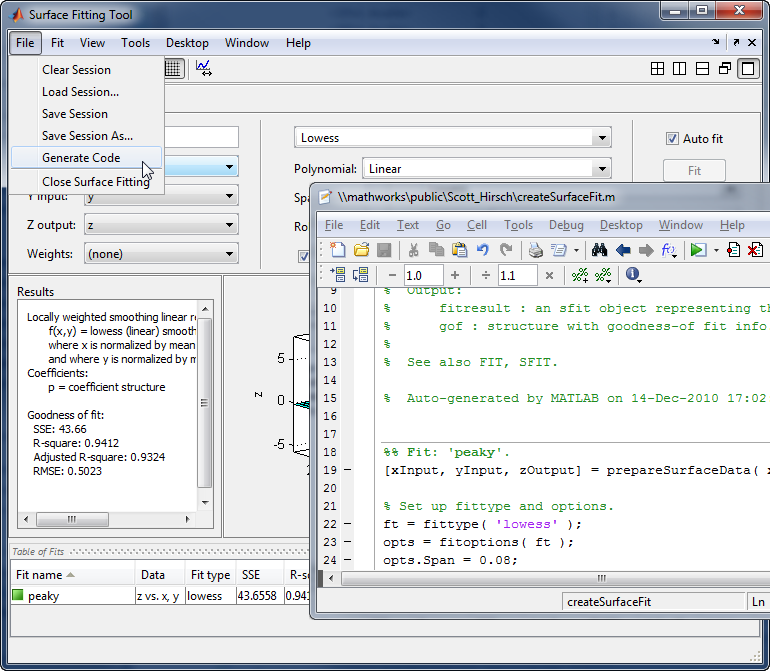
Automatic MATLAB code generation from Surface Fitting Tool

Even though I’ve been using MATLAB for 16 years, I have come to rely pretty heavily on the automatically generated MATLAB code for certain tasks.  I love the little one-liners pushed to the command window by the plot selector.  I find that these help me seamlessly bounce between clicking and typing, depending on what’s easiest at the time.  I love that these commands end up in my history, so that I can recall them later just as if I had typed them myself. I’m also a huge fan of the code generated by the new surface fitting tool in the Curve Fitting Toolbox.  It somehow seems to do just what I want, and is easy to read at the same time.  I already can’t imagine going back to writing this code from scratch.

I’ll admit that I have a harder time using the code generated from customized plots. At times it can be difficult to recognize my intentions in the generated code.  What I’ve found works best for me is to generate code for a small portion of a plot to learn the specific commands for that particular feature.  You can do this via the context menu in plot edit mode. Just right-click (command-click if using 1-button mouse) on the object of interest and select “Show Code” from the menu.  For example, here’s how I would learn the code for adding a text arrow to a plot:
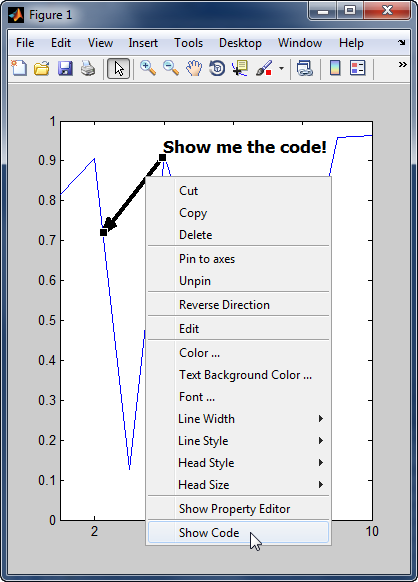
Automatic MATLAB code generation for a plot annotation

How about you?  Do you use (or avoid?) automatically generated MATLAB code?  Please share your comments here.

17 Responses to “Can MATLAB write MATLAB programs for you?”

  1. Aurelien Queffurust replied on :

    Hi!

    Yesterday I just wanted to give a better position to a legend of one of my plots.
    What I have done :
    1) Show Plot Tools
    2) Click on the legend
    3) Change his position in Property Editor until I find the best position which fitted my needs
    4) File -> Generate Code
    This gave me the command line I was looking for:
    set(legend1,’Location’,'South’);

    It is definety helpful to get some piece of code once we have modified all properties (like legend in my example) in Show Plot Tools!

    I just tested again to generate code from pie function within 11a Prerelease (from my remark in Mike’s previous post) the code is not generated yet for pie … nevermind , I already love 11a !!!

  2. Scott replied on :

    Thanks for the great example, Aurelien! I agree that it would be nice to generate code properly for pie, along with several other plotting functions.

  3. Andy replied on :

    I sometimes use automagically generated code to find undocumented ML features. A quick example (for those with the Statistics Toolbox):

    a=random('normal',10,1,[1000 1]);
    dfittool(a)
    

    Then click “New Fit” and change the distribution to Birnbaum-Saunders, then apply and close the window. In the distribution fitting tool, go to File and Generate M File. Then, looking through the generated code, there is a line

    y_ = pdf('birnbaumsaunders',x_,p_(1), p_(2));
    

    But if you look at the documentation for pdf, ‘birnbaumsaunders’ is not listed as an acceptable name for a distribution. Of course, now that you see it IS acceptable, it’s not hard to guess that:

    1) other “unacceptable” distribution names are also acceptable, such as ‘nakagami’ or ‘inversegaussian’, and
    2) these distribution names are also acceptable by other statistics functions such as cdf.

  4. Scott replied on :

    That’s an interesting trick, Andy. I’ve been known to use all sorts of techniques to poke around to learn about undocumented parts of MATLAB (though surely nowhere near as much as our friend Yair). I’d actually consider it a bug that we are using undocumented features in the code we generate. It’s risky to rely on undocumented features in your code, because these are more likely to potentially change without notice. I checked with the Statistics development team – it turns out they are already hard at work cleaning this up so you will be able to learn documented ways of generating the PDFs that you want.

  5. Andy replied on :

    I don’t mind the risk of using undocumented features. It’s no more risky than using eval (for example, as auto-generated code when importing data tends to do). I’m pretty skeptical of any auto-generated code, and I never use it directly. Instead, I just go through it and take the lines I need.

    As a related example, do you consider it a bug that auto-generated code uses internal helper functions? The same code generated from my last example uses the statistics toolbox helper function dfswitchyard (among others).

  6. Scott replied on :

    Thanks for the followup, Andy. I do believe that the use of internal helper functions is also a bug. The team is cleaning up this aspect of the code, too :)

    In my view, the best thing we can do is to make sure that you know which functions are intended for you to use and which ones are just part of what we’ve needed to build the whole system. I don’t want users to unknowingly use undocumented functionality and then have their code break when we change the behavior without following the normal deprecation path we use for documented functionality. It seems that we are sending a mixed message when we give you code using undocumented functions, so I’m glad to see this being cleaned up.

  7. Malcolm Lidierth replied on :

    For GUI-based MATLAB applications you can also stick a gateway function between the menu item and your code and have this write the m-code. The GUIHistory function on the FEX does this and builds the m-file needed to replicate a users actions in the GUIs application data area. http://www.mathworks.com/matlabcentral/fileexchange/28322-guihistory
    In the sigTOOL project that this was developed for, code created by MATLAB in e.g. dfilt objects is copied to a subfunction in the generated m-file.

    http://sigtool.sourceforge.net/

  8. Scott replied on :

    It’s good to hear from you, Malcolm. Thanks for pointing us to your File Exchange submission. It looks really interesting, and I’d love to hear if other users are excited about having the ability to provide MATLAB code generation from their own custom GUIs. Do you have any tips from your experience with sigTOOL on what makes for good quality generated code?

  9. Andy replied on :

    Scott, I take it from your comments that the point of the auto-generated code capabilities in Matlab is to provide the user with fully functional, fully supported code that they should feel free to use as is. This brings me to a question that I’ve had for a while: why FIG files? Why does GUIDE not generate the same sort of m-file I would have if I design a GUI programmatically?

    I tried to use GUIDE to generate code when I was first learning the GUI capabilities of Matlab, and I found that it was useless as a learning tool. I couldn’t see how it was creating uicontrols and settings their properties, since the actual creation of the GUI is hidden in the support function gui_mainfcn. As a result, I couldn’t use GUIDE the way I really wanted: as a layout editor. For various reasons, I needed my GUI to be programmatic, so in the end I had to abandon GUIDE altogether. For a GUI with dozens of controls, setting their positions (not to mention all of their other properties) by hand is no small task.

  10. Scott replied on :

    Good questions, Andy. The point of generated code really varies depending on the tool. I hadn’t really thought about GUIDE much as I was writing the blog post. The point of the GUIDE code really is to be the foundation of your custom application, as opposed to just a learning tool. We have many heated debates at MathWorks about how best to store the GUI construction information. If I remember correctly, early versions of GUIDE stored everything in MATLAB code. This can lead to some challenges trying to re-open a GUI in GUIDE, if for instance the GUI construction code was modified outside of GUIDE. I certainly see strong arguments on both sides:

    For putting everything in code:
    It is easy to understand, it is helpful to learn from, and it’s easier to share just a single file.

    For separating it out (with, for instance, a FIG file):
    The opacity of the FIG file makes it safer – less risk that the file will be corrupted in a way that it can’t get back into GUIDE. (That said, we have had sporadic instances over the years where users have had trouble with GUIDE FIG files getting corrupted).

    We’ve looked at lots of GUI building packages, and the standard definitely seems to be to use some sort of data storage to represent the structure of the GUI, as opposed to rebuilding it through code. Many newer systems have adopted an XML-based file format for the GUI storage.

    If you’ve made it through my long answer, I have some maybe good news for you. You can export a GUI as a single MATLAB file, including all of the GUI construction commands. From within GUIDE, choose “File -> Export”. I know lots of users who use GUIDE to layout their GUI, then grab just the GUI construction code from this exported file. I hope this helps!

  11. Malcolm Lidierth replied on :

    Scott
    In most cases, auto-creating human-readable and decently structured code is the challenge (therefore nice to see MATLAB even including comments in the code embedded in filter objects, at least those from FDATool).
    Most GUI design tools are particularly bad at this. I have never understood why, as GUI’s are inherently hierarchical and should lend themselves to neatly structured coding. On that note, why can GUIDE not accept a GUIs container handle as input and just analyse its structure on-the-fly? That would regenerate the effects of any code changes made by hand and is the approach I am using.

  12. Scott replied on :

    Interesting idea, Malcolm. If I understand you correctly, that will work as long as you can get the GUI container handle. My concern is when a user mucks around with MATLAB code (assuming no separate representation of the GUI), and ends up in a state where the code fails to reproduce the GUI.

    It’s helpful to know that this has worked well for your application.

  13. Andy replied on :

    Scott, thanks for the reply. I’ll look more into the ability to export as one file. I didn’t know about that before.

    As for the possibility of the user corrupting the m-file so that GUIDE can’t read it back in, I think I’m okay with that. I’m not sure I understand what sort of scenario you’re describing, but if I code a uicontrol with a bad property or something, I wouldn’t expect it to render whether it’s programmatic or reloaded into GUIDE.

    As for GUIDE not being a learning tool, I didn’t mean to say before that I only wanted to use it as a learning tool. I find that my primary use of any auto-generated code in Matlab is as a learning tool. But with GUIDE in particular, I wanted to be able to use it as a layout editor, and for my purposes I couldn’t because the construction code was (I thought) hidden from me.

  14. Malcolm Lidierth replied on :

    Scott
    I had not thought of that. Are there people who muck around with MATLAB code??
    At present the GUI objects are stored in JTree so it may be possible to use XMLEncoder to save an XML file in parallel. The reason I’m trying this is to parasitize existing GUIs. There are many good open-source, MATLAB tools that have a GUI front-end. It is often very easy to take over some of their callbacks and so re-use the GUI. That means digging through the code. Regenerating it from scratch in a standard format would often make that task simpler.

  15. Alan Tay replied on :

    Hi all,

    I am having some problems writing the script for the following question. It relates to Dynamics and Control (Mech. Engineering), and specifically to drawing Step-Response Curves. The question is from Modern Control Engineering, K Ogata, 3rd edition, Problem B-4-3 of the Textbook.

    “Consider the system shown in Figure (a) of next page. The damping ratio of this system is 0.158 and the undamped natural frequency is 3.16 rad/sec. To improve the relative
    stability, we employ tachometer feedback. Figure (b) shows such a tachometer-feedback system.
    Determine the value of Kh so that the damping ratio of the system is 0.5. Draw unit-step response curves of both the original and tachometer-feedback systems. Also draw the
    error-versus-time curves for the unit-ramp response of both systems.”

    I have attached the function below, as I cannot paste the diagram here…

    “G(s) = 10/{s(s+1)}

    C1(s)/R(s) = 10/(s^2 + s + 10)

    C1(s) = 10/s{s^2 + s + 10)

    Damping Ratio = 0.158

    Undamped Natural Frequency = 3.16 rad/s

    peak Time = 1.00sec

    settling time = 8.00 sec

    Max. Overshoot = 0.60

    Damped Frequency = 3.12 rad/s

    If anyone can show me how to draw the graphs for part (a) (without the tachometer), it will be greatly appreciated. As you can tell, I am very raw and new to MATLAB, and need to learn this fast. Thanks in advance! =)

  16. Scott replied on :

    Sorry, Alan. But this blog isn’t a good place to get homework help.

  17. Kyaw replied on :

    Dear Mike,

    I am looking for callback checkbox. In mu GUI, I checked(clicked) check boxes then the auto draw function will be draw continuously except I unchecked the check box.

    Pls advise me since I was newbie in this event driven for Matlab.

    Thanks and best regards
    Kyaw

Leave a Reply

Wrap code fragments inside <pre> tags, like this:

<pre class="code">
a = magic(3);
sum(a)
</pre>

If you have a "<" character in your code, either follow it with a space or replace it with "&lt;" (including the semicolon).


MathWorks
Mike works on the MATLAB Desktop team.

These postings are the author's and don't necessarily represent the opinions of The MathWorks.