Mike on the MATLAB Desktop

January 16th, 2012

MATLAB Mobile iPad App

We are pleased to introduce MATLAB Mobile 3.0! This is a universal app, with UIs for both iPad and iPhone. You can download it today from the App Store.

iPad Landscape Screenshot


What’s New in MATLAB Mobile Version 3.0

  • MATLAB Mobile iPad app
    Many of you have been asking for a dedicated iPad app. It’s here, enjoy!
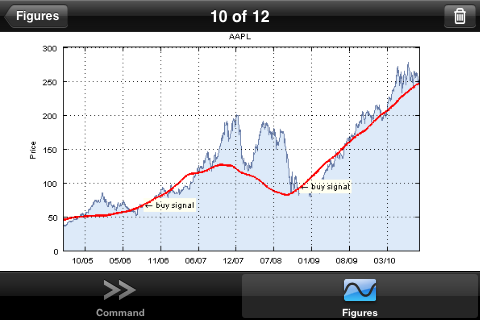
  • Redesigned figure and snapshot views
    Figures and snapshots are combined into a single list for a streamline interface and easy access to a gallery of all the plots you have ever created on the device.
  • Better zooming capabilities for 2D figures
    When you have a live 2D figure, you can now zoom with the axes fixed.
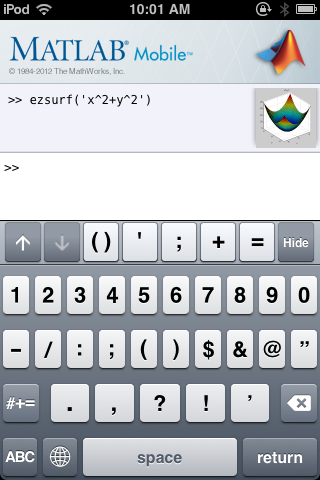
  • New keys and symbols in extended keyboard
    Typing MATLAB code can still be a bit foreign on phones and tablet devices. We’ve added several commonly used keys to our extended keyboard. Tap and hold to discover more options.
  • Automatic parentheses matching
    This is my favorite app feature in this release. We all know brackets and parentheses are widely used in MATLAB code. This saves you the headache of closing and matching brackets.

If you have an iPhone or iPad give us feedback for this version!

32 Responses to “MATLAB Mobile iPad App”

  1. Dan Mac replied on :

    Looks cool but…

    ANDROID PLEASE.

  2. Clayton Chu replied on :

    ANDROID. How is it not out by now?

  3. Simon replied on :

    It looks really cool!

    Unfortunately, it won’t let me create a userid. After i input my email and password for my Mathworks account, it automatically tries to connect to the cloud and returns the error message “Unable to login because the user does not have a userid”.

    Is there another way to create this id?

  4. daniel replied on :

    @Dan and @Clayton
    Thank you for your feedback.

    @Simon
    I be happy to troubleshoot this for you. Since I will need some of your account information, it’s best if we do this through email.

  5. Julian replied on :

    I notice that your favourite app in this release is “Automatic parentheses matching” which sounds great. Sadly I can’t try this out because I don’t have an iPhone (I do have an Android), but I am guessing it will be similar to a neat feature I have seen elsewhere – you type an open bracket ( or { and the matching closing bracket ) or } is added automatically but with the cursor inside the bracketed expression. The question is can we please have such a feature on the MATLAB desktop too, this being I imagine the default environment for MATLAB work?

  6. John replied on :

    I am also having the same “Unable to login because the user does not have a userid” message and I have an existing matlab account associated with our commercial license. Would you assist me as well Daniel?

    Regards,
    John

  7. Todd replied on :

    I too am receiving an error: “unable to login because the user does not have a user id”. Has anyone identified a solution for this? Thanks!

  8. mkwak replied on :

    I have the same error “Unable to login because the user does not have a user id”.
    Daniel, please send an email about the error to me as well.

  9. daniel replied on :

    @Todd and @mkwak

    We are investigating this issue. Once I have an update I will contact you individually and post an update in the blog post. Thanks for your patience.

  10. daniel replied on :

    @Julian

    I will forward this enhancement request to our MATLAB Desktop team. In general, if you have an idea how to make MATLAB more user friendly, we are always listening. You can post here, MATLAB Central, or create an enhancement request at our Support page!

    Link: http://www.mathworks.com/support/contact_us/index.html

  11. Michael replied on :

    Daniel, I am also having the same issue as Todd and mkwak. Could you contact me as well when the issue has been resolved? Thanks!

  12. daniel replied on :

    @Michael

    Sure thing! Thanks for your patience.

  13. Brian replied on :

    I also am getting the “Unable to login because the user does not have a user id” error. Could you please help me as well? Thanks in advance.

  14. daniel replied on :

    @Brian, and users who are encountering the user id error

    Feel free to leave a comment below if you like to receive an email once the issue has been resolved.

    If I do not respond to your comment directly, it does not mean I won’t email you. I will provide an update as soon as I can.

  15. David Fischer replied on :

    cannot create userid, as noted above.

  16. Hector replied on :

    I am also encountering the userid problem. I would appreciate receiving email feedback. Kindly,

  17. Michael Katz replied on :

    @Dan, @Clayton and others,
    Re: Android. We’re currently working on an Android solution for MATLAB Mobile. Stay tuned here when we’re ready to announce.

  18. Guillaume replied on :

    Same problem: i have an end user license , i installed the connector and matlab mobile today, but this one tells me i don’t have an userid…?! Please let me know how to fix this issue ! Thanks

  19. Andrew Foster replied on :

    Same userid problem. Have tah license.

  20. Kolby replied on :

    I’m having the same userid problem. Thank you

  21. Andrew replied on :

    Please email me as well when you have found a solution. Thanks.

  22. Esther replied on :

    Hi! I’m having the same userid issue… please email me too. Thank you!

  23. Peter replied on :

    I’m also having the userid problem.

  24. Bugra replied on :

    Just downloaded matlab mobile on my iphone. Have an account number and license but I am having the same userid problem as well.

  25. Michael Katz replied on :

    Hey all, we must released MATLAB Mobile 3.0.1 in the app store. This fixes the User ID issue. When you log in, you should be brought to a screen where you will be prompted to create a user id. Let us know if you continue to experience log on issues.

  26. Ron replied on :

    Will you release this on Windows Phone?

    Thanks.

  27. Todd replied on :

    Just updated the app. Works great. Well done! Thanks

  28. Michael Katz replied on :

    @Ron,
    We are still evaluating platforms beyond iOS and Android, but have nothing to announce at this time.

  29. Ekendra replied on :

    This must be request from a huge Android base community; and we are sure that you will surprise us soon with Android based version soon! Thank you, while we wait a while!

  30. Jason replied on :

    Cool…but useless to me until there’s an Android version.

  31. Alejandro replied on :

    Any chance to get an WebOS app?

  32. TDK replied on :

    What about Windows Phone?? You know that we’re waiting for it!!
    Please!!! :(

Leave a Reply

Wrap code fragments inside <pre> tags, like this:

<pre class="code">
a = magic(3);
sum(a)
</pre>

If you have a "<" character in your code, either follow it with a space or replace it with "&lt;" (including the semicolon).


MathWorks
Mike works on the MATLAB Desktop team.

These postings are the author's and don't necessarily represent the opinions of The MathWorks.