Steve on Image Processing

May 5th, 2006

Spatial transformations: Inverse mapping

I wrote last week about the forward mapping method of spatially transforming images. Because of the disadvantages of the forward mapping method, most of the practical implementations use a different technique, called inverse mapping.

Here's how it works:

Locate your output image pixel grid somewhere in output space. Then for each output pixel on the grid:

  • Apply the inverse spatial transformation to determine the corresponding location in input space: (uk,vk) = T-1{(xk,yk)}.
  • Using the input image pixels nearest to (uk,vk), interpolate to get an approximate value for the input image at (uk,vk).
  • Use that value for the k-th output pixel.

This diagram illustrates the procedure:
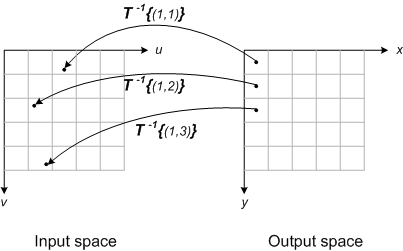
This method completely avoids problems with gaps and overlaps. You just have to decide which interpolation method to you, and you also have to establish a rule for what value to use when (uk,vk) isn't within the input image pixel grid.

The inverse mapping does have its own disadvantages. I'll talk about those later, when I discuss more of the design details of specific Image Processing Toolbox functions.

17 Responses to “Spatial transformations: Inverse mapping”

  1. Jose Kuba replied on :

    Hi, Steve.
    Forward an Inverse Mapping is symetrical problem, so if you tranforman the corners of pixel of the Output Space into the Input Space, like you do with forward transform, we have the same problem => you obtain a quadrilateral in Input Space and how you decide the value of output pixel, may be doing an intersection with Input Space pixels and the percentage the each pixel into the quadrilateral it’s the weight table to use to calculate the final value of output pixel?.

  2. Steve replied on :

    For the purpose of transforming an image, forward mapping and inverse mapping are not symmetrical. That is, filling in an output image grid is much easier to implement using inverse mapping than forward mapping. I don’t recommend doing the quadrilateral intersection and weighting tests that you mention - it’s too computationally expensive. One relatively simple procedure is to compute a multiresolution pyramid. The local scaling determines which image in the multiresolution pyramid is used to do the interpolation. But there are lots of different procedures that have been used.

    Here are some useful references:

    • “Fundamentals of Texture Mapping and Image Warping,” Paul Heckbert, Masters Thesis, UC Berkeley
    • “Survey of Texture Mapping,” Paul Heckbert, IEEE Computer Graphics and Applications, November 1986.
    • Digital Image Warping, George Wolbert, IEEE Computer Society Press.
  3. John replied on :

    Hi is it possible to have functions oject area, object position, which take as inputs a labelled image and an object label and output the information, ie, the area, position and orientation for that object.

  4. Steve replied on :

    John - Use regionprops. It returns a structure array with the desired measurements for all the labeled objects. Then the measurements for any particular object are found by indexing into the structure array.

  5. subrajeet mohapatra replied on :

    Hello steve,
    how can we do inverse transformation for histogram matching.For eg. I have an input image with certain probability distribution of my pixels.How can I find the transform function so that my output image pixels follows an rayleigh distrubution.

  6. Steve replied on :

    Subrajeet - See the descriptions in the books Digital Image Processing and Digital Image Processing Using MATLAB, or take a look at the code in the Image Processing Toolbox function histeq.

  7. shengdong nie replied on :

    dear Steve:
    I have a question about the implementation process of the forward mapping method.Could you give me the detail steps of the forward mapping?
    thank you very much for your help!

  8. Steve replied on :

    Shengdong—No, I don’t have details of that method. There aren’t many good reasons for using it, and there are several good reasons for not using it.

  9. roman replied on :

    could you talk about of The inverse mapping disadvantages?. thanks

  10. Steve replied on :

    Roman—I’ll add it to my list of possible blog topics. Why are you interested?

  11. roman replied on :

    Because they always talk about the advantages and disadvantages ever in the texts

  12. Diego replied on :

    Hi Steve,

    first of all congratulations for this blog. I would like to know what happen when it is not possible to calculate the inverse spatial transformation T^-1. What I think it is the case in non-linear registration, for example, in small deformation approaches when the deformations are parameterized
    by a linear combination of continuous basis functions.

  13. Steve replied on :

    Diego—In that case, the spatial transformation is inferred in the inverse direction (from output space to input space). See this post.

  14. Ramana Murthy replied on :

    Hi steve,
    I’m encountering a similar problem.
    With some points in input space and corresponding output space(manually choosing)I try to fit a funtion T. Then using T or T-1, I can obtain mapping for all the points in any way.
    How to write this in MATLAB code.Any material for pseudo code etc.
    Thanking you very much,

    with regards,
    ramana murthy

  15. Steve replied on :

    Ramana—There are several relevant functions in the Image Processing Toolbox. See maketform, tformfwd, tforminv, cp2tform, and cpselect.

  16. sam replied on :

    hello steve,

    Sam- I’m having trouble understanding Reverse Mapping Could you please explain it in some more detail.

    thank you very much

  17. Steve replied on :

    Sam—Can you be a little more specific? What is it you want to know that’s not covered in this post?

Leave a Reply

Wrap code fragments inside <pre> tags, like this:

<pre class="code">
a = magic(3);
sum(a)
</pre>

If you have a "<" character in your code, either follow it with a space or replace it with "&lt;" (including the semicolon).


Steve Eddins manages the Image & Geospatial development team at The MathWorks and coauthored Digital Image Processing Using MATLAB. He writes here about image processing concepts, algorithm implementations, and MATLAB.

  • Sana: hi steve, could you explain to me how i would be able to use the dir function, to do a loop through a directory...
  • Nishtha: Sir, I have preprocessed the image in following steps: [1] adaptive histogram equalization [2] thresholding...
  • Kristof: I also strongly support the idea. I have just recently bumped into the problem that im2single was not...
  • Steve: David—I’ m glad you found it useful!
  • David Lalejini: I found your example very useful for finding connected nodes in a large set of input pairs. I start...
  • tommy: Dear Steve, I have a question,please if you are kind to help me regarding the accumulator array dimensions of...
  • Steve: Abc—I don’t know how to distinguish the faces. You might try posting your question in the MATLAB...
  • Manju: well if we have a few ovals within each other like in a cell how do we measure the distance from the center...
  • Steve: Manju—What do you mean? How is each region defined?
  • Manju: if we have 2-3 regions within each other how do we measure the regions of each one?

These postings are the author's and don't necessarily represent the opinions of The MathWorks.

