Ken & Mike on the MATLAB Desktop

April 20th, 2007

Split Screen mode in the Editor

A common need when writing a large M-file is to be able to view two parts of the file simultaneously. For example, perhaps you are calling a subfunction from the main body of your code, and you need to see the order of arguments.

You can split your Editor window into two sections, either vertically or horizontally, and then navigate independently in the file’s two views. To accomplish this, use either the Split Screen submenu off of the Editor’s Window menu (or context menu), or click on the little grey rectangles next to the scrollbars.

SplitScreenBefore.png

If you are using Emacs keybindings, keybinding shortcuts can also be used to switch between the different Split Screen modes.

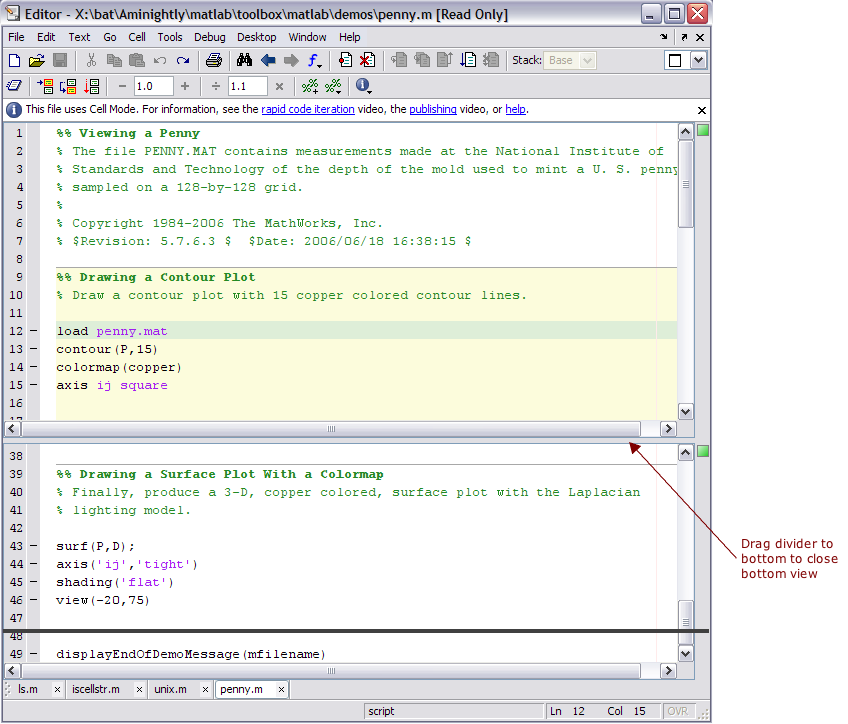
When you are done with the second view of the file, just drag the divider to the edge of the file container and it will disappear!
SplitScreenAfter.png

5 Responses to “Split Screen mode in the Editor”

  1. per isakson replied on :

    Split screen is a valuable feature. In some situations it would even better if one could lock the “second” pane to a bookmark instead of to a line number. I typically dock the the editor and thus size is limited. The “second” pane is small and if it displays lines with higher numbers than the pane I’m working in the lines of interest may slip out of the pane.

    /per

  2. junziyang replied on :

    I found that at the end of the comment section of most of the .m files that come with MATLAB there are several lines about the copyright and revision time. For example, in ode45.m I found the following 3 lines:
    % Mark W. Reichelt and Lawrence F. Shampine, 6-14-94
    % Copyright 1984-2005 The MathWorks, Inc.
    % $Revision: 5.74.4.9 $ $Date: 2005/12/12 23:24:17 $

    I want to know such information is generated by the Editor or added manually by the author of the M file. Thanks!

  3. Christina replied on :

    The comments are added manually by the M-file authors. We do have requests though to add templates, and that is something that we are considering for a future release. Thanks!

  4. Amy Farris replied on :

    Love this! Thanks, Amy

  5. Han Geerligs replied on :

    Hi Junziyang,

    I think the Revision and Date text is inserted by a Source Code Management system.
    You could have a look at the keywords use for the CVS: it defines $Revision$ and $Date$

    kind regards, Han

Leave a Reply

Wrap code fragments inside <pre> tags, like this:

<pre class="code">
a = magic(3);
sum(a)
</pre>

If you have a "<" character in your code, either follow it with a space or replace it with "&lt;" (including the semicolon).


Ken & Mike work on the MATLAB Desktop team.
  • DP: Hi i have a problem with ezplot3, i want to plot more than i curve in the same graph but hold on command...
  • Ken: Hi Arsalan, Unfortunately there is no way to get the new Editor API in older versions of MATLAB. -Ken
  • Arsalan: Hi, I am very excited about the MATLAB API for editor because right now i am working on a project and i need...
  • Johannes: Since I started using matlab-emacs some days ago I never experienced Emacslink. But I experienced some...
  • Francisco J. Beron-Vera: Hi all, I have recently learned about ViEmu (http://www.vimemu.c om) which, for Vi/Vim...
  • OysterEngineer: When I first learned of the Publish feature in MatLab, I thought it might be useful to help to...
  • Ken: Hi Herve, I’m not quite sure what you mean by “stand-alone&# 8221; mode? -Ken
  • Herve: I wonder when the publish fonction will be supported in standalone mode.
  • Mike: Ravi, What you described should work as far I understand it. Please follow up with technical support. With a...
  • Mike: @Daniel, Thanks for that note.

These postings are the author's and don't necessarily represent the opinions of The MathWorks.