
R2009 in review
We’ve had a fantastic year with new and improved features in MATLAB R2009a and R2009b. Let’s take a walk down memory lane…
On the MATLAB desktop
 2009 was a big year for our power users. R2009b introduced customizeable keyboard shortcuts. Many actions from simple open, new, cut, and copy to more complex ones such as inserting publish formatting or launching reports are now available for you to bind to any key combinations you wish. Many of you have requested this feature over the years, and we are quite happy to deliver it. This feature allows saving and sharing of custom keybinding sets and we hope you’ll share good ones with us here on the blog and on the file exchange….
 …which you can get to with the brand new in File Exchange application that allows you to search user-contributed files and download them for use in your MATLAB programs. The program doesn’t yet let you upload directly from MATLAB, but don’t let that stop you from contributing your own files through the web interface. Those files let us and MATLAB users around the world learn from how you use MATLAB and allow your colleagues to do new and interesting things, all for the low sum of zero dollars.
The current folder saw a redesign with a new address bar, a tree view expandable folders, a search bar, and a preview pane for viewing the contents of files without opening them. While not easy to enumerate, we feel this new interface significantly enhances a number of workflows and makes it easier to manage projects that span multiple folders on disk.
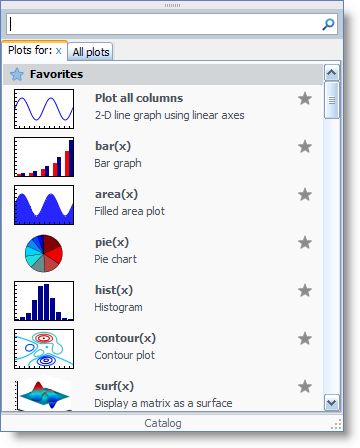
Also updated this year was the plot selector. The new plot selector makes it easier to find the most useful plot types as well as see plots provided by the various toolboxes you have installed.
Static Analysis in the Editor
 We introduced Extended M-Lint tips in ‘9a. This feature allows you to request on-demand help for many warning, error, and informational messages about your code. If the short information is enough for you deal with it, great. If not, you’ve got a mechanism to request more information. Most of the long messages have links to open the documentation for yet even more information. This progressive disclosure allows us to be helpful without being annoying.
At the same time we made easier to configure which messages are show in the editor through a new preferences interface with search capability. These enhancements have laid the foundation for us to provide additional forms of code analysis in the future.
Publishing
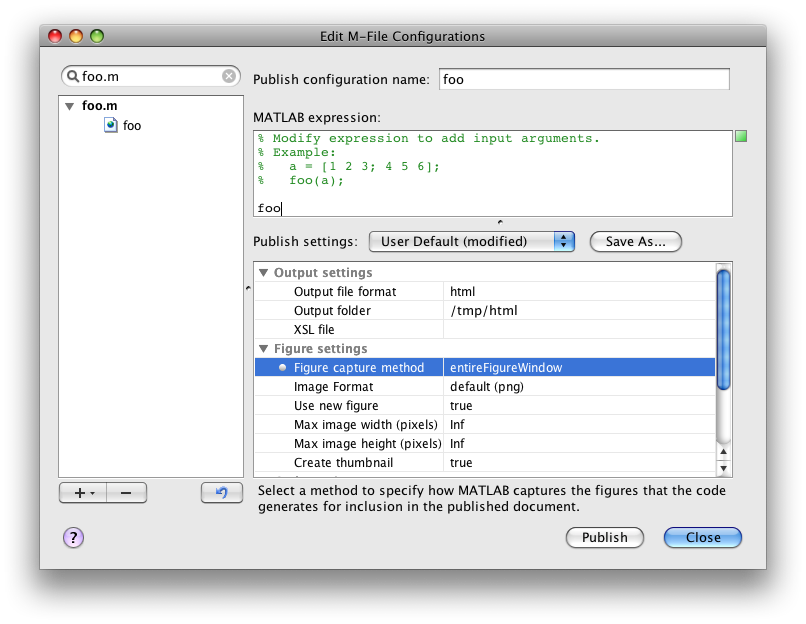 Both 2009 releases had improvements to our code publishing feature. First we introduced new figure capturing modes to allow you better control on how figures and GUIs are placed into a published document. Then came the ability to publish directly to PDF. PDF files aren’t as easy to read on as many devices as html, but easy to share since both the text and figures are in the same file.
Help
 2009 was also a big year for the help browser. Introduced was a new short-width layout, searching with improved search results and better organization of those results. Also added was a breadcrumb/navigational bar to the help so you can move about the help without having to constantly swap between contents and search views.
Platform Support
Two major operating systems were released in 2009: Mac OS X 10.6 Snow Leopard and Windows 7. MATLAB R2009b runs on both platforms, although as some of you have noticed there has been a few sporadic issues with the interface on Snow Leopard. We’re aware of them and we’re working internally and with our vendors to resolve or work around those issues. We’ve also enhanced the look and feel of some of our components to appear more like the standard widgets. Such as Ken’s more Mac-like tabs.
Release Notes
The following release notes describe the new desktop functionality in each release.
How has MATLAB made your life better in 2009?


Comments
To leave a comment, please click here to sign in to your MathWorks Account or create a new one.