File Exchange Pick of the Week

August 28th, 2007

Heat maps in MATLAB

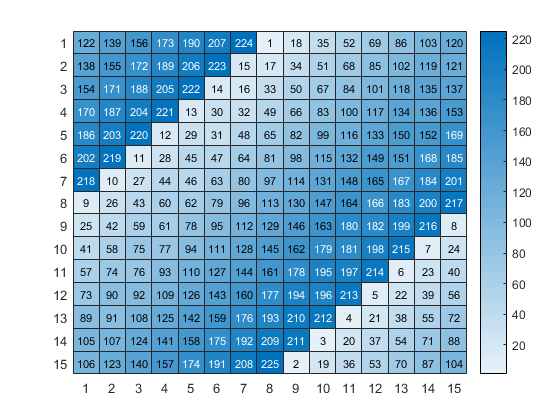
Here at The MathWorks we are always concerned with useful ways of displaying data. A heat map is a graphical representation of data where the values taken by a variable in a two-dimensional map are represented as colors. This is something that is natural for an image, and indeed we have had that in IMTOOL for quite sometime now.

imtool.jpg

This week’s pick shows how to make a heat map in MATLAB for your own data. This heat map will scale nicely so that the text is always the right size. As a bonus, this code also used created a published m-file to make a nice html document showing how to use the code.

4 Responses to “Heat maps in MATLAB”

  1. Markus replied on :

    Yesterday I read your blog, today I needed exactly the function heatmaptext. Great!

  2. Doug replied on :

    I have found that the more data visualizations I know, the more likely I am to “need” them. Glad this new trick helped.

    Doug

  3. JerBen replied on :

    Hi Doug,

    Love the blog and videos. It really helps to see someone else using matlab.

    If you are looking for some great insight into ways to visualize data: check out Tutfe: http://www.edwardtufte.com His books and seminar are excellent.

    JerBen

  4. Doug replied on :

    JerBen,

    We are very familiar with Tufte here at the MathWorks, many of us go to his excellent one day seminar when he come to Boston on tour. His three major books are on my bookshelf right in front of me.

    Doug

Leave a Reply

Wrap code fragments inside <pre> tags, like this:

<pre class="code">
a = magic(3);
sum(a)
</pre>

If you have a "<" character in your code, either follow it with a space or replace it with "&lt;" (including the semicolon).


Bob, Brett & Jiro share their favorite user-contributed submissions from the File Exchange.

  • Zach: Hi Doug and Les, I didn’t have a lot of time to mess with this, but I did find a work-around. I plotted...
  • hamed: k
  • Les: @Zach This isn’t exactly what you are looking for but at least it puts all three parameters on the same...
  • Zach: Thanks for your suggestions Doug. I’ll give that a shot and see what happens. I’ve seen many of...
  • Doug: @Zach, I would say to use plotYYY, because that is close to what you want, but using depth as Y makes sense....
  • Doug: @Teja, I think this will work: http://www.mathworks .com/access/helpdesk /help/techdoc/ref...
  • Gify: merry christmas :) nice christmas tree! Regards, Janet Gify
  • Teja: Dear Doug Is there anyway to plot a surface from nonuniform data without meshgrid and griddata? Basically i...
  • Zach: I’m working with geophysical data, so I’d like to produce a depth profile. The y-axis would be...
  • Doug: @Ashok First, please do not use variable names that are MATLAB commands (std and mean). Second, p(j) should be...

These postings are the author's and don't necessarily represent the opinions of The MathWorks.