File Exchange Pick of the Week

May 8th, 2009

Is your memory fragmented? What can you do about it?

Want to know? Then download Stuart McGarrity's CHKMEM submission!

Brett's Pick this week helps you determine if your memory is fragmented, and, more importantly, what steps you might take to minimize 'Out of Memory' errors. Many of you know of Stuart from the MATLAB Central File Exchange; for years, when we tracked these things, he was the most-downloaded author on the Exchange. Those of us who know him as a colleague at The MathWorks know him as well as a guru of sorts for dealing with memory (and out-of-memory) issues.

Suppose you wanted to know the size of the largest variable you could create at any given moment in MATLAB. We know from the documentation for the MEMORY command that the largest possible variable is the smaller of the following two values: a)The largest contiguous memory block found in the MATLAB virtual address space, and b) The total available system memory. (The MEMORY command will return this value in a field called MaxPossibleArrayBytes.) Stuart's file CHKMEM takes MATLAB's memory command and does it one better. CHKMEM compares the largest available variable size to your system's RAM and provides suggestions for decreasing the gap between the two. It also suggests ways to increase the available physical memory. For instance, I had thought that my 3-GB switch was enabled; Stuart's code informed me that, in fact, it is not currently set. And then he provides links to documentation showing how to set it!
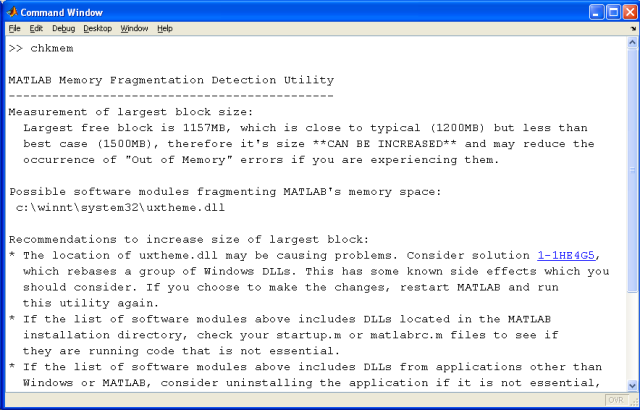
Very nice utility, Stuart! Thanks for sharing it.

Comments? Share them here.


Get the MATLAB code

Published with MATLAB® 7.8

3 Responses to “Is your memory fragmented? What can you do about it?”

  1. us replied on :

    hi brett! and thanks for alluding to stuart’s great submission…

    in addition to this utility, i’d like to alert the wintel system users to a recent piece from windows sysinternal: VMMAP (1.1), available here

    http://technet.microsoft.com/en-us/sysinternals/dd535533.aspx

    which does an amazing job in giving you all the information you ever wanted (re memory issues)…

    best
    urs

  2. Yair Altman replied on :

    Thanks for spotlighting this useful utility Brett. Chkmem uses two of Matlab’s standard memory-reporting utilities. But except for making the data human-readable, Chckmem adds its own processing, suggesting specific remedies for specific issues detected, along with some external links. This causes Chkmem to have a big added value over using Matlab’s basic functions, and is a great example of extending Matlab’s basic functionality with external resources.

    However, users should note that Chkmem relies on undocumented features (feature ‘memstats’ and ‘dumpmem’) which are unsupported by MathWorks and might break without prior warning in a future release. I personally have no problem with this, but it should be noted for the record.

    users interested in these undocumented memory features may also be interested in checking the output of the related feature(’processmem’), which is not used by Chkmem.

    Yair

  3. Brett replied on :

    Urs and Yair,

    Thanks for your helpful comments. Urs-I haven’t yet tried it, but VMMap _looks_ like a very useful additional utility. By the way, I should also have pointed out that Stuart’s CHKMEM only works on 32-bit Windows systems. VMMAP, too, is Windows-centric (it’s from Microsoft), and is, I believe, compatible with 64-bit systems. However, Google turns up some discussions about problems with using it on 64-bit machines.

    And Yair, thanks, too, for pointing out that Stuart’s submission uses undocumented functionality. I should have pointed that out myself.

    We’ve struggled in the past with whether or not to steer away from featuring submissions that use undocumented commands. Sometimes they’re just too good to pass up! (Some of your own files fall in that category, by the way.)

    Cheers,
    Brett

Leave a Reply

Wrap code fragments inside <pre> tags, like this:

<pre class="code">
a = magic(3);
sum(a)
</pre>

If you have a "<" character in your code, either follow it with a space or replace it with "&lt;" (including the semicolon).


Bob, Brett & Jiro share their favorite user-contributed submissions from the File Exchange.

  • Zach: Hi Doug and Les, I didn’t have a lot of time to mess with this, but I did find a work-around. I plotted...
  • hamed: k
  • Les: @Zach This isn’t exactly what you are looking for but at least it puts all three parameters on the same...
  • Zach: Thanks for your suggestions Doug. I’ll give that a shot and see what happens. I’ve seen many of...
  • Doug: @Zach, I would say to use plotYYY, because that is close to what you want, but using depth as Y makes sense....
  • Doug: @Teja, I think this will work: http://www.mathworks .com/access/helpdesk /help/techdoc/ref...
  • Gify: merry christmas :) nice christmas tree! Regards, Janet Gify
  • Teja: Dear Doug Is there anyway to plot a surface from nonuniform data without meshgrid and griddata? Basically i...
  • Zach: I’m working with geophysical data, so I’d like to produce a depth profile. The y-axis would be...
  • Doug: @Ashok First, please do not use variable names that are MATLAB commands (std and mean). Second, p(j) should be...

These postings are the author's and don't necessarily represent the opinions of The MathWorks.
