
Patching together a BMW Z4
Contents
One From the Gallery
This week's Pick is of the Week is Car, by Ronald Biro.
Ronald's file creates a graphical reconstruction of a BMW Roadster, and gets me as close to this sweet ride as I am likely to get in the near future.
Ronald created his version of the Z4, shown here
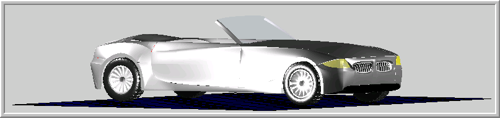
using nearly 200 calls to his own version of "patches". Actually, Ronald's mypatch calls to and creates low-level surface objects. I'd be interested to hear the author's rationale for using surface objects instead of true patches. (For a brief discussion of the differences, read this.)
Just for comparison, here's the real deal:

Some Notes
When I first ran the Z4.m file, it executed perfectly on my computer. On the other hand, Bob quickly got an error running the same file on his computer. Why the difference? I like to disable warnings in my startup file, so the offending issue was ignored when I ran the code. In this case, had I enabled my warnings (their default state), MATLAB would have warned me me that "the variable "Z4" is also the name of this script." That can be problematic because MATLAB won't be able to differentiate the script from the variable in any context from which the script is called. (So, readers, be aware that you may need to suppress your warnings to run the file.)
One more thing: the integration of the M-Lint Code Analyzer into the MATLAB Editor is really helpful for identifying code issues. There are several places in which (more size-appropriate) preallocations might improve the performance of the code (admittedly, less of an issue in a just-for-fun gallery submission), and other places where command window output could be suppressed with a simple semicolon. Still, I like the file; a lot of work clearly went into it, and it is of limited practical use. My wife might say the same of me. :)
"Virtual Career Fair"
Also, before I sign off, one bit of promotion: The MathWorks will be holding a "Virtual Career Fair" from 11 a.m. to 7 p.m. on February 4, 2010. This Fair is designed to give graduate students and recent grads an opportunity to learn more about careers at The MathWorks, and to chat live with engineers and managers about the company. Interested? Register here.
- Category:
- Picks




Comments
To leave a comment, please click here to sign in to your MathWorks Account or create a new one.