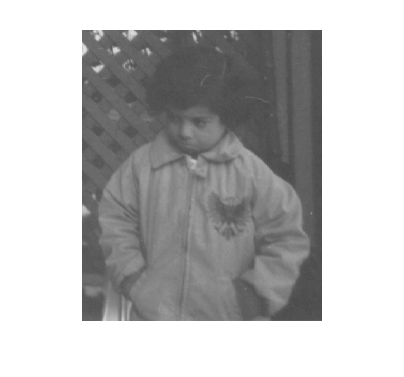
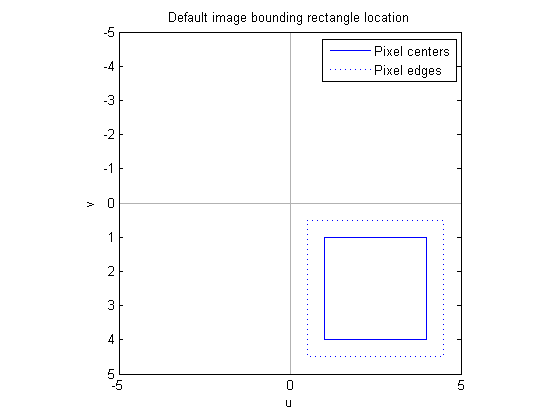
To explore spatial transformations of images, we need a simple, nontrivial, and useful transformation. The affine transformation fits the bill.
Here's the basic affine equation:
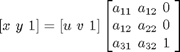
or:

Already we've encountered another common notational confusion. Sometimes a user will contact us and say "imtransform shrank my image in the horizontal direction, when it should have shrunk it in the vertical direction. Is this a bug in imtransform?" No, it's not a bug. The cause is that the user tried an A matrix from a source that defines the affine equation this way:
The A matrices in these two formulas are not the same; one is the transpose of the other.
Several common spatial transformations applied to images can be expressed in terms of an affine equation, including scaling:
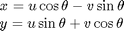
Rotation:
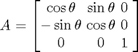
And translation:
OK, enough background notation and equations. Next time we'll jump into MATLAB, construct some affine transformations, and apply them to points.
Get
the MATLAB code
Published with MATLAB® 7.1


Hello again,
This is a very interesting subjet (geometric trasformations I mean) but I always wonder how MATLAB implements this transformations over an image.
Is there any way to “vectorize” the operation? The problem even will be worst with a projective transformation due to the fact that the third output coordinate will not be one, so you have to make aditional operations to come back to cartesian coordinates from the homogenious coords.
In adittion there must be a resampling too.
What about a little insight on imtransform function? Thanks
copi – Don’t worry, I’ll get there. It’s a big subject area, and I’m taking it a step at a time.
Steve, is it possible to transform an image given only a forward transform? I have a transform in mind but it is rather complicated to compute and its inverse cannot be solved for.
Josh – Not with Image Processing Toolbox functions. imtransform and tformarray use inverse mapping, for reasons I’ll get into in future blog posts. I suggest that you reverse the input and output images in your computation, so that what you’ve been calling the forward transform becomes the inverse transform. Then you can use imtransform or tformarray.
Hi Steve,
I’m glad I found this blog. I have some calibration data and would like to find the optimal transformation (affine or other) to a set of reference points. With the ‘maketform’ I can only use three or four corresponding points. Is there an algorithm (hopefully implemented in Matlab) that can use a larger set of corresponding points to find a transformation?
Thanks
Axel – Yes. See the function cp2tform.
Hi Steve,
Thanks for your information. I have a set of points on the image. I want to know which groups of points are polygons and which ones are not? Is there a solution in Matlab for it?
Thanks,Mehdi
Mehdi – You’ll have to be more specific about your problem. Any group of points can be vertices of a polygon if you allow degenerate and nonsimple polygons.
Hi Steve,
Thanks for your reply. I applied a segmentation procedure and extract some features in the image. Some of the segmented features look like closed curves or polygon and some of features look like linear feauture or open contours. I don’t know in Matlan there is such a command to classify closed curve or contours from open ones?
Thank you very much,
Mehdi
Mehdi – I don’t have any particular suggestions for you.
Steve,
I’m not sure whether my question is related to this topic.
I have two images, which I need to combine as follows: one image should be represented in pseudocolors (in “hsv” colormap) but the other image should be represented as a value. In other words, the brightness of pixels needs to be modified. Of course, both images are 2D matrices of the same size. I’m quite confused on how to do it…
Thank you very much!!!
Gleb
Gleb – Your question is a little too vague to answer specifically. Usually people will take three 2-D matrices, treat them as different components of some color space, modify them as desired, concatenate them to form an M-by-N-by-3 array, and then use one of the color space conversion functions to make an RGB image for display. Something like this:
Steve,
thank you very much! I will try. :)
Steve,
it’s exactly what I needed! Thank you again!!!
Gleb – I’m glad it worked!
Can’t wait to see Matlab.
Eric—What do you mean?
Dear Steve,
I am trying to find the similarity degree between historic and modern maps (statistically). I need to convert the coordinates of the modern image to fit that of the old one using Matlab.For example: through affine transformation.
Please, advise so.
Great Thanks for you.
Maher—You might try using cpselect to select pairs of corresponding points, followed by cp2tform to infer an affine transformation.
I am trying to use the affine function and it is giving me the error
??? Error using ==> mtimes
Integers can only be combined with integers of the same class, or scalar doubles.
Error in ==> affine at 154
XYZmm = old_R*(XYZvox-1) + repmat(old_T, [1, 8]);
so I changed my tranformation matrix into type double and now it is tranforming my original 3D image into a 2D image with and thie warning comes up
Warning: Matrix is singular to working precision.
In affine at 231
I’m not quite sure what is going on here. Any help would be great, thanks!
Jules—There is no function called affine in MATLAB or in the Image Processing Toolbox.
Hi Steve,
I’m one of those people that’s used to the other form of transformation notation and would like to make sure I’m using the one you show correctly. If I want to do a composite transformation of a rotation-scaling-translation transformation using the 3×3 affine transformation matrices R, S, T for rotation, scaling, and translation, respectively, is the below correct or do I have to ‘transpose’ the matrix order (or the matrices themselves or something like that?
[x',y',1] = [x,y,1]*R*S*T
Tim—That expression would apply a rotation with R, followed by a scaling with S, followed by a translation with T.