MATLAB Spoken Here

February 25th, 2013

Your MATLAB Files on the Cloud. And more.

Happy 2013!

2012 was an eventful year for MATLAB Mobile, with releases for the iPad, the Android platform, and several enhancements to graphics and usability.

To kick off 2013 on a high note, we are making connecting to the cloud even better.

Introducing… MATLAB Cloud Storage

You can now upload MATLAB files and data to MathWorks Cloud and run them from MATLAB Mobile. You can also download your files from the cloud and save them to your computer.

To upload your files, navigate to the MATLAB Cloud Storage page at https://www.mathworks.com/mobile/cloud-storage.html. To access this page, you will need to have a valid MathWorks Account associated with a license that is current on maintenance. You will also need to have created a user ID on MATLAB Mobile.

Once your files have been uploaded, you can execute them from your mobile device running MATLAB Mobile. For more information, please refer to Store MATLAB files on the cloud.


But wait, there’s more!

- When you connect to MathWorks cloud, you can now access all your licensed MathWorks products.

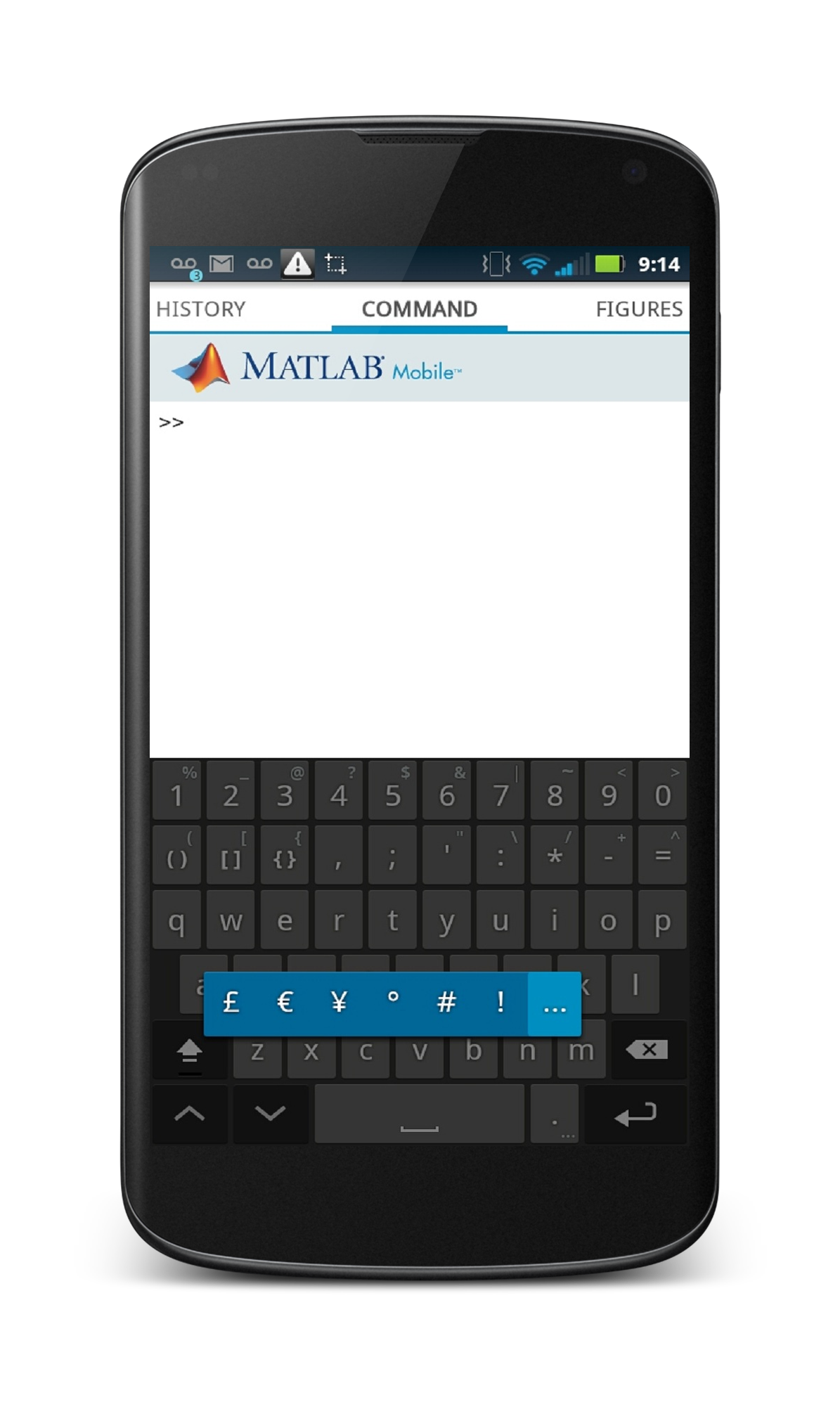
- We’ve also added a customized keyboard for the Android platform, making it easy for you to enter MATLAB commands without having to switch between multiple screens. The keyboard provides easy access to commonly used MATLAB characters like parenthesis, indexing operators, arithmetic operators and the like. You can also access previously entered commands with the touch of a single key. Tapping and holding on selected keys displays additional characters. For instance, a long tap on the ‘.’ key displays the list of characters in blue.

- MATLAB Mobile for iOS now supports iPhone 5 and iPad mini.

To download the latest version of MATLAB Mobile, visit the App Store or Google Play.

With cloud storage, what files are you running from your mobile device? How is the new Android keyboard helping you? Leave us a comment here with your thoughts.

7 Responses to “Your MATLAB Files on the Cloud. And more.”

  1. Stephen Collins replied on :

    These changes are great! I really like the new keyboard (it’s going to save me a lot of time) and I’m excited to find new uses for the cloud storage feature.

    Keep up the good work!

    Stephen

  2. Felix replied on :

    What about Windows Phone 7.8 and 8 and Windows RT? I never saw a Hippster with an iPhone/Pad in a Starbucks store creating Matlab code?! And which Android user knows Matlab anyway? So please release Matlab Mobile for Windows Platform. I Need this to WORK!

  3. Tamir replied on :

    The future is mobile great work
    it would be beneficial also to develop for windows 8 and windows tablets platform RT

  4. Yanbo replied on :

    What about Windows Phone and Windows RT? Although their current market share is relatively low, but you need to admit that, WP users are more likely MATLAB users and we are eager for this to work!

    Come on, dear MATLAB, please develop this for WP platform as well as Windows RT.

  5. Pradeep Ramamoorthy replied on :

    @Felix, Tamir and Yanbo:

    Thank you for the Windows Phone and RT votes. We’re still evaluating platforms beyond iOS and Android, but I will forward this feedback to the rest of the team.

  6. Yanbo replied on :

    Hi Pradeep,

    I am not sure how much effort does it involve to get this done in WP8 or Windows RT platform, one thing I know it MATLAB 2012b supports Windows 8; Windows RT and WP8 share the same kernel as Windows 8, doesn’t it mean it’s relatively easier to develop a MATLAB mobile app for WP8? You know Windows is still dominate in PC market, and the synergy between Windows and Windows Phone is getting only stronger and stronger, this is a great opportunity!

    Please!

  7. Mudasir replied on :

    Hi, Pradeep:

    I have been evaluating Matlab Mobile, and have two questions for you:

    1. How can we DELETE a file that we have uploaded on the Matlab Cloud? So far, all we can do is upload and download them, but there doesn’t seem to be an option to REMOVE a file that has been uploaded to the cloud space.

    2. Matlab Mobile has disabled all user input features in Matlab. This defeats the core purpose of Matlab Mobile: to get user input on the fly, crunch numbers and produce output on the go. Please let us know if Matlab Mobile will include user input features, and if so, when. The feature has not been available since 2012: http://www.mathworks.com/matlabcentral/answers/31666

    I am in the process of selecting a computation platform for all my future mobile computation needs. The answers to the aforementioned questions will determine which platform I select. Looking forward to hearing from you soon.

Leave a Reply

Wrap code fragments inside <pre> tags, like this:

<pre class="code">
a = magic(3);
sum(a)
</pre>

If you have a "<" character in your code, either follow it with a space or replace it with "&lt;" (including the semicolon).


MathWorks
News from the intersection of MATLAB, Community, and the web.

These postings are the author's and don't necessarily represent the opinions of MathWorks.