Recently I mentioned that I would describe a relatively new optimization we have for MATLAB code that allows some function calls to operate on variables without allocating more memory for the result. This can be very beneficial when processing large datasets. I will describe and demonstrate this feature using R2007a.
Contents
Make Data
Create a "large" dataset. This one works for me with 1GB RAM and 1.5GB of swap space running Windows XP and no other applications.
n = 38*2^20; x = randn(n,1);
Now call another function that will call either a regular function or an in-place function.
inplaceTest(x)
Let's look at the code for inplaceTest.
type inplaceTestfunction inplaceTest(x) % Call functions with either regular or in-place semantics. %% Call a Regular Function with the Same Left-Hand Side x = myfunc(x); %% Call an In-place Function with the Same Left-Hand Side x = myfuncIP(x); %% Call a Regular Function with a Different Left-Hand Side y = myfunc(x); %% Call an In-place Function with Same Left-Hand Side % Note: if we changed this next call to assign output to a new LHS, we get an error x = myfuncIP(x);
It just gets the data in and twice calls two different functions.
See what the Windows Task Manager shows for a recent run of mine for the 4 calculations. You can see when the CPU was busy and you can match that with the times that memory was allocated, whether temporary or permanent. Here's how a typical run of this code appears in the Windows Task Manager Performance tab when I run it.
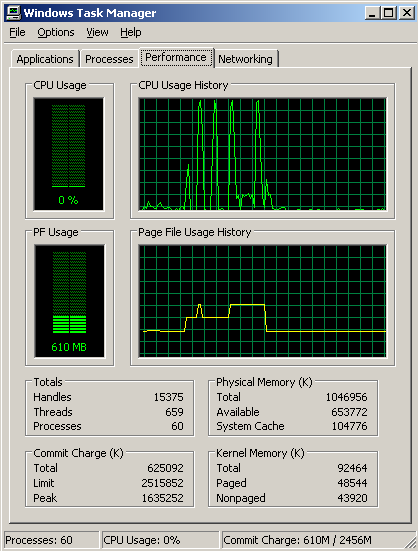
You can see the four calls to the computational functions in the CPU Usage History, and you can see the amount of extra memory used in the Page File Usage History. When we call the in-place function using the same input and output variable names from the test function, no extra memory is allocated.
Required Characteristics of In-place Behavior
Let's look at the code for the two functions myfunc and myfuncIP so we can see how they differ.
Here's the function myfunc.m
type myfuncfunction y = myfunc(x) y = sin(2*x.^2+3*x+4);
and here's the function myfuncIP.m
type myfuncIPfunction x = myfuncIP(x) x = sin(2*x.^2+3*x+4);
As you can see, the two myfunc functions differ. The in-place version has a return argument with the same name as one of the input arguments, in this case, x. Also, the computation needs to put its results into x instead of y, since the new return variable name is now different.
The second important idea required to take advantage of in-place computation is that the in-place function must itself be called from another function, as I've done with inplaceTest.
Considerations
I'd like to pass on several tips and rules of thumb about in-place functions. This is not an ordered list.
- Because of MATLAB's JIT, some functions or parts of code are already doing some work in place. In these cases, you will see less or no benefit than you might expect by switching to in-place operations. For example, using the binary version of max (e.g, A=max(A,B)) doesn't gain, even if in a function.
- Benefits don't usually occur for the smallest arrays. It takes typically at least 1000 elements before you might see a difference.
- Keep your code natural. Don't write unnatural code just to take advantage of this. This is particularly true if your function is already computationally intensive. There is more speed gain for simpler functions, though memory might still be a concern. For example, lu is an order n^3 operation, and the memory speed gain is only order n^2. So it's not worth doing contortions to write [L A P] = lu(A) (more naturally written [L U P] = lu(A)), unless you really need to conserve memory.
Limitations
There are some limitations regarding when the in-place optimization is operative. These include:
- Not all built-in MATLAB functions currently obey in-place semantics. We tried to support the most important and obvious ones first such as elementwise operations. There is not a list of these functions. It will grow from release to release.
- There is no interface for the in-place operations via MEX-files.
- MATLAB should be able to recognize in-place possibilities even when variable names don't match between the input and output names.
Feedback?
Do you plan to take advantage of this new feature in your code? Let me know here.
Get
the MATLAB code
Published with MATLAB® 7.4

Loren,
Could you explain how this applies within the structure of a larger function. If I use intermediate calculations, does the in-place performance apply to that as well, or is strictly the matching of the input variables to output variables in the function declaration that cues MatLab to do so? How does the speed efficiency compare when one is considering the overhead of additional function calls versus the calculational savings of performing in place assignments?
Thanks,
Dan
Dan-
Within a larger function, this does nothing specific. It’s the function call boundaries that allow this optimization to occur right now. The function call overhead should be tiny compared to the memory savings for large arrays.
–Loren
the usual applies to this loren blog: very nicely written, very good points, excellent examples…
however, whilst there are good pointS - there are still no pointERS!
will we ever get these critters that this community’s been longing for ever since 1984…
us
This is a great addition to Matlab! I am planning to use it to simplify the coding of the addition of a sparse matrix to a large dense matrix (see my newsgroup article complaining about my failure to attempt this using ‘evalin’ [which was way too slow] at: http://newsreader.mathworks.com/WebX?14@43.71OCbY2f4a5@.ef5149c ).
Dear Loren,
this looks like an extremely useful feature. I often work with large three dimensional data sets (video data) and this could be invaluable for making efficient use of memory.
In which release was this optimisation added and where is it documented?
Thanks,
Alex
Alex-
Parts of this optimization started getting added with the JIT in R13, but most of it started getting added in R2006b. The full effect is only available in R2007a currently. I think this is not yet in the documentation so this is probably your best place for the information. Stuart McGarrity may also soon have an article out in News & Notes with this as part of this topic.
–Loren
How I can use the task manager by using a dual core cpu? I think you have to install a special prog? Thanks for any information
I use the task manager on my dual core machine by changing View->CPU History->One Graph, All CPUs
–Loren
Hi Loren, interesting fact. It would be great to get regular updates on the Matlab JIT both positive and negative features.
My question is: I use “rogue” in-place in mex files a lot, using the fact that modifying input arguments in mex files in fact changes the data in the matlab environment. This is not officially supported though. Will this be changed? If not then I think users might appreciate it to document this feature and make it “official”.
Christoph
Christoph-
I don’t know the plans, but I know we don’t claim to support changing the input arguments. It isn’t not something you can depend on to be available in the future.
–Loren
Very useful addition. Does it work with quad CPU´s?
Trip-Trap,
The memory management is separate from processors. If you turn in multi-threading in R2007a, certain operations will benefit. See the documentation for more information on the details.
–Loren
I tested the example with the profiler and I used both a row vector with 10^6 elements and a rectangular matrix with 1000 * 1000 elements. Here are my results:
1. Vector
x = myfunc(x); 0.138 s
y = myfunc(x); 0.132 s
y = myfuncIP(x); 0.119 s
x = myfuncIP(x); 0.118 s
The inplace function is 10 - 20 ms faster than the regular function, which is not surprising. When the left-hand side is different from the output parameter, the regular function is faster and the in-place function is slower when compared to the case that left-hand side and output parameter are the same, even though the difference is small.
2. Matrix
x = myfunc(x); 0.138 s
y = myfuncIP(x); 0.125 s
y = myfunc(x); 0.123 s
x = myfuncIP(x); 0.119 s
This time, the regular function is a little bit faster than the in-place function when left-hand side and output parameter are different. When left-hand side and output parameter are the same, the in-place function is significantly faster than the regular function.
It seems that using an in-place function can sometimes speed up and sometimes slow down a program. How can this be explained? Are in-place functions only a means of saving memory or can they be used to speed up a program?
Timing is tricky. And it’s best to run things a few times first before doing the timing to ensure that all dlls, etc. are loaded. Also, in this case, you need to be sure everything is running from functions.
I wonder if your first set of timings reflects the first time running effect instead of something more profound. Or…
The profiler also can influence the times. And I am not sure if the profiler interferes with true inplace behavior. You’d have to watch your task manager at the same time to see if memory was really being used in place or not.
Also, when doing timings like these, I would recommend using larger arrays so the times can differ more profoundly.
I am unaware of cases where inplace is actually slower than regular. If it can’t do the operation in place, it should be comparable to the calculation don’t without the inplace semantics.
–Loren
I ran the profiler several times for both the vector and the matrix, so the first running effect certainly did not influence the timing. An array with one million elements of type double is not enough for a comparison? I get an out of memory error when trying to use 36 million elements, so here are my results for a vector with 25 million elements:
x = myfunc(x); 3.650 s
y = myfuncIP(x); 3.130 s
y = myfunc(x); 3.104 s
x = myfuncIP(x); 3.030 s
These are the results for a rectangular matrix with 5000 * 5000 elements:
x = myfunc(x); 3.784 s
y = myfuncIP(x); 3.171 s
y = myfunc(x); 3.075 s
x = myfuncIP(x); 3.045 s
When I wrote my previous message, I overlooked that the output parameter of myfunc(x) is y and the output parameter and myfuncIP(x) is x. This means that the following comparisons should be done:
% different left-hand side
x = myfunc(x);
y = myfuncIP(x);
% same left-hand side
y = myfunc(x);
x = myfuncIP(x);
I don’t know whether the profiler influences timing significantly, especially. If it doesn’t, I conclude that in-place functions are faster than regular functions and that using the same left-hand side is faster than using different left-hand sides. However, when the same left-hand side is used, an in-place function is not significantly faster than a regular one.
Does Matlab use some kind of return value optimization like C++ does?
Thanks for clarifying and rerunning code. MATLAB does look to see if the work can be done in place and if the user asked for it to be done in place (via the same variable on right and left hand sides). Only if the user requests the in place behavior AND the function is suitable does MATLAB do this optimization currently. There are some more optimizations that we can add over time.
–Loren
This functionality should be very useful. In my application the solution matrix is stored as a field of a structure. A function is applied to that field repeatedly to obtain new solutions. I don’t know how to do in-place operation for structures. I guess ‘pulling out’ and ‘putting back’ lots of data into structures may be quite expensive.
Hi Loren. I want to define an class of object which behaves almost exactly like Matlab builtin ’struct’, only with a few extra methods I’d like to add later. I want to inherit from a struct object so that I don’t have to write many accessor or general utility functions. Why can’t I use a struct as my parent object? In my constructor I do class(newobj,’newobjname’,stru) where stru is a builtin struct object, Matlab then complains that this parent object is not valid. Do you know if it’s possible at all to inherit Matlab builtin structures? Thanks!
Shakeham-
You cannot inherit from built-in datatypes in MATLAB. It’s been reported to development as an enhancement request.
–Loren
Thanks for the reply Loren! This prevents me from trying further in vain. I’d definitely keep an eye on the development of this feature. Since an object must be a struct first, I guess the only builtin object that can be inherited is the struct.
btw in the previous question, does in-place operation work on structure? Let’s say in function a struct is input and some fields of it is modified and the output is the same as input name to signal for inplace op. What will Matlab do?
Shakeham-
MATLAB only makes copies of struct fields if they change. I don’t think it will do them in-place currently. You could try modifying the code yourself to use structs and see what happens as you watch the task manager.
–Loren
I have some problems with the following that I saw was posted:
x = myfunc(x); 3.650 s
y = myfuncIP(x); 3.130 s
y = myfunc(x); 3.104 s
x = myfuncIP(x); 3.030 s
I feel that the following is better suited.
x = myfunc(x); 3.600 s
y = myfuncIP(x); 3.120 s
y = myfunc(x); 3.104 s
x = myfuncIP(x); 3.050 s
I have been playing with it for a while and I found that it seems to run a little smoother with those changes. I am not sure if it is because of personal taste or what. But I would suggest that you give those a try and tell me what you think. I am always open and thankful for feedback that I get from people on my coding. If I am in error about anything, or if someone finds a better way to get something done, I would always love to hear about it.
Hi,
Can I use this technique in case of recursion ? I wrote a deteminant of matrix function using symbolic toolbox for computing symbolic determinant by recursion technique.
How do I go about using it ?
regards,
Balavelan
Loren,
Thanks for pointing me to this blog entry; it is a better approach than manipulating caller variables. However, I’m having trouble getting it to do what I need. What I’m trying to write is something akin to the following:
function [x y] = myfuncIP2(x)
x = sin(2*x.^2+3*x+4);
y = x(1);
end
It looks to me like x is not handled in place unless it is the only return argument. Is this true? The only workaround I have to this is to set x.y = y and then have the caller pull it back out. But then if I have a big structure that needs to be handled in place, and it is passed all over in the code, then all of my functions are constrained to return their results by embedding them into this structure, which is ugly. Do you have any suggestions?
Thanks,
Jonathan
Jonathan-
To the best of my knowledge (and I just tried it with your example), you can have as many inputs and outputs as you like. And they don’t need to be in the same order. However, you must call the function from another function to have the inplace operation have a chance. Perhaps you ran from a script or the command line?
–Loren
I am calling it from another function, but have just noticed a bit more odd behavior. Here is what I’m currently using for testing:
function inplaceTest(x)
tic; x = myfuncIP(x); toc;
tic; [x y] = myfuncIP2(x); toc;
end
function x = myfuncIP(x)
x = 2*x;
end
function [x y] = myfuncIP2(x)
x = 2*x;
y = x(1);
end
I call it with:
inplaceTest(randn(38*2^20, 1))
and get this result:
Elapsed time is 0.316449 seconds.
Elapsed time is 0.152508 seconds.
Elapsed time is 0.152818 seconds.
Elapsed time is 0.338881 seconds.
Elapsed time is 0.398801 seconds.
Elapsed time is 0.399128 seconds.
These times are consistent over multiple runs; the first call to myfuncIP always takes twice as long as the next two, and always about the same amount of time as those to myfuncIP2. I am interpreting this to mean that for some reason the first call to myfuncIP is not in place, the next two are, and none of the final three calls are. I have tried this in more complicated examples, and have seen over an order of magnitude slowdown as a result of adding the extra parameter. Any ideas?
Thanks,
Jonathan
Jonathan-
The behavior you see is because the variable x has to come into inplaceTest and then a copy is made so nothing bad happens to the copy in the base workspace. Instead, create the initial x inside inplacedTest so the variable creation is locked down as well. I urge you to run my example from the initial post exactly as I wrote it. If you are on Windows, use the task manager and you will convince yourself there is no extra copying being done, even when you update it and use myfuncIP2.
–Loren