
Icon Editor
Bob's pick this week is IconEditor v1.4 by Elmar Tarajan. This tool could improve your MATLAB workflow more than you might think. Let me explain.
If you follow the MATLAB Desktop blog you may have noticed the gallery of screenshots provided by MATLAB users. Looking through them I noticed only a few took advantage of MATLAB Desktop Shortcuts. Considering
how much I rely on desktop shortcuts everyday I can only conclude that more users simply don't know about them yet. So you
might check out Kristin's post and Doug's video.
One of the things I love about shortcuts is the flexibility. You can make shortcuts for just about anything. For example,
I do a lot of interactive data exploration using all the constrained and unconstrained pan and zoom modes. (Note: To learn
more about MATLAB's pan and zoom capabilities check out Dan's post and Doug's video.) Since I prefer toolbar buttons to menus I made shortcuts for each mode.
 You can make your shortcut labels as descriptive or cryptic as you want. If your screen is not wide enough for all your shortcuts
you can save space by turning off the labels. Then, when your mouse pointer hovers over an icon its label appears as a tool
tip. You can also choose icons that are as unique and intuitive as you want.
You can make your shortcut labels as descriptive or cryptic as you want. If your screen is not wide enough for all your shortcuts
you can save space by turning off the labels. Then, when your mouse pointer hovers over an icon its label appears as a tool
tip. You can also choose icons that are as unique and intuitive as you want.
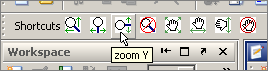 How did I create those icons? That's where Elmar's IconEditor came in real handy. Those icons didn't exist anywhere to my knowledge so I just made my own, and you can too thanks to Elmar.
This is a simple but useful GUI that looks very nice for starters.
How did I create those icons? That's where Elmar's IconEditor came in real handy. Those icons didn't exist anywhere to my knowledge so I just made my own, and you can too thanks to Elmar.
This is a simple but useful GUI that looks very nice for starters.
 The help goes on to explain the command line options for loading image data in different formats for example. For those who
enjoy looking inside M-files, the last subfunction, icondata contains the data behind its own icons such as the pencil and bucket. There are more useful features to be discovered, so
check it out.
How could you use this editor and custom icons? Tell us about it here.
The help goes on to explain the command line options for loading image data in different formats for example. For those who
enjoy looking inside M-files, the last subfunction, icondata contains the data behind its own icons such as the pencil and bucket. There are more useful features to be discovered, so
check it out.
How could you use this editor and custom icons? Tell us about it here.
You can make your shortcut labels as descriptive or cryptic as you want. If your screen is not wide enough for all your shortcuts
you can save space by turning off the labels. Then, when your mouse pointer hovers over an icon its label appears as a tool
tip. You can also choose icons that are as unique and intuitive as you want.
How did I create those icons? That's where Elmar's IconEditor came in real handy. Those icons didn't exist anywhere to my knowledge so I just made my own, and you can too thanks to Elmar.
This is a simple but useful GUI that looks very nice for starters.
The help goes on to explain the command line options for loading image data in different formats for example. For those who
enjoy looking inside M-files, the last subfunction, icondata contains the data behind its own icons such as the pencil and bucket. There are more useful features to be discovered, so
check it out.
How could you use this editor and custom icons? Tell us about it here.
- Category:
- Picks




Comments
To leave a comment, please click here to sign in to your MathWorks Account or create a new one.