
A Template Saves You Time
Jiro's pick this week is NEWFCN by Frank González-Morphy.
We all have our own style of writing functions in MATLAB. I've adopted a convention that is similar to the "best practice"
that The MathWorks uses for the shipping m-files.
     function out = myPlusFcn(varargin)
     % MYPLUSFCN  Adds matrices
     %   OUT = MYPLUSFCN(A, B) adds matrices A and B.
     %   OUT = MYPLUSFCN(A, B, C, ...) adds all the matrices
     %         provided. All of the matrices must be either
     %         the same size or mix of same-sized matrices
     %         and scalars.
     %
     % Examples:
     %   out = myPlusFcn(1:3, 5);
     %
     %   out = myPlusFcn(2, eye(3), rand(3), magic(3));
     %
     % See also PLUS, SUM.
<code starts here>
- There is the function definition line.
- The first comment line is the H1 line used by commands like lookfor.
- The rest of the comment block is the help text.
- I try to include a few examples of calling the function.
- "See also" entries help guide users to similar functions.
You can read about them here.
If I always create my functions this way, why not have a template for this. This is where NEWFCN by Frank comes into play. With this, you can have a head start on creating new functions. He has it customized for his own
style, so when you run
newfcn('myfcn')
it generates this m-file and opens it up in the editor:
     function myfcn()
     % MYFCN ...
     %
     %   ...
     %% AUTHOR    : Frank Gonzalez-Morphy
     %% $DATE     : 17-Jun-2008 15:53:25 $
     %% $Revision : 1.00 $
     %% DEVELOPED : 7.6.0.324 (R2008a)
     %% FILENAME  : myfcn.m
disp('!!!You must enter code into this file <myfcn.m>!!!')
     % Created with NEWFCN.m by Frank González-Morphy
     % Contact...: frank.gonzalez-morphy@mathworks.de
     % ===== EOF ====== [myfcn.m] ======
What's nice about this is that some of the text are dynamically created, such as the file name, date, and the version. For
those of you with different coding styles, his function is easy to understand so it shouldn't take much time to modify it.
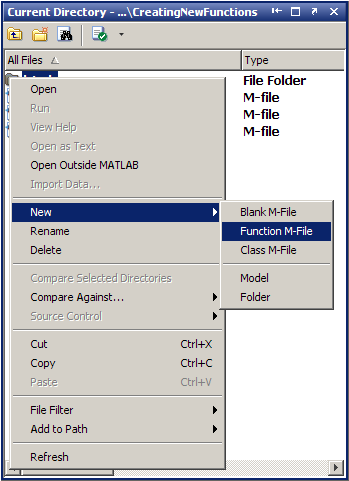
As an extra nugget of knowledge, you can also create a new function m-file with a basic template directly from the Current
Directory Browser, but it's not as comprehensive as Frank's.
Comments
I think laziness fuels innovation. And I mean this in a good way! Thanks for writing this, Frank. How do you use MATLAB to
reduce your day-to-day work load? Tell us here.
Published with MATLAB® 7.6
- Category:
- Picks




Comments
To leave a comment, please click here to sign in to your MathWorks Account or create a new one.