File Exchange Pick of the Week

January 2nd, 2009

Automatic Text Placement

Jiro's pick this week is textbp by Peter Mao.

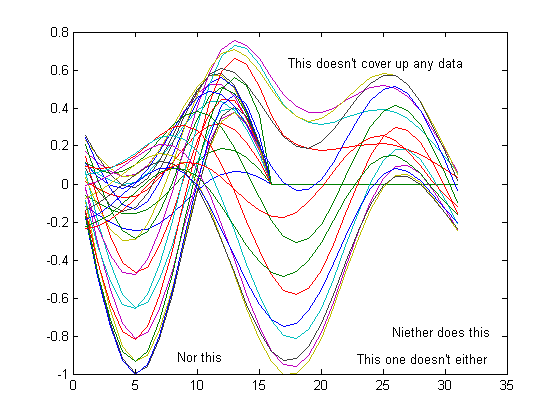
Have you ever wanted to place a text on a figure (using TEXT), and end up spending time trying to figure out a nice location where it doesn't cover up the data? To be reusable for arbitrary data, you have to be clever in determining the X-Y location.

If only MATLAB could do this work for you...

Peter took on this challenge, and wrote textbp. With this, you can simply ask MATLAB to place the text at the "best" location. Now, that's clever.

plot(membrane(6));
textbp('This doesn''t cover up any data');
textbp('This one doesn''t either');
textbp('Niether does this');
textbp('Nor this');
Comments?


Get the MATLAB code

Published with MATLAB® 7.7

3 Responses to “Automatic Text Placement”

  1. Nosmo replied on :

    This looks great. If it had a spell checker that would be even better (neither not niether).
    Thanks for this!

  2. jiro replied on :

    Ha! Good catch. If it were a mistake in an equation, I would’ve noticed it. :)

  3. biao replied on :

    it seems this function doesn’t support 3D graph, for instance, plot3d, surf.

Leave a Reply

Wrap code fragments inside <pre> tags, like this:

<pre class="code">
a = magic(3);
sum(a)
</pre>

If you have a "<" character in your code, either follow it with a space or replace it with "&lt;" (including the semicolon).


MathWorks

Brett & Jiro share their favorite user-contributed submissions from the File Exchange.

These postings are the author's and don't necessarily represent the opinions of The MathWorks.