This post comes to us courtesy of David Wey. David leads the MathWorks Online Community group in our Natick office.
If you use MATLAB Answers, you may have wondered why you enter your question (or… read more >>

This post comes to us courtesy of David Wey. David leads the MathWorks Online Community group in our Natick office.
If you use MATLAB Answers, you may have wondered why you enter your question (or… read more >>

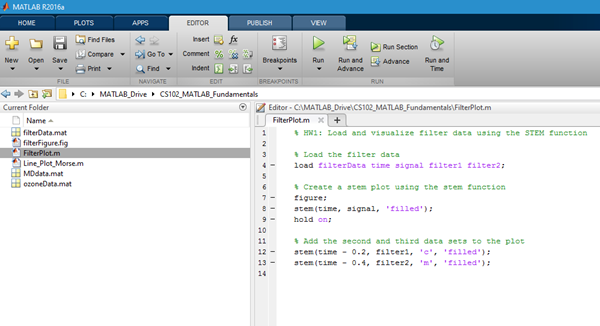
MATLAB Mobile Gets an Editor
If you’ve been using MATLAB Mobile over the past years, you’ve been able to do command-line prototyping and run files on your computer or on the cloud. With the latest… read more >>
Since the long ago Ken days (circa 2009), the MATLAB Editor team and the Simulink Embedded MATLAB team have had an ongoing, under-the-covers project: integrating the Embedded MATLAB editor with the… read more >>
Another R2011b change was recently discussed in a MATLAB Answers question. This change is when you use the run button in the MATLAB editor, the name of the script/function will be displayed in the… read more >>
The MATLAB R2011b feature that I’ve been most anticipating is the automatic rename in the Editor. Renaming functions and variables is a common operation for programmers. It’s useful for… read more >>
It’s (almost) fall, and that means a brand-new release of MATLAB. Here are a few awesome new Desktop features in this release:
Improved Command Window Formatting
The Command Window… read more >>
Over the weekend, reader “mnasr14” reminded me with a comment on an old post about the oft-overlooked Go To… dialog in the Editor. The Go To… dialog provides a quick way to… read more >>
In R2010b we started highlighting non-local variables in light blue. Non-local variables are variables that are used in at least two functions that share scope. For example, a variable used both in a… read more >>
Last Friday we released MATLAB 7.12 (R2011a), the latest and greatest in MATLAB. There are a lot of new and improved features in this release. At the same time we also released MATLAB Mobile 1.3, and… read more >>
Scripting files in Cell Mode has plenty of benefits. In addition to code organization, rapid iteration, and publishing, cell mode can also be used to present cell-by-cell interactive… read more >>