
Essence of Indexing
Indexing into arrays allows you to address portions of the elements of an array and treat this subset as an array itself, whether for calculations or input to other functions (essentially a right-hand side) or for assignment (left-hand side).
Contents
Dimensions
Arrays in MATLAB are N-dimensional, with an infinite number of trailing singleton dimensions. Trailing singleton dimensions past the second are not displayed or reported on, e.g., with size. No array has fewer than two dimensions. Empty arrays are the logical extension of general arrays but have at least one size 0 dimension. The syntax [] denotes the empty array of size 0x0 and is treated as an exception occasionally (for backward compatibility); it is also used specially during assignment.
Right-Hand Side
- General indexing on RHS If A is an array with N dimensions of size [s1 s2 ... sN], then a subset can be extracted by indexing with arrays of indices whos values lie between 1 and si for each dimension i = 1,...,N. For dimensions starting from the right hand side that are scalar, their dimension is dropped from the result (e.g., for size) and is implicitly 1 unless the dimension is <=2.
A = rand(2,3,2,1,1,1)
ndA = ndims(A)
sizeA = size(A)
B = A(1,2:3,2)
sizeB = size(B)
A(:,:,1) =
    0.2974    0.6932    0.9830
    0.0492    0.6501    0.5527
A(:,:,2) =
    0.4001    0.6252    0.3759
    0.1988    0.7334    0.0099
ndA =
     3
sizeA =
     2     3     2
B =
    0.6252    0.3759
sizeB =
     1     2
- Indexing with more indices than dimensions If i>N when indexing, the indices >N must be 1, otherwise there will be an error.
A(1,2,1,1)
ans =
    0.6932
try
    A(1,1,1,3)
catch
    s = lasterror();
    s.message
end
ans =
Error using ==> evalin
Index exceeds matrix dimensions.
- Indexing with fewer indices than dimensions If the final dimension i<N, the right-hand dimensions collapse into the final dimension. E.g., if A = rand(1,3,4,1,7) and we type A(1,2,12), then we get the element as if A were reshaped to A(1,3,28) and then indexed into. 28 repesents the product of the final size of the final dimension addressed and the other "trailing" ones.
A = 1:(3*4*7);
A = reshape(A,1,3,4,1,7);
sizeA = size(A)
sizeA =
     1     3     4     1     7
Show the middle chunk and index into it for one value.
A(:,:,10:14)
A(1,2,12)
ans(:,:,1) =
    28    29    30
ans(:,:,2) =
    31    32    33
ans(:,:,3) =
    34    35    36
ans(:,:,4) =
    37    38    39
ans(:,:,5) =
    40    41    42
ans =
    35
- Indexing with : The colon means to select all elements in that specific dimension. This is equivalent to using 1:end for the dimension of interest.
A = magic(3)
B = A(:,2)
C = A(1:2,:)
A =
     8     1     6
     3     5     7
     4     9     2
B =
     1
     5
     9
C =
     8     1     6
     3     5     7
- Indexing with end Replace end with the relevant size(A,dim) value when using indexing expressions. You can calculate with end.
V = 1:3;
V(end-1) = 7
V =
     1     7     3
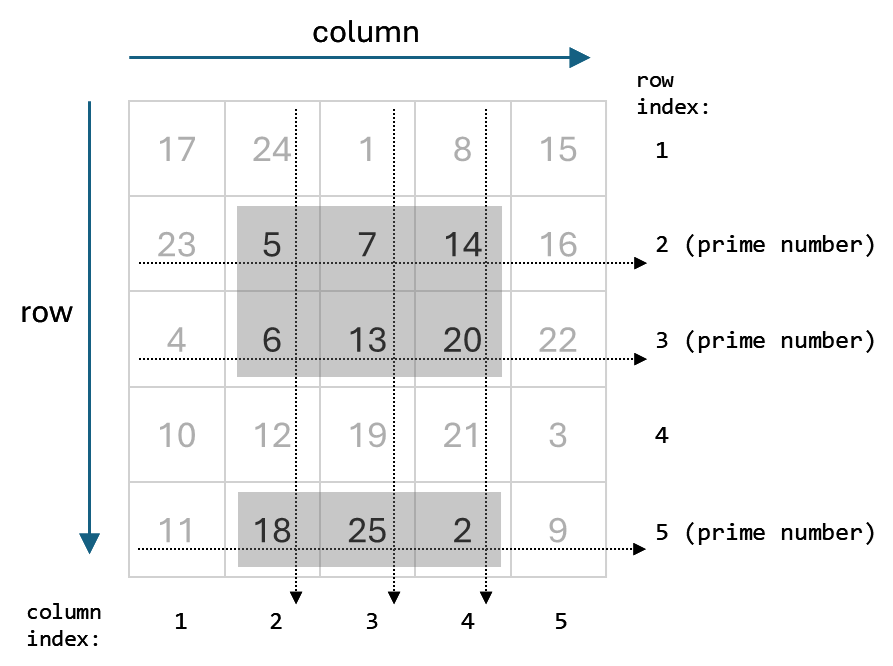
- Indexing with a colon-expression n1:n2 or n1:step:n2 selects particular entries in the specified dimension and are equivalent to replacing the indices with [n1 n1+1 ... n2] and [n1 n1+step n1+2*step ... n1+step*fix((n2-n1)/step)].
A = magic(5)
A(1:3,1:2:5)
A =
    17    24     1     8    15
    23     5     7    14    16
     4     6    13    20    22
    10    12    19    21     3
    11    18    25     2     9
ans =
    17     1    15
    23     7    16
     4    13    22
- Indexing with one array C = A(B) produces output the size of B unless both A and B are vectors.
A = 1:10
B = [1 3; 2 4]
C = A(B)
A =
     1     2     3     4     5     6     7     8     9    10
B =
     1     3
     2     4
C =
     1     3
     2     4
When both A and B are vectors, the number of elements in C is the number of elements in B and with orientation of A.
row = 1:4
column = (1:4)'
row(column)
column(row)
row =
     1     2     3     4
column =
     1
     2
     3
     4
ans =
     1     2     3     4
ans =
     1
     2
     3
     4
- Indexing with several arrays When C = A(B1,B2,...,Bk), the size of C is [numel(B1), numel(B2), ..., numel(Bk)].
A = magic(6)
ind1 = [1 4]
ind2 = [1 2; 2 6]
C = A(ind1,ind2)
A =
    35     1     6    26    19    24
     3    32     7    21    23    25
    31     9     2    22    27    20
     8    28    33    17    10    15
    30     5    34    12    14    16
     4    36    29    13    18    11
ind1 =
     1     4
ind2 =
     1     2
     2     6
C =
    35     1     1    24
     8    28    28    15
- Logical indexing Indexing by a logical matrix B is equivalent to indexing by the column vector B(:).
A = magic(3)
B = [true false; true true]
C = A(B)
Arow = A(:)'
C = Arow(B)
A =
     8     1     6
     3     5     7
     4     9     2
B =
     1     0
     1     1
C =
     8
     3
     1
Arow =
     8     3     4     1     5     9     6     7     2
C =
     8     3     1
Left-Hand Side
- General rule for LHS In general, the right-hand side needs to be either a scalar or the same size as the left-hand side (except when the left-hand side is A(:) as mentioned below). Otherwise, you will see an error.
A = magic(3)
A(:,2) = 17
A(1,:) = 2:2:6
A =
     8     1     6
     3     5     7
     4     9     2
A =
     8    17     6
     3    17     7
     4    17     2
A =
     2     4     6
     3    17     7
     4    17     2
- Array growth Using indices outside the bounds of the array grows the array, appending the values specified from the right-hand side. Where no explict values are given, the left-hand side value is set to 0.
A = 1:3
A(3,[2 4]) = 17
A =
     1     2     3
A =
     1     2     3     0
     0     0     0     0
     0    17     0    17
- Datatype conversion If the left-hand side already exists, values assigned on the right are converted to the datatype of the left-hand side if possible. Otherwise, the operation results in an error.
A = single(magic(2))
A(1) = 17
class(A)
A =
     1     3
     4     2
A =
    17     3
     4     2
ans =
single
- Deletion If the right-hand side is explicitly [], then the elements referred to on the left-hand side are deleted. This is how people remove datapoints with missing information, for example.
A = magic(3)
A([1 3],:) = []
A =
     8     1     6
     3     5     7
     4     9     2
A =
     3     5     7
- : retains shape A(:) = expression retains the original shape/size/datatype of A, regardless of the shape of the right-hand side.
A = 1:9;
A(:) = magic(3)
A =
     8     3     4     1     5     9     6     7     2
References
Here are some references to documentation and other articles related to indexing.
Let me know if it's helpful having all the indexing information in one place.
Published with MATLAB® 7.2
- Category:
- Indexing,
- Vectorization


See Also
-

Indexing - Mixing It Up
Blogs
-

Linear indexing
Blogs
Comments
To leave a comment, please click here to sign in to your MathWorks Account or create a new one.