Skip to Main Content Skip to Search
File Exchange
MATLAB Newsgroup
Link Exchange
  Blogs  
 Contest 
MathWorks.com

Loren on the Art of MATLAB

May 14th, 2008

Acting on Specific Elements in a Matrix

Using MATLAB, there are several ways to identify elements from an array for which you wish to perform some action. Depending on how you've chosen the elements, you may either have the list of elements to toss or the list if elements to retain. And you might not have much if any control yourself how the list gets presented to you since the list could be passed to you from another calculation. The lists might be indices, subscripts, or logical arrays (often referred to as masks). Let's look at how you might arrive at such a situation and see what the code looks like to perform one particular action, setting the desired element values to 0.

Contents

Note: I am not discussing efficiency in this article. It is highly dependent on the number of elements in the original array and how many will be retained or thrown out. This article focuses on specifying what to keep or replace.

General Setup

Here's the setup for this investigation. I will use a fixed matrix for all the methods and always end up with the same final output. The plan is to show you multiple ways to get the result, since different methods may be appropriate under different circumstances.

A = magic(17);
Result = A;
Result( A < mean(A(:)) ) = 0;

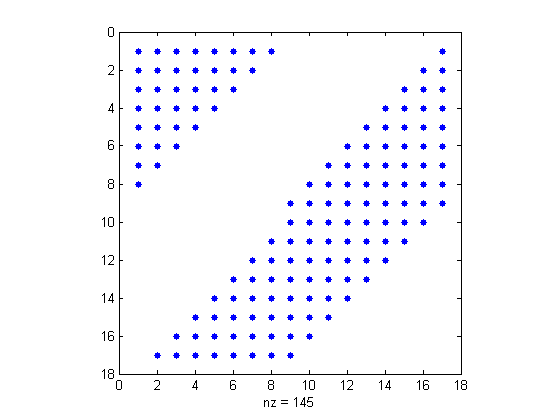
Let's look at the nonzero pattern of Result using spy.

spy(Result)
Method #1 - Using Subscripts of Keepers

Here's a list of the subscripts for the elements to keep unchanged.

[rA,cA] = find(A > (17^2)/2);

Next we convert the subscripts to indices.

Result1 = zeros(size(A));
indices = sub2ind(size(A),rA,cA);
Result1(indices) = A(indices);
isequal(Result, Result1)
ans =
     1

Why did I convert subscripts to indices? Let me illustrate with a very small example.

matrix = [ -1 1 0; 2 0 -2; 0 3 -3]
[rows,cols] = find(matrix==0)
matrix =
    -1     1     0
     2     0    -2
     0     3    -3
rows =
     3
     2
     1
cols =
     1
     2
     3

Now let's see what I get if I use the subscripts to address the selected elements:

matrix(rows,cols)
ans =
     0     3    -3
     2     0    -2
    -1     1     0

I get the full matrix back, even though I selected only 3 elements. This definitely surprised me when I first encountered this. What's happening?

MATLAB matches each row element with each column element. matrix([1 2 3],2) returns the elements from rows 1 through 3 in column 1.

matrix(1:3,2)
ans =
     1
     0
     3

To learn more about indexing in general, you might want to read these posts or search the MATLAB documentation.

Method #2 - Using Indices of Keepers

Here we used the single output form of find which returns indices instead of subscripts.

indA = find(A > (17^2)/2);
Result2 = zeros(size(A));
Result2(indA) = A(indA);
isequal(Result, Result2)
ans =
     1

Method #3 - Using Logical Keepers

We'll try keeping about half of the elements unchanged.

keepA = (A > (17^2)/2);
Result3 = zeros(size(A));
Result3(keepA) = A(keepA);
isequal(Result, Result3)
ans =
     1

keepA is a logical matrix the same size as A. I use logical indexing to populate Result3 with the chosen values from A.

Method #4 - Subscripts for Elements to Set to Zero

If instead we have a list of candidates to set to 0, we have an easier time since we don't need to start off with a matrix of zeros. Instead we start with a copy of A.

Result4 = A;
[rnotA,cnotA] = find(A <= (17^2)/2);

Convert indices to subscripts, as in method #1.

indices = sub2ind(size(A),rnotA,cnotA);

Now zero out the selected matrix elements.

Result4(indices) = 0;
isequal(Result, Result4)
ans =
     1

Method #5 - Indices for Elements to Set to Zero

If we're instead given indices, we simply skip the step of converting subscripts and follow similar logic to that in method #4.

Result5 = A;
indnotA = find(A <= (17^2)/2);
Result5(indnotA) = 0;
isequal(Result, Result5)
ans =
     1

Method #6 - Using Logical Arrays to Specify Zero Elements

Finally, if we have a mask for the values to set to 0, we simply use it to select and set elements.

Result6 = A;
keepnotA = (A <= (17^2)/2);
Result6(keepnotA) = 0;
isequal(Result, Result6)
ans =
     1

Which Method(s) Do You Prefer?

Which method or methods do you naturally find yourself using? Do you ever invert the logic of your algorithm to fit your way of thinking about addressing the data (the ins or the outs)? Please post your thoughts here. I look forward to seeing them.


Get the MATLAB code

Published with MATLAB® 7.6

17 Responses to “Acting on Specific Elements in a Matrix”

  1. Christian replied on :

    I definitely prefer the use of logical index, because the it’s more explicit. I think the code stay more readable. It’s something that I miss on other lenguajes.

  2. OkinawaDolphin replied on :

    It depends on the algorithm whether logical or numerical indexing is most suitable.

    When I need a list of indices several times because I don’t want to create new variables, a list of numerical indices is shorter than a logical matrix. Also, when the positions of selected elements are of interest, a list of numerical indices is better, because subscripts are easy to calculate from numerical indices.

    In other cases there is the warning “logical indexing is usually faster than find”. Then I use logical indexing.

  3. Daniel Armyr replied on :

    Personally, I have started to use logical indexing as much as possible. What I like about logical indexing is that I can plot the data and the mask in the same plot and clearly see what I am removing and what I am not removing.

    –DA

  4. Loren replied on :

    Thanks to all of you. For a long time, it seemed like people weren’t learning about logical indexing but now people are. I think that’s good

    (but, as OkinawaDolphin says, not always optimal when the indices need to hang around for several operations and the array is large compared to the number of values of interest).

    –Loren

  5. Petr Pošík replied on :

    Loren,

    nowadays I do use logical indexing (with the exception that OkinawaDolphin pointed out). But the ONE thing which prevented me from using logical indexing from the beginning is the following.

    When I saw the result of the following operations
    > a = [1 2 3 4 5]
    > i1 = (a > 3)
    ans =
    0 0 0 1 1
    and when I realized that I can use this array in the following way (for logical indexing):
    > a(i1)
    ans =
    4 5
    I thought I can create the logical arrays by hand and use them:
    > i2 = [0 0 0 1 1]
    > a(i2)
    ??? Subscript indices must be real positive integers or logicals.

    Of course, now I know that i2 created that way is real array which cannot be used as a mask and that the right way is
    > a(logical(i2))
    ans =
    4 5

    Trivial. But for me, this was the reason why I tended to use indices and ‘find’ instead of logicals for a long time.

    Petr

  6. Loren replied on :

    Petr-

    Thanks for clarifying that the array must be of logical type for logical indexing.

    –Loren

  7. Ed L. replied on :

    I started using logical arrays a LOT more often after heeding the warnings and recommendations issued by ‘mlint’. Initially, I didn’t really believe logical arrays were that much more efficient, but profiling my code before and after has shown direct performance improvements.

  8. Tony Booer replied on :

    I’ve always enjoyed using array indexing of all sorts (logical or otherwise) because it can be a very compact way of expressing an operation.

    Here, for example, is a “logical array” method for removing row R and column C (both scalars) from a matrix X…

    X(R~=1:end, C~=1:end)

    How cool is that ?

    …how would you do the same thing if R and C were vectors ?

    -Tony

  9. Tony Booer replied on :

    Actually, to answer Loren’s original question “Which Method(s) Do You Prefer?”, I have to say “none of the above”.

    I often rely on the rather naughty mix of arithmetic and logical operations:

    A .* (A > (17^2)/2)

    …because it doesn’t require an assignment statement and can be used inline as part of a longer expression.

    -Tony

  10. Dan K replied on :

    For myself, generally the answer to my preference depends on what I’m going to do with the selected elements. If I’m going to be doing something that can be vectorized (is “vectorizable”?) then I try to use logical arrays. If not, I tend to need the actual indices of the selected elements. As a related question, is there any way to determine which of the following will be faster (or even a rule of thumb)?
    A= rand(10000,100);
    A(5001:end,:)=[];
    B=A(1:5000,:);
    A=A(1:5000,:);
    A=A(1:5000,1:100); %Explicityly stating the number of columns
    B=zeros(5000,100);
    for n=1:size(A,2)
    B(:,n)=A(1:5000,n);
    end
    some other method?

    When I’m dealing with very large data sets, this is one of the most frustrating slow points, since it can exceed the time requirements of many of the calculations.
    Dan

  11. Steve L replied on :

    Tony,

    With regard to removing rows R and columns C from a matrix, you can use:

    A = reshape(1:49, 7, 7);
    B = A; % for comparison
    R = 1:2:7; % Rows to remove
    C = 2:2:7;
    B(R, :) = [];
    B(:, C) = [];

    or:

    A = reshape(1:49, 7, 7);
    R = 1:2:7; % Rows to remove
    C = 2:2:7;
    B = A(setxor(R, 1:7), setxor(C, 1:7));
    % or
    B = A(setdiff(1:7, R), setdiff(1:7, C));

    As for the arithmetic/logical combination, that will work … as long as all your elements of A are finite.

    A = 1:1000;
    B = A.*(A > (17^2)/2);
    all(B == A | B == 0)

    A = 1:1000;
    A([5 982]) = NaN;
    A([7 562]) = Inf;
    A([324 870]) = -Inf;
    B = A.*(A > (17^2)/2);
    all(B == A | B == 0)

    Note that not only are elements 5 and 982 of the second B NaN (as you would expect, since any arithmetic operation on a NaN results in a NaN result) but so are elements 324 and 870. This is because 0*Inf and 0*(-Inf) also both return NaN.

  12. Loren replied on :

    Steve-

    Nice reply to Tony’s challenge. You can use end’s in the expressions of your first solutions as well:

      A = reshape(1:49, 7, 7);
      R = 1:2:7; % Rows to remove
      C = 2:2:7;
      B = A(setxor(R, 1:end), setxor(C, 1:end));
      % or
      B = A(setdiff(1:end, R), setdiff(1:end, C));
    

    –Loren

  13. Luca Balbi replied on :

    I definitely prefer, and use as often as possible, logical indexing, possibly keeping the indices stored for future reference only if really needed.
    It makes the code much more readable and, as I used to be programming with SQL languages, it exploits the semantic power of the WHERE clauses which are what make DB programming so powerful.

  14. helper replied on :

    I tend to use all methods mentioned based on my need.

    What I find interesting is how common a problem it is for (not necessarily beginner) users to run into the issue mentioned in Method #1. Often users are using subscripting and don’t realize they need to convert to linear indices to solve a specific problem.

    I find myself having to repeatedly explain the difference and am glad you have addressed the topic here.

  15. Tony Booer replied on :

    Steve, Loren,

    Thanks very much for this solution…

    B = A(setdiff(1:end, R), setdiff(1:end, C));

    Steve - very neat,
    Loren - I had no idea I could use “end” in a function call !

    …where’s that documented ?

  16. Loren replied on :

    Tony-

    Here’s the documentation for end:

    http://www.mathworks.com/access/helpdesk/help/techdoc/ref/end.html

    The capability has been allowed, I believe, since its introduction as an index (and overloadable with the class system).

    –Loren

  17. Tom replied on :

    Hey Loren,

    Logical indexing is nice, but not always practical. We produce hundreds of GB of data every day a subsequently load it into MATLAB. It’s possible to construct a short array of numerical indices, which contains the subset of the data I may be interested in but keeping a logical index around is not really feasible, either in MATLAB or on disk.

    Further, to the comparison of logical vs. numerical indexing (on a smaller footprint example)

    x = rand(2 * 1e9, 1); %16GB of data

    tic; l = x > 0.5; toc
    Elapsed time is 4.771542 seconds.

    tic; i = find(l); toc
    Elapsed time is 29.321260 seconds.

    >> tic; y=x(l); toc
    Elapsed time is 49.782177 seconds.

    >> tic; z=x(i); toc
    Elapsed time is 51.138457 seconds.

    As you can see, there is very little in it for a large set, since most of the computation is likely to be memory bound. I have to say that I’m disappointed with the implementation of the numeric subscript. It is not surprising that a logical index must grow the resulting array, since it doesn’t know in advance how many elements may be in the result. However, to see reallocations on my system monitors during the final subscript call seems unnecessary, since I know *exactly* how many elements there’ll be. Memory reallocation would actually be the reason why, for large datasets, I’d expect the numerical index to outperform the logical index.

    On a similar note, here are two features I’d like to see in MATLAB:
    1) Don’t construct the logical array if you don’t need to: For example,

    i = find(logical expression);

    or even

    b = logical expression;
    i = find(b);
    % b no longer used after here

    There seems no reason why you have to do construct the temporary logical array first and then follow the computation by another pass over the logical array. This is slow and wastes an unnecessary amount of memory for a temporary.

    2) Again, suppose I have a large dataset (200+ GB in size). I want to perform a computation on a subset of it (say 50GB). I have to make a copy to use the data in the computation, which is a problem, as I’m already riding hard against the amount of available memory. If I have a list of the indices already, I’d like to use an “indirect” array – an object that holds both indices and the original data and allows me to subscript it as a regular array. To preempt objections: a) Yes, I could write a class to do it but that’s not very fast. b) The object could be read only, so that you wouldn’t have to worry about multiple numerical indices with the same value.

    Many thanks,

    Tom

Leave a Reply


Loren Shure works on design of the MATLAB language at The MathWorks. She writes here about once a week on MATLAB programming and related topics.

  • J.B. Brown: Ah, and I am at fault for simply testing collinearity with the origin in the example above.
  • J.B. Brown: Indeed, > collinear( [0 3],[0 8],[0 -1e21+2e-15] ) ans = 1 > collinear( [0 3],[0 8],[0 -1e22+2e-15]...
  • OkinawaDolphin: Loren, thank you for telling me where to download timeit. Here are the two functions I just tested...
  • Loren: JB- It looks to me like Ilya’s solution and therefore yours are equivalent to the determinant. As Tim...
  • Loren: OkinawaDolphin, timeit can be downloaded from the File Exchange. Steve Eddins is the author. It does not ship...
  • OkinawaDolphin: It seems that neither R2007a nor R2007b have the function timeit, but I investigated computation time...
  • J.B. Brown: It would appear to me that Ilya Rozenfeld’s solution would be the cleanest. Just to help those who...
  • Loren: Markus- Congratulations on winning! And a nice illustration of how the size matters. Small enough, and the...
  • Markus: Hi Loren, which version is fastest also depends very much on the matrix dimensions. Look at my test function:...
  • Duncan: OkinawaDolphin, Regarding why your third example is slower than your second example, the result is in fact...

These postings are the author's and don't necessarily represent the opinions of The MathWorks.

Related Topics