Loren on the Art of MATLAB

October 3rd, 2008

MATLAB for Teaching

I occasionally get involved in activities at MathWorks that aren't strictly focused on development. These activities often include interacting with customers, giving seminars, writing articles, for example. Early this summer, for instance, I spent a little bit of time creating a webinar about using MATLAB for Teaching. I tried to design it with the goal of reaching people already familiar with MATLAB as well as those who are not yet acquainted with it.

For those of you already using MATLAB, whether for teaching or not, the earlier demo in the webinar is fairly rudimentary, since I give an introductory demo of MATLAB, including numerical calculations, visualization, finding information, and using the editor to create an M-file.

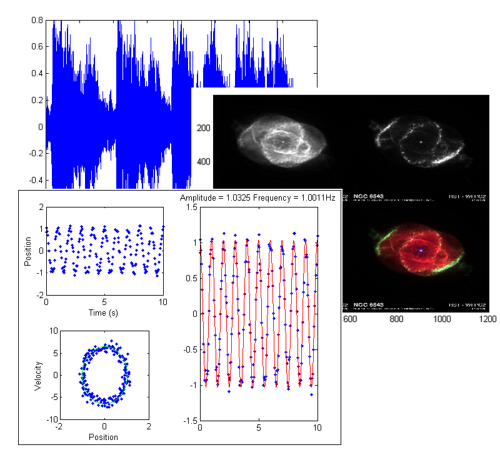
Even for those of you not new to MATLAB, you may find the latter part interesting. I show a rich example, motivated by the work of Professor Joseph M. Mahaffy of San Diego State University. The example illustrates how to estimate the physical characteristics of a spring pendulum. It's an example of how you might connect work in the laboratory with analyzing the collected data, incorporating mathematical modeling and visualization, common denominators for MATLAB users. Along the way I also use cell mode execution, a technique that allows the student to interactively test out various parameters. And I show the published report, a way to share the results without writing a separate report.

There are additional resources for those of you interested in incorporating MATLAB into your curricula. I list a few of them here.

And here are resources for your students, especially if you want to have your students gain familiarity with MATLAB in advance of your classes.


Get the MATLAB code

Published with MATLAB® 7.6

3 Responses to “MATLAB for Teaching”

  1. George Kapodistrias replied on :

    Hi Loren,

    Though I have not seen the webinar, I find your suggestion (use cell mode, publishing, and other cool tools for teaching) as more applicable to academia or users familiar with it. In my experience (MATLAB user for years in both academia and industry) a lot (most?) casual (or less than casual) MATLAB users in the industry tend to learn best (they become more receptive to the language) by using simple constructions (e.g. small programmes or short functions that accomplish a specific task). That might not be best/efficient for the abilities of the language but it is definitely helpful when you work with people that have diverse programming backgrounds (casual programmers are heavily influenced by what they formally learned possibly 10-40 years ago).

    In my opinion, the best way to teach something is to keep the message simple.

    BTW, I enjoy your posts.

    Cheers,

    gk.

  2. Loren replied on :

    George-

    I don’t disagree that looking at and learning from small programs is very helpful. I was thinking more about teaching non-programming concepts for cell-mode etc. There’s a lot to be said for looking at well-written, concise programs whenever possible. I am in a reading group on programming patterns where we do just that. I write the examples in MATLAB to be sure I understand them. I usually write my driver/test program in cell mode.

    –Loren

  3. George Kapodistrias replied on :

    Hi Loren,

    Thank you for your reply. Of the non-programming concepts I find the cell mode as the most useful tool The Mathworks have made available in the last few years. Brilliant!

    Programming patterns… Very interesting topic for a future post!

    Cheers,

    gk.

Leave a Reply

Wrap code fragments inside <pre> tags, like this:

<pre class="code">
a = magic(3);
sum(a)
</pre>

If you have a "<" character in your code, either follow it with a space or replace it with "&lt;" (including the semicolon).


Loren Shure works on design of the MATLAB language at The MathWorks. She writes here about once a week on MATLAB programming and related topics.

  • Jun: I totally can not believe it, Loren. You are really helpful. Thank you so much, MATLAB master!
  • Loren: Wow folks- Always lots of interest when there’s a quickie to try out! I will only make 2 general...
  • Loren: Jun- ismember is your friend here: >> [aa,ind] = ismember(Array2,Arra y1) aa = 1 1 1 1 1 1 1 ind = 1 2 1 4 4 3...
  • Dan: I like the first way better than the second way. Combining the arrays into one and running any is nice, although...
  • James Myatt: How about I = (a == 0 | b == 0); a(I) = []; b(I) = [];
  • Tunc: Hello Loren, love your blog because of such inspiring and challenging comments to such ’small’...
  • Pekka Kumpulainen: Here is my tradeoff. I usually want to keep the original variables as they are most probably...
  • Iain: Followup: Of course, to allow NaNs (counting them as non-zero): mask = (a~=0) & (b~=0); The mask says “a...
  • Matt Fig: I would usually go with something like this: y = a&b; x = a(y); y = b(y); But I was surprised to find...
  • kk: c=all([a;b]) a(c) a(b)

These postings are the author's and don't necessarily represent the opinions of The MathWorks.