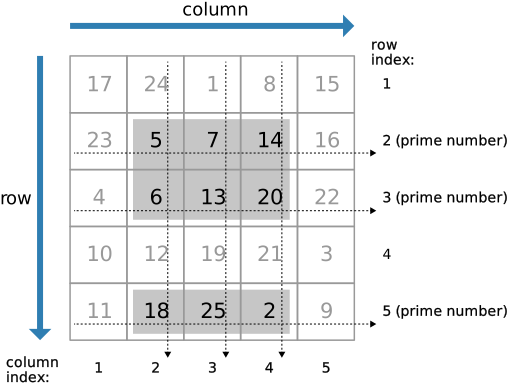
I've talked about logical indexing before in some of the linked posts, but recent work makes me want to show it off again. One of the nice things about logical indexing is that it is very easy and natural to combine the results of different conditions to select items based on multiple criteria.
Contents
What is Logical Indexing?
Suppose I have an array of integers, not sorted, and want to find the ones that are less than a certain number. Here's how I can do it using the function find.
X = randperm(20) target = 5;
X =
Columns 1 through 13
3 7 1 16 20 15 13 9 14 8 11 19 18
Columns 14 through 20
4 10 5 6 17 12 2
ind = find(X < target)
ind =
1 3 14 20
You can see that find returns the indices into the array X that have values less than the target. And we can use these to extract the values.
Xtarget = X(ind)
Xtarget =
3 1 4 2
Another way to accomplish the same outcome is to use the logical expression to directly perform the indexing operation. Here's what I mean.
logInd = X < target
logInd =
Columns 1 through 13
1 0 1 0 0 0 0 0 0 0 0 0 0
Columns 14 through 20
1 0 0 0 0 0 1
MATLAB returns an array that matches the elements of the array X, element-by-element holding 1s where the matching values in X are the desired values, and 0s otherwise. The array logInd is not an array of double numbers, but have the class logical.
whos logInd
Name Size Bytes Class Attributes logInd 1x20 20 logical
I can now use this array to extract the desired values from X.
XtargetLogical = X(logInd)
XtargetLogical =
3 1 4 2
Both methods return the results.
isequal(Xtarget, XtargetLogical)
ans =
1
Compound conditions.
Let me create an anonymous function that returns true (logical(1)) for values that are even integers.
iseven = @(x) ~logical(rem(x,2))
iseven =
@(x)~logical(rem(x,2))
Test iseven.
iseven(1:5)
ans =
0 1 0 1 0
Find Values Meeting More Than One Condition
Now I would like to find the values in X that are less than target and are even. This is very natural to do with logical indexing. We have the pieces of code we need already.
compoundCondInd = (X < target) & iseven(X)
compoundCondInd =
Columns 1 through 13
0 0 0 0 0 0 0 0 0 0 0 0 0
Columns 14 through 20
1 0 0 0 0 0 1
We can see we found suitable values at locations 3 and 19. And we can extract those values next.
X(compoundCondInd)
ans =
4 2
Did You Notice?
Did you see how easy it is to combine multiple conditions? I simply look for each of condition, getting back logical arrays, and then compute a logical array where the two input arrays are both true (via &). I could, of course, calculate a compound condition where only either one or the other condition needs to be true using logical or (via |).
A Recent Application
I recently used this in the context of finding suspect data values. I had 2 arrays, hourly temperature and speed. The problem is that when the temperature gets near or below freezing, the speed sensor might freeze. But I didn't want to delete ALL the values below freezing. So I looked for data where the temperature was sufficiently low AND the speed was very low (which could potentially mean the sensor was frozen). That way, I did not need to discard all data at low temperatures.
Have You Used Compound Indexing?
Did you do it like I did, using logical expressions? Or did you use some other techniques? What were you trying to achieve with your compound indexing? Let me know here.
Get
the MATLAB code
Published with MATLAB® R2012b


Hi Loren,
I was wondering why you use an anonymous function and not inline the rem-function:
compoundCondInd = (X < target) & ~rem(X,2)
–Han
Dear Loren,
I use logical indexing from time to time, but I tend to forget to do so and sometime write rather complicated code. Thank you for this clear reminder.
To help filing your newsletter that I receive as e-mail, could you supplement the “object” of your e-mail with the subject of the day?
Best regards,
Pierre
Han-
I could have done that as well. No special reason. I guess I was trying to explain thing clearly so I separated the pieces.
–Loren
Pierre-
Glad for the reminder about logical indexing!
I’m afraid I don’t know what you mean about a newsletter.
–loren
Hi Loren,
Nice post…logical indexing is one of the things I love most about MATLAB.
I do a lot of image processing with MATLAB, and frequently present on the topic. When I do so, I always talk about logical indexing. I like to point out that regardless of your data source (images, sensors, etc.), once you’ve read them into MATLAB as a standard array, they’re simply matrices of numbers. And as such, the rules of logical indexing apply.
So…you could logically mask an “image” using this same approach:
street = imread(‘street1.jpg’);
% This is an “RGB (m x n x 3), uint8 image”:
whos street
% Consider only the “green plane”:
green = street(:,:,2);
imgHandle = image(green); % Display image
axis equal; axis off
colormap(gray(256))
% So, if we wanted to suppress/blacken anything “dark”,
% (say, intensities < 150) we could use logical indexing:
green(green < 150) = 0;
set(imgHandle,'cdata',green)
% And if we wanted to isolate intensities between 210 and 245, for instance:
green = street(:,:,2);
green(green 245) = 0;
set(imgHandle,’cdata’,green)
Note that using logical indexing doesn’t change the class of the variable that you’re manipulating:
class(green)
ans =
uint8
This makes logical indexing VERY useful for image processing, or just about any other type of data processing one can imagine!
Cheers,
Brett
Sometimes it’s more efficient to do the second test on only those elements which passed the first test. This requires a different compound indexing approach. E.g.
V_long = rand(1000,1); % Input data
I_long = V_long 0.09; % Second test
I_combined = I_long; I_combined(I_long) = I_short; % Combine the indices
The code was supposed to read:
V_long = rand(1000,1); % Input data
I_long = V_long < 0.1; % First test
V_short = V_long(I_long); % The data which passed
I_short = V_short > 0.09; % Second test
I_combined = I_long; I_combined(I_long) = I_short; % Combine the indices
I use the logical indexing of MATLAB in many of my scripts and functions. There is a good way I have found to think about the problem effectively and to write easy to read code. Let me describe it, because I think your readers will find it more useful to look at the general problem.
The key, I have found, is to look at the dataset that you are analyzing as a database. I’m not talking here about using extremely complex database functions, although that is possible. Think of the data in your problem as a simple table of information. I’ll try to use the same type of problem you mentioned, but the procedure here is applicable to any flat file database, i.e, a table of values.
Suppose we have time, speed and temperature as
time = [0 0.5 1 1.5 2 2.5 3];
speed = [0 15 3.2 5.9 4.8 12 18];
temperature = [59 48 30 48 20 47 49];
dataTable = [time' speed' temperature']
speedThreshold = 4.0;
tempThreshold = 32;
suspectDataSelector = speed<speedThreshold & temperature<tempThreshold;
suspectTime = time(suspectDataSelector);
In this manner, we can write easy to read code even for fairly complex conditions and read the suspect data times, or temperatures. I almost always label the logical index as selectorSomething so that it is easy to see what is going on.
I created the variable dataTable only to show that this is in fact a flat file database. if your data is in a matrix, it’s rather easy to select only the rows that meet the selector (logical indexing) criteria, or to reject the rows that meet the criteria.
Most of the people to whom I hand off code like this don’t really understand logical indexing, but it’s the terminology that makes this seem more complex. The important point is that you can hand this code off to virtually anyone and they will be able to further refine the code.
Oliver-
You are correct that there can be times that unnecessary computation can be avoided by cascading the steps rather than combining them into one statement. It depends on the nature of the computation, of course.
Peter-
Nice example and discussion. Thanks.
–Loren
Oliver,
In some instances (though not this one), short-circuit logical operators (&& and ||) address just the situation you describe.
Given, for example:
if A && B
do something
end
if A fails, then B isn’t evaluated; the AND operation has already terminated.
In the case of logical indexing, that doesn’t work so well. But I puzzled over your code for a few minutes before I realized that it could be written more simply as:
I_combined = V_long < 0.1;
I_combined = I_combined & V_long > 0.09;
That gives the same answer, more clearly and concisely. Doesn’t it?
Regards,
Brett
I use an number of datasets where the data read into memory is a struct with the fields each being equal length vectors of disparate data types. I have some functions:
struct2 = select_eq(struct1,fieldnames,values);
struct2 = select_le(struct1,fieldnames,values);
struct2 = select_ge(struct1,fieldnames,values);
…
I pass the field names and values to match (eq,le,gt,etc.) and they return a new struct with a slice of just those lines that matched in the comparison. The neat thing is that it performs the match once to obtain which rows it wants, and then walks through each field in the struct to grab its slice, based on that initial value match.
This makes it quick and easy to get a subset of the row data without too much overhead that looping would require. One only needs to test what kind of data each field is so they use the proper indexing method for cell vs numeric vectors.
Steve-
Nice application of logical indexing. Have you considered putting your files on MATLAB Central File Exchange?
–Loren
Hi Loren,
Nice article. I would have thought, though, that your first example would end with the code:
XtargetLogical = X(X<5)
XtargetLogical = 1 3 14 20
Namely, index the variable directly using the “raw” logical condition. In certain contexts, I’ve found that MATLAB’s code analyzer will suggests this substitution when find() results are immediately used to index a variable.
Brad
Brad-
Yes, I could do that. But I was trying to show the form that the conditions take in a logical expression since some users are not fluent with that, especially for indexing. In my own code, I would often write what you did. Except for times when I need the same indices in multiple arrays. Then I want to compute the logical expression only once, and reuse it.
–Loren
Loren,
Yes, I understand that you were trying to take a simple approach. In my code, I generally index in the same two-step manner as you do, as the additional complexity is a risk factor for bugs & the two-step approach documents the logic better.
That said, I do wish, for the sake of completeness in discussing a MATLAB language feature, that you’ll please consider in future adding the additional paragraph or two to mention (even briefly) the more advanced way of doing something? I.e., what an experienced user would definitely be familiar with or want to know about..
Thanks,
Brad
Brad-
Thanks. That’s an excellent suggestion that I will try to follow. If I don’t, you know how to remind me ;-)
–Loren
Hi Loren,
I’m wondering why logical indexing with column vectors creates a row vector. This script shows what I mean:
clear all
disp(‘logical indexing with row vectors creates a row vector:’)
xr=1:5
g2r=xr>2
yr(g2r)=xr(g2r)
disp(‘but logical indexing with column vectors also creates a row vector:’)
xc=xr’
g2c=xc>2
yc(g2c)=xc(g2c)
I don’t know if this ‘feature’ is intentional, but it’s a bit of a nuisance when using logical indexing to write functions. It doesn’t happen if yc is initialised first as a column vector.
-Stephen
Stephen-
The same behavior occurs if the regular indices are used in place of logical indexing, fwiw. I believe it’s intentional, but I don’t know the reasoning.
If arrays are predefined with a shape, indexing tries to preserve that orientation where possible.
–Loren
Brett: Yes, you’re right, but perhaps I made the example too simple, because your simplification misses the point. The benefit of using the approach as I wrote it arises when the computation of I_short is expensive, i.e. not just some trivial comparison. It is therefore worth avoiding doing the computation on all elements of V_long, but rather only on those that passed the first test, i.e. V_short. In this case my approach is more efficient than your simplification (as I stated in the first line of my original comment). I hope that is now clear, and the situations where one might use the approach I outlined are clear also.
Loren: “Steve- Nice.” “Peter- Nice, thanks.” “Oliver- Meh, it depends.” Wow! Pathetically, I feel pretty hard done by there.
PS I don’t disagree with the “depends”; I even said “sometimes” in my comment, stating as much.
Oliver-
Not trying to dis you – at all! You did say sometimes and you are write. The case where you need to do a heavy computation if something else is true can definitely benefit from extracting the subset of elements first.
Sorry…
–Loren
Hi Loren, I didn’t feel you were dissing me, so no worries there. I was just sad that my input, which I thought was both answering your question and very helpful to your readers, didn’t merit the same compliments that you gave the other two comments I mentioned, which is why I felt hard done by. As I say, pathetic of me really.