File Exchange Pick of the Week

February 7th, 2007

Graphical removal of data points

This week I wanted to show a cool utility for the removal of data points from a set. John wrote this code, it has plenty of help and examples included in it too.
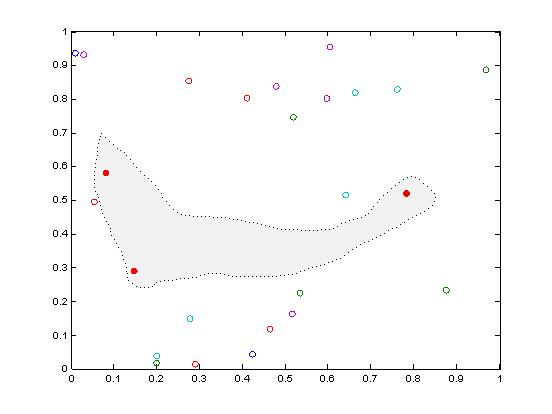
SelectData

As a bonus, this week I was curious how long it would take me to find a random number seed that would produce a certain set of numbers from a pool of fifty (essentially playing the lottery in MATLAB). I was pleased to see it took only three minutes to find the seed that would generate my six numbers. It was a cool exercise in Distributed Computing to be able to test every random number seed until I found the one I was looking for.

rand('state',5967887)

sort(ceil(rand(1,6) * 50))
ans =

     4     8    15    16    23    42

2 Responses to “Graphical removal of data points”

  1. Rommel replied on :

    Hi Doug,
    I saw this post because I was looking for a similar function that would generate random numbers and at the same time whole numbers. I am a newbie in Matlab and I checked out your statement and ran through a number of iterations and on the sixth iteration there are two numbers that are the same. This will be unlikely for lottery picks because it can only pick the numbers that are still remaining not the ones that have already been picked. I would also like to ask what does the whole number after ’state’ do for the rand function.

  2. Doug Hull replied on :

    Rommel,

    You are correct; this is not a true “lottery” simulation. It is essentially generating a vector of six uniformly distributed numbers ([0 1]) and then scaling them to [0 50] and finally rounding them up to be only integers ([1 50]). The essentially means there is ‘replacement’ between picks. It would be easy enough to use the “unique” function in MATLAB to ensure you had unique values, or you could use “randperm” to get a random permutation of the numbers and just select the first few.

    The number after ’state’ is setting up the state of the random number generator. This is much like setting the seed. I did that because I was specifically looking to generate “4 8 15 16 23 42″ as my lottery picks.

    Thanks for the interest,
    Doug

Leave a Reply

Wrap code fragments inside <pre> tags, like this:

<pre class="code">
a = magic(3);
sum(a)
</pre>

If you have a "<" character in your code, either follow it with a space or replace it with "&lt;" (including the semicolon).


Bob, Brett & Jiro share their favorite user-contributed submissions from the File Exchange.

  • Zach: Hi Doug and Les, I didn’t have a lot of time to mess with this, but I did find a work-around. I plotted...
  • hamed: k
  • Les: @Zach This isn’t exactly what you are looking for but at least it puts all three parameters on the same...
  • Zach: Thanks for your suggestions Doug. I’ll give that a shot and see what happens. I’ve seen many of...
  • Doug: @Zach, I would say to use plotYYY, because that is close to what you want, but using depth as Y makes sense....
  • Doug: @Teja, I think this will work: http://www.mathworks .com/access/helpdesk /help/techdoc/ref...
  • Gify: merry christmas :) nice christmas tree! Regards, Janet Gify
  • Teja: Dear Doug Is there anyway to plot a surface from nonuniform data without meshgrid and griddata? Basically i...
  • Zach: I’m working with geophysical data, so I’d like to produce a depth profile. The y-axis would be...
  • Doug: @Ashok First, please do not use variable names that are MATLAB commands (std and mean). Second, p(j) should be...

These postings are the author's and don't necessarily represent the opinions of The MathWorks.
