File Exchange Pick of the Week

September 3rd, 2008

How our developers make MATLAB faster

Last week, we had a Puzzler [click here] that could be developed faster and easier by using the Image Processing Toolbox. Some people used the toolbox, and some did not. As the conversation in the comments continued [click here] we scaled the problem up by solving the problem thousands of times. At this scale, a bottleneck in RMFIELD, which is used by REGIONPROPS, noticeably slowed the Image Processing based code.

It did not take long for Steve Eddins, of Image Processing fame, to notice this conversation. Soon, one of the developers on the team, Inpakala, worked up a solution that speed up the code 70%!

It is too late for this speed optimization to make the 2008b release of MATLAB, but it should make 2009a once all testing is done. This is a case of writing code clean and clear at first and only then doing optimization where the bottlenecks appear. I would like to talk about this solution, and use some MATLAB tools to explore it.

Here is the crux of the problem, in its simplest form:

im = round(rand(100));
for i = 1:1000
    old = regionprops(im,'area');
end


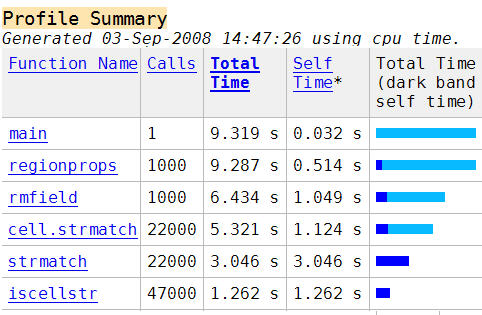
Looking at the Profiler report for this simple code, [Click here for a video on the Profiler]
MATLAB profiler

we can quickly find the slowest part of each m-file until we hit the culprit.

MATLAB profiler

arrow.jpg
MATLAB profiler

arrow.jpg
MATLAB profiler

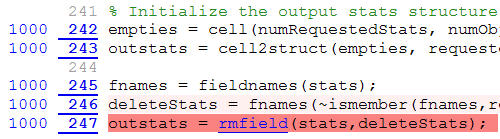
By looking at the slowest line each time, Inpakala found that the slow line of code was from the use of STRMATCH, which is called by RMFIELD. Since that file is not something she can easily modify, just like any other MATLAB user, she needed to find a different way of writing the code she could control.

Lets look at her modified code using the file comparison tool:
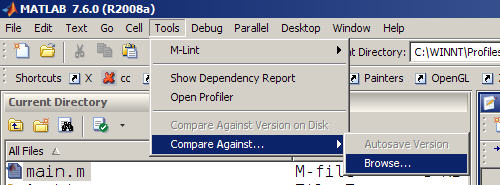
MATLAB file comparison tool

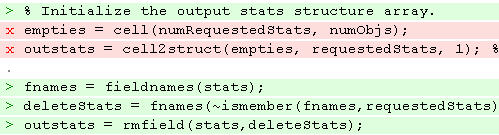
We find that around the trouble line, Inpakala mde the following changes.
MATLAB file comparison tool

The analysis of the actual code changes made is really beyond the scope of this entry, but basically she changed two lines of code (in red) and added three others (in green) along with a new ten line subfunction (not shown).

In the final analysis: the code got longer, more complicated and faster. Notice the code started with the simplest code that would work, and only when optimization was needed was it attempted. In the end, this optimization knocked 70% off of the runtime for REGIONPROPS.
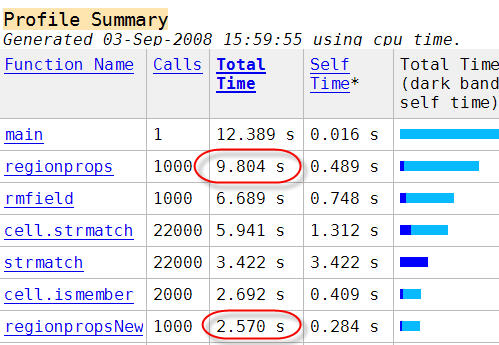
MATLAB profiler

Do you find bottlenecks with the profiler? If you find a bottleneck in MATLAB code that could be improved, don’t be shy! Tell us about it!

4 Responses to “How our developers make MATLAB faster”

  1. Duane Hanselman replied on :

    Did anyone ever try replacing strmatch with strcmp (or its siblings as needed)? I recall mlint telling me that this is much faster since strcmp now works when one argument is a cell array of strings. If I am not mistaken, strmatch is really an obsolete function now.

    TF = strcmp(’str’, C) compares string str to the each element of cell array C, where str is a character vector (or a 1-by-1 cell array) and C is a cell array of strings.

  2. Doug replied on :

    Duane,

    I just looked, I did not see an m-lint warning against STRMATCH in 2008a. However, I seem to recall what you mention also.

    I have entered this into our internal enhancement tracking database.

    Thanks,
    Doug

  3. Duane Hanselman replied on :

    FYI…

    % strmatch replacements
    % strmatch is obsolete, strncmp and strcmp are built in
    % case insensitive works too with strncmpi and strcmpi

    idx=strmatch(str,strarray); % is replaced by
    idx=find(strncmp(str,cellstr(strcell),length(str)));

    % note that find( ) can be removed for logical results
    % in any of these cases.

    idx=strmatch(str,strcell); % is replaced by
    idx=find(strncmp(str,strcell,length(str)));

    idx=strmatch(str,strarray,’exact’); % is replaced by
    idx=find(strcmp(strx,cellstr(strarray)));

    idx=strmatch(str,strcell,’exact’); % is replaced by
    idx=find(strcmp(strx,strcell));

  4. Brad Phelan replied on :

    Funny that this problem with rmfield has only just been noticed. I wrote a trivial mex file to solve this problem for my requirements about 3 years ago.

    http://pastie.org/267994

    It might not cover all bases but i remember it sped up my particular app significantly.

Leave a Reply

Wrap code fragments inside <pre> tags, like this:

<pre class="code">
a = magic(3);
sum(a)
</pre>

If you have a "<" character in your code, either follow it with a space or replace it with "&lt;" (including the semicolon).


Bob, Brett & Jiro share their favorite user-contributed submissions from the File Exchange.

  • Zach: Hi Doug and Les, I didn’t have a lot of time to mess with this, but I did find a work-around. I plotted...
  • hamed: k
  • Les: @Zach This isn’t exactly what you are looking for but at least it puts all three parameters on the same...
  • Zach: Thanks for your suggestions Doug. I’ll give that a shot and see what happens. I’ve seen many of...
  • Doug: @Zach, I would say to use plotYYY, because that is close to what you want, but using depth as Y makes sense....
  • Doug: @Teja, I think this will work: http://www.mathworks .com/access/helpdesk /help/techdoc/ref...
  • Gify: merry christmas :) nice christmas tree! Regards, Janet Gify
  • Teja: Dear Doug Is there anyway to plot a surface from nonuniform data without meshgrid and griddata? Basically i...
  • Zach: I’m working with geophysical data, so I’d like to produce a depth profile. The y-axis would be...
  • Doug: @Ashok First, please do not use variable names that are MATLAB commands (std and mean). Second, p(j) should be...

These postings are the author's and don't necessarily represent the opinions of The MathWorks.