
This “Peaks” My Interest
Jiro's pick this week is PeakFinder by Nate Yoder.
"What? Another peak finder?" you might say. Some of you may classify this as one of those utilities that has been created by many people over the years, like sudoku and waitbar. Well, peak finding happens to be something dear to my heart.
I have been using MATLAB for almost 10 years since my first year of graduate school. I initially learned by trying to decipher my advisor's code. One day, I was struggling to write some code for finding peaks in my data.
% Sample data
t = 0:0.01:10;
x = sin(2*t) - 3*cos(3.8*t);
That's when my advisor showed me his code:
dx = diff(x);          % get differences between consecutive points
pkIDX = (dx(1:end-1) >= 0) & (dx(2:end) < 0); % look for slope changes
pkIDX = [dx(1)<0, pkIDX, dx(end)>=0];         % deal with edges
plot(t, x, t(pkIDX), x(pkIDX), 'ro');
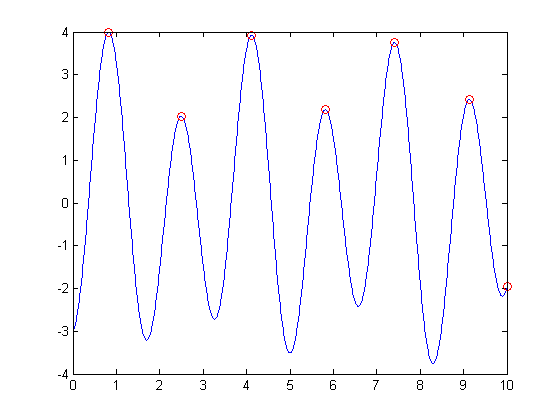
This was an eye-opener and was the moment I experienced the power of vector operation for the first time. The way I code in MATLAB had changed from that point on. ... So when I see "peak finding", it brings back memories.
There are quite a few File Exchange entries for finding peaks (and valleys), including two previous POTW selections: FPEAK and EXTREMA. But I really like peakfinder by Nate. Not only does his code deal with noisy data (my algorithm above will be useless if the signal is noisy), but also his coding practice is quite solid. He has a great help section, robust error-checking of input arguments, and variable input and output arguments for ease of use.
xNoise = x + 0.3*sin(40*t);   % add a few more bumps
peakfinder(xNoise);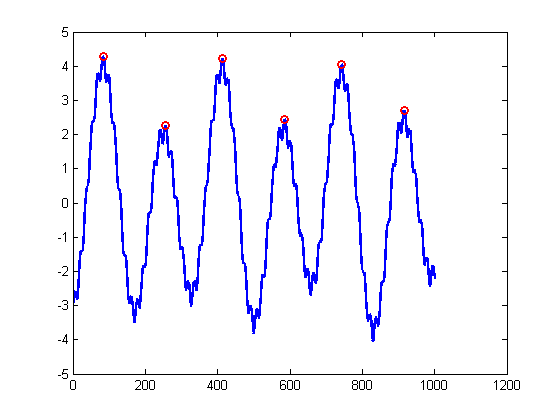
I looked through a few peak finding entries, but I'm sure I may have missed some. Feel free to let me know of others you really like here.
- Category:
- Picks


Comments
To leave a comment, please click here to sign in to your MathWorks Account or create a new one.