
cprintf – Easy display of formatted colored text in Command Window
I recently took a deep dive into some new MATLAB functionality that allows you to use ANSI escape sequences to display formatted text using the built in fprintf command. While the syntax used is standard, it's also arcane!
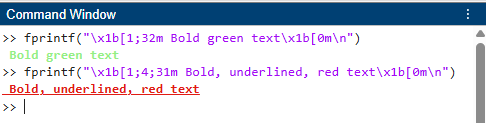
Yair Altman's cprintf command uses ANSI escape escape sequences under the hood on modern versions of MATLAB and provides a user-friendly way of specifying the formatting. However, it also works on older versions of MATLAB too using alternative techniques and has been in use for many years with over 30,000 downloads at the time of writing.
I'm using MATLAB R2026b so can easily install it using mpminstall
I'll defer to the File Exchange page for full details of everything that cprintf can do but here are a few examples

- Category:
- Picks


See Also
-

Colorizing text output
Blogs





Comments
To leave a comment, please click here to sign in to your MathWorks Account or create a new one.