Mike on the MATLAB Desktop
April 11th, 2011
Introducing MATLAB R2011a
Last Friday we released MATLAB 7.12 (R2011a), the latest and greatest in MATLAB. There are a lot of new and improved features in this release. At the same time we also released MATLAB Mobile 1.3, and there are a few new and improved things in the community to talk about as well. Sadly for me, this is also the last release of (desktop) MATLAB that has new code I actually wrote.
MATLAB 7.12
MATLAB Desktop

|
MATLAB now behaves more like other native applications on Mac OS X by showing its menus at the top of the screen instead of inside the application frame. |
MATLAB Editor
 |
matlab.desktop.editor API |
|
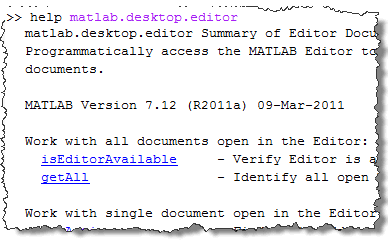
As I long ago promised, we now provide an official programmatic way to access the MATLAB Editor, and its contents. Check it out with help matlab.desktop.editor. Over the next few months I’ll be posting more about how this API works and give examples of a lot of cool things you can do now. |
|
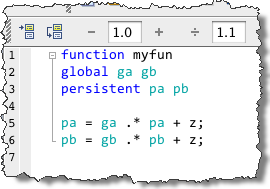
Previously we started highlighting non-local variables used across functions; now, we’ve extended this to cover global and persistent variables as well. |
Plot Catalog
|
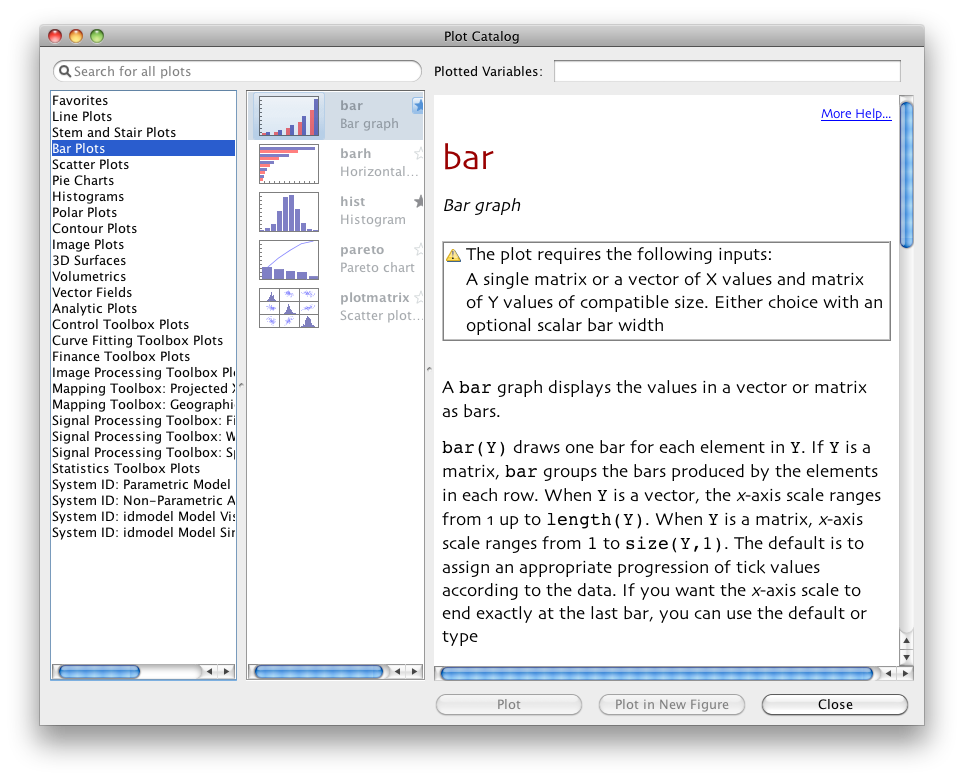
The plot catalog has been redesigned to be more usable, include more plot types, and provide diagnostics. Watch the video |
Support
|
You can now use a built-in GUI for submitting support requests instead of using the MathWorks.com website. This is also a great way to ask for all the enhancement you want. It’ll get to the developers faster than by leaving a comment on this blog. To use it, just go to the Help menu and select “Submit a MathWorks Support Request.” You’ll need your MathWorks Account credentials handy in order to log in. Watch the video |
Comparison Tool
|
With the Comparison tool you can now compare individual variables in a MAT-file down to the field or element of arrays and structures. You can also now merge differences in MAT files. |
MATLAB Mobile
MATLAB Mobile 1.3
|
We were lucky that we were able to release the latest version of MATLAB Mobile at the same time as new desktop MATLAB. This version has a lot UI and performance improvements. We’ve made the custom keyboard easier to use, added snapshot previews to the Command Window, and reorganized the History to be filterable and easier to understand. |
MATLAB Community
MATLAB Answers
|
MATLAB Answers has come a long way since it was first released. We’ve added a bunch of cool new features, including a categorical navigation/search on the left side of the screen. Also Community Members with more than 1500 reputation points can edit questions, answers, and tags. Be sure to check back on this blog in the next few weeks for an in-depth review. |
Programming Contest
|
The new contest starts this Wednesday, April 13. The contest is a great way to show your MATLAB chops, and to learn new tricks and techniques. It’s a pretty unique social computing experience, and I recommend that everyone try it out at least once. I promised not to give anything a way, not even by pun, so don’t even ask; just check back in two days! |
By
Michael Katz
Mike is a developer on the MATLAB Mobile team. When not describing himself in the third person, biking, homebrewing, or rooting for the home team, he's busy trying to make the world a better place for programming.
17:34 UTC |
Posted in Community, Current Directory, Data Tools, Editor, Help Browser, Mac, MATLAB Central, MATLAB Mobile, Releases |
Permalink |
17 Comments »
You can follow any responses to this entry through the RSS 2.0 feed.
You can skip to the end and leave a response. Pinging is currently not allowed.
Leave a Reply
|
|
Are you able to state any performance improvement to the Mac version of Matlab? Still requires X11 to run?
Has it been tested with the Lion beta on the Mac?
@Thomas,
As Lion is not out yet, it’s too early to talk about plans for it. Once it’s released, we’ll post our plans on the Platform Roadmap.
@Antonio,
We’ll have a full post about the state of Mac. There are still a few products that need X11, and so that will be started up as needed, but it is not required for basic MATLAB.
Performance on OS X is significantly worse as far as matlab bench benchmark[1] suggests comparing 2010a and 2011a – there are significant drops for LU, FFT, ODE and 3D. This is compared to either 32 or 64bit 2010a.
And guide is still as awfully sluggish on 2011a.
—-
[1] run bench 12 times, discount the first run and do the stats.
One very nice bug fix though is that the fake aqua swing widgets that were so clearly different sizes to either Windows or Linux, i.e. that made guide UIs visually break placement on OS X seems greatly improved. This means I don’t have to hack look-and-feel for the first time in years.
@Ian,
As you can see from the documentation page for BENCH (see Tip):
http://www.mathworks.com/help/techdoc/ref/bench.html
BENCH is not designed for comparison between different versions. It’s used to compare performances between different machines/OS on the same version.
On 8th April I wrote a message on the newsgroup with title “Performance: R2009bSP1 & 2010a faster than R2011a?”
Comparing the execution speed of the same code between R2009bSP1, R2010a and R2011a I found R2011a to be significantly slower than previous versions.
Gabriele
Perhaps I am doing something wrong, but, on my Mac (running OSX 10.6.7) I am not getting the MATLAB menus at the top of the Mac screen when using R2011a.
@Sid — Same thing for me, no menus up top.
@Sid, @Adam,
Do you have Stateflow installed? If so, check out the release notes.
@Mike – Yes, I do have Stateflow installed. I contacted support and they helped solve the problem. The solution you linked above worked perfectly for me.
I run a very latency sensitive application. As part of the framework, I have implemented a rigorous performance testing routine. The framework utilizes basic vector and matrix operations. I have also seen significant performance drops when upgrading from R2010b to R2011a on three different platforms. This is contrary to my expectation after reviewing the update notes: “Improved performance for many linear algebra functions in MATLAB” [Mathworks Website]
Is this being looked into?
@Hannes,
Without specifics, I can’t really provide a satisfactory comment. Please open a technical support request. File -> Help -> Submit a MathWorks Support Request. The engineers there will help you either resolve the issue or file a bug so that your observed degradation can be fixed.
I am not seeing the menus at the top of the screen. It’s still behaving in the old un-Mac way.
@Roy,
Do you have Stateflow installed? See the explanation provided in the menu bar thread.