Loren on the Art of MATLAB

June 25th, 2008

Speeding Up MATLAB Applications

Today I’d like to introduce a guest blogger, Sarah Wait Zaranek, who is an application engineer here at The MathWorks. Today she talks about speeding up code from a customer to get acceptable performance.

Contents

Introduction

A customer ran into slow performance issues with her code in MATLAB. She saw such slow performance in that she decided to recode her algorithm in another language. I wanted to show her some simple techniques in MATLAB that could bring her code down to a more reasonable running time.

I enlisted the help of my fellow application engineers to suggest possible changes. Many of them chimed in with some really great suggestions. I have integrated most of our thoughts into a few code versions to share with you. These versions illustrate our thought processes as we worked through the code collaboratively to improve its speed.

In this post, I focus on

  • preallocation
  • vectorization
  • elimination of repeated calculations

What Does This Code Do?

For security reasons, the user couldn't give me her exact code. So the code we will use in this blog serves as an approximation of the code she is using.

The code generates locations on a 2D grid with dimensions nx1 by nx2. These grid locations serve as values for initial and final positions used by the main part of the calculation. The code iterates through all possible combinations of these initial and final positions.

Given an initial and final position, the code calculates the quantity exponent . If exponent is less than a particular threshold value, gausThresh, exponent is then used to calculate out. subs contains the indices corresponding to the initial and final positions used to calculate out.

For some of you, this probably is better understood just by looking at the code itself.

The Initial Code

% Initialize the grid and initial and final points
nx1 = 10; nx2 =  10;
x1l =  0; x1u = 100;
x2l =  0; x2u = 100;

x1 = linspace(x1l,x1u,nx1+1);
x2 = linspace(x2l,x2u,nx2+1);

limsf1 = 1:nx1+1; limsf2 = 1:nx2+1;

% Initalize other variables
t = 1;
sigmax1 = 0.5; sigmax2 = 1;
sigma = t * [sigmax1^2 0; 0 sigmax2^2];
invSig = inv(sigma);
detSig = det(sigma);

expF = [1 0; 0 1];
n = size (expF, 1);
gausThresh = 10;

small = 0; subs = []; vals = [];

% Iterate through all possible initial
% and final positions and calculate
% the values of exponent and out
% if exponent > gausThresh.

for i1 = 1:nx1+1
    for i2 = 1:nx2+1
        for f1 = limsf1
            for f2 = limsf2

                % Initial and final position
                xi = [x1(i1) x2(i2)]';
                xf = [x1(f1) x2(f2)]';

                exponent = 0.5 * (xf - expF * xi)'...
                    * invSig * (xf - expF * xi);

                if exponent > gausThresh
                    small = small + 1;
                else
                    out = 1 / (sqrt((2 * pi)^n * detSig))...
                        * exp(-exponent);
                    subs = [subs; i1 i2 f1 f2];
                    vals = [vals; out];
                end

            end
        end
    end
end

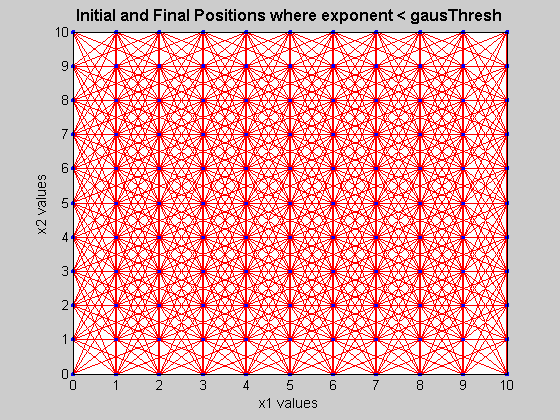
Here is a graphical representation of the results for nx1=nx2=100. Because the data is quite dense, I have magnified a portion of the total graph. The red lines connect the initial and final points where exponent < gausThresh and the thickness of the line reflects the value of vals.

open('results.fig');
Here are the runtimes on my computer, a T60 Lenovo dual-core laptop with multithreading enabled.

displayRunTimes(1)
    nx1      nx2      time
    50       50       296 seconds
    100      100      9826 seconds

Listen to M-Lint

The first and easiest step is to listen to the suggestions from M-Lint, the static code analyzer that ships with core MATLAB. You can either access it via the editor or command line. In this case, I use the command line and define a simple function displayMlint so that the display is compact.

output = mlint('initial.m');
displayMlint(output);
'subs' might be growing inside a
 loop. Consider preallocating
 for speed.
     
'vals' might be growing inside a
 loop. Consider preallocating
 for speed.
     

Following these suggestions, I know I need to preallocate some of the arrays.

Why?

MATLAB needs contiguous blocks of memory for each array. Therefore, by repeatedly resizing the array, I keep asking MATLAB to look for a new contiguous blocks of memory and move the old array elements into that new block. If I preallocate the maximum amount of space that would be required by the array, I do not have to suffer the additional cost to do this searching and moving.

However, since I am unsure of the final size of subs and vars, I don't know what size I should preallocate. I could make them the maximum possible size. However for the case of nx1 = nx2 = 100, that requires a vector of 100^4 elements, which gets me into trouble!

try
    zeros(1,100^4)
catch ME
end
display(ME.message)
Out of memory. Type HELP MEMORY for your options.

Therefore, I need to block allocate the variable.

I do this by first preallocating a reasonable size (that doesn't create an out of memory error) for subs and vars and then increase that allocation by a reasonable amount, chunk by chunk, if subs and vars go beyond their preallocated sizes.

This way, I only suffer the cost of resizing the array a few times instead of every time a new element is added.

I have also introduced a function, initialize, to do the variable initializations so that you don't have to repeatedly look at the part of the code that does not change.

The Code with Preallocation

% Initialization
nx1 = 10;
nx2 = 10;

[x1,x2,limsf1,limsf2,expF,gausThresh,small,invSig,detSig,n]= ...
    initialize(nx1,nx2);

% Initial guess for preallocation
mm = min((nx1+1)^2*(nx2+1)^2, 10^6);
subs = zeros(mm,4);
vals = zeros(mm,1);

counter = 0;

% Iterate through all possible initial
% and final positions
for i1 = 1:nx1+1
    for i2 = 1:nx2+1
        for f1 = limsf1
            for f2 = limsf2

                xi = [x1(i1) x2(i2)]'; %% Initial position
                xf = [x1(f1) x2(f2)]'; %% Final position

                exponent = 0.5 * (xf - expF * xi)'...
                    * invSig * (xf - expF * xi);

                % Increase preallocation if necessary
                if counter == length(vals)
                    subs = [subs; zeros(mm, 4)];
                    vals = [vals; zeros(mm, 1)];
                end

                if exponent > gausThresh
                    small = small + 1;
                else
                    % Counter introduced
                    counter=counter + 1;
                    out = 1 / (sqrt((2 * pi)^n * detSig))...
                        * exp(-exponent);
                    subs(counter,:) = [i1 i2 f1 f2];
                    vals(counter) = out;
                end

            end
        end
    end
end

% Remove zero components that came from preallocation
vals = vals(vals > 0);
subs = subs(vals > 0);

The preallocation makes for slightly faster code.

displayRunTimes(2)
    nx1      nx2      time
    50       50       267 seconds
    100      100      4228 seconds

However, this isn't exactly the speedup I was looking for. So, let's try to tackle the code using vectorization.

Vectorization

Because MATLAB is a array-based language, code written in terms of matrix and array operations is often faster than code which relies on for loops, especially in the case of nested for loops. In vectorizing, matrix and vector operations substitute for the equivalent for loop calculations.

There are several possibilities for vectorizing this code. I am going to explore two in this blog entry.

  • Vectorize the Inner Two loops
  • Vectorize the Inner Three loops

The Code with Preallocation and Vectorization of the Inner Two Loops

Try 1: Vectorize the Inner Two loops

% Initialization

nx1 = 10;
nx2 = 10;

[x1,x2,limsf1,limsf2,expF,gausThresh,small,invSig,detSig,n]= ...
    initialize(nx1,nx2);

vals = cell(nx1+1,nx2+1); % Cell preallocation
subs = cell(nx1+1,nx2+1); % Cell preallocation

[xind,yind] = meshgrid(limsf1,limsf2);
xyindices = [xind(:)' ; yind(:)'];

[x,y] = meshgrid(x1(limsf1),x2(limsf2));
xyfinal = [x(:)' ; y(:)'];

exptotal = zeros(length(xyfinal),1);

% Loop over all possible combinations of positions
for i1 = 1:nx1+1
    for i2 = 1:nx2+1

        xyinitial = repmat([x1(i1);x2(i2)],1,length(xyfinal));

        expa = 0.5 * (xyfinal - expF * xyinitial);
        expb = invSig * (xyfinal - expF * xyinitial);
        exptotal(:,1) = expa(1,:).*expb(1,:)+expa(2,:).*expb(2,:);

        index = find(exptotal < gausThresh);
        expreduced = exptotal(exptotal < gausThresh);

        out = 1 / (sqrt((2 * pi)^n * detSig)) * exp(-(expreduced));
        vals{i1,i2} = out;
        subs{i1,i2} = [i1*ones(1,length(index)) ; ...
            i2*ones(1,length(index)); xyindices(1,index); ...
            xyindices(2,index)]' ;

    end
end

% Reshape and convert output so it is in a
% simple matrix format
vals = cell2mat(vals(:));
subs = cell2mat(subs(:));

small = ((nx1+1)^2*(nx2+1)^2)-length(subs);

Wow! With just this little bit of vectorization, the run time decreased tremendously.

displayRunTimes(3)
    nx1      nx2      time
    50       50       1.51 seconds
    100      100      19.28 seconds

Let's go over the main techniques I've illustrated here.

  • Use of meshgrid and repmat to create matrices
  • Use of vector and matrix operations
  • Use of element-wise operations when appropriate

meshgrid produces two vectors of the x and y positions for all possible combinations of the x and y input vectors. In other words, given the vectors x and y, meshgrid gives all possible positions in a mesh or grid defined on a side by those x and y input vectors. The n-dimensional version of meshgrid is ndgrid, which I use it in the next example.

The function repmat replicates and tiles arrays.

Generally I use matrices as part of the vectorization, so whenever possible I use vector and matrix operations.

However, in one segment of the code it is actually faster to explicitly write out a vector-vector multiply element by element. This is somewhat unintuitive, so let's discuss this a bit more in detail.

To calculate exponent in the original code, there is a series of vector and matrix multiplies with the original and final positions, each represented by two-element vectors. The values of the initial and final position are then changed every step through the loop.

When the code is vectorized, all the initial positions and final positions are now contained in two matrices xyinitial and xyfinal. Therefore, to calculate the value of exponent, only the diagonal terms of the multiplication of expa and expb are relevant. However, in this case, taking the diagonal of a matrix multiply turns out to be a rather expensive operation. Instead I choose to write it as an element-by-element operation.

I have only shown you a few functions that are useful for vectorization in this post. Here is a more extensive list of useful functions for vectorization.

The Code with Preallocation and Vectorization of the Inner Three Loops

Try 2: Vectorize the Inner Three Loops

% Initialization
nx1 = 10;
nx2 = 10;

[x1,x2,limsf1,limsf2,expF,gausThresh,small,invSig,detSig,n]= ...
    initialize(nx1,nx2);

limsi1 = limsf1;
limsi2 = limsf2;

% ndgrid gives a matrix of all the possible combinations
[aind,bind,cind] = ndgrid(limsi2,limsf1,limsf2);
[a,b,c] = ndgrid(x2,x1,x2);

vals = cell(nx1+1,nx2+1);  % Cell preallocation
subs = cell(nx1+1,nx2+1);  % Cell preallocation

% Convert grids to single vector to use in a single loop
b = b(:); aind = aind(:); bind = bind(:); cind = cind(:);

expac = a(:)-c(:); % Calculate x2-x1

% Iterate through initial x1 positions (i1)
for i1 = limsi1

    exbx1= b-x1(i1);
    expaux = invSig(2)*exbx1.*expac;
    exponent = 0.5*(invSig(1)*exbx1.*exbx1+expaux);

    index = find(exponent < gausThresh);
    expreduced = exponent(exponent < gausThresh);

    vals{i1} = 1 / (sqrt((2 * pi)^n * detSig))...
        .*exp(-expreduced);

    subs{i1} = [i1*ones(1,length(index));
        aind(index)' ; bind(index)';...
        cind(index)']';

end

vals = cell2mat(vals(:));
subs = cell2mat(subs(:));

small = ((nx1+1)^2*(nx2+1)^2)-length(subs);

Now the code runs in even less time.

displayRunTimes(4)
    nx1      nx2      time
    50       50       0.658 seconds
    100      100      8.77 seconds

Why don't I try to vectorize all the loops?

I certainly could. In this case, I didn't see much of a benefit with total vectorization, and the code became a bit harder to read. So, I am not going to show the fully vectorized code. Considering performance and readability of the code, try 2 seems to be the best solution.

Once the code is vectorized, you can easily see that I repeatedly calculate values that only need to be calculated once. Also, assuming some of the vectors keep the same form (such as sigma), other calculations (e.g., InvSig) are unnecessary.

Some of these changes are quite easy to do, and some are a bit more advanced, but I wanted to finish this entry with the fastest version of the code from the application engineering participants.

The Code with Preallocation, Vectorization and Only Calculating Once

nx1 =  100; nx2 = 100;
x1l =   0; x1u = 100;
x2l =   0; x2u = 100;

x1 = linspace(x1l,x1u,nx1+1);
x2 = linspace(x2l,x2u,nx2+1);

limsi1 = 1:nx1+1;
limsi2 = 1:nx2+1;

limsf1 = 1:nx1+1;
limsf2 = 1:nx2+1;

t = 1;

sigmax1 = 0.5;
sigmax2 = 1;

sigma = t * [sigmax1^2 sigmax2^2];
detSig = sigma(1)*sigma(2);
invSig = [1/sigma(1) 1/sigma(2)];

gausThresh = 10;
n=3;
const=1 / (sqrt((2 * pi)^n * detSig));

% ndgrid gives a matrix of all the possible combinations
% of position, except limsi1 which we iterate over

[aind,bind,cind] = ndgrid(limsi2,limsf1,limsf2);
[a,b,c] = ndgrid(x2,x1,x2);

vals = cell(nx1+1,nx2+1);  % Cell preallocation
subs = cell(nx1+1,nx2+1);  % Cell preallocation

% Convert grids to single vector to
% use in a single for-loop
b = b(:);
aind = aind(:);
bind = bind(:);
cind = cind(:);

expac= a(:)-c(:);
expaux = invSig(2)*expac.*expac;

% Iterate through initial x1 positions

for i1 = limsi1

    expbx1= b-x1(i1);
    exponent = 0.5*(invSig(1)*expbx1.*expbx1+expaux);

    % Find indices where exponent < gausThresh
    index = find(exponent < gausThresh);

    % Find and keep values where exp < gausThresh

    expreduced = exponent(exponent < gausThresh);

    vals{i1} = const.*exp(-expreduced);

    subs{i1} = [i1*ones(1,length(index));
        aind(index)' ; bind(index)';...
        cind(index)']';
end

vals = cell2mat(vals(:));
subs = cell2mat(subs(:));

small = ((nx1+1)^2*(nx2+1)^2)-length(subs);

With this, here are the magical times.

displayRunTimes(5)
    nx1      nx2      time
    50       50       0.568 seconds
    100      100      8.36 seconds

Pretty good speedup. In fact, you see the run-time reduced to about 2% of the original times.

Additional Resources

In this post, I focused on preallocation, vectorization, and only doing calculations a single time. However, there are also additional techniques to help you speed up your MATLAB code such as using the profiler to diagnose bottlenecks, using MEX-files, using bsxfun, and enabling multithreading. The documentation for MATLAB has a very helpful section entitled Performance. I encourage you to go there to read more about these and other relevant topics.

Your Examples

Tell me about some of the ways you speed up MATLAB applications or feel free to post a example of a technique I didn't illustrate here.


Get the MATLAB code

Published with MATLAB® 7.6

19 Responses to “Speeding Up MATLAB Applications”

  1. Jared Jensen replied on :

    In grad school I was working on a GSM receiver in Matlab. I found some source online that had been open-sourced that used a Viterbi Equalizer. It worked well, but was extremely slow. (Especially forming the channel estimate.) It looked like the original author was very prone to Computer-Science-Like FOR loops and lots of IF logic. So I took some time to rewrite the code using vectorization, meshgrid and linear indexing. You mentioned the first two, but I have found big speedups in using linear indexed arrays and matrices for my operations. (Mainly because I don’t have to pick elements out with loop variables and such.) The original was about 5*real time. (5 seconds to demod 1 second of signal.) The final rewrite with a .mex file for the actual Viterbi was right at 1/10 of real time. Here’s an example from the code using some meshgrid, vectorization, linear indexing and reshaping matrices for easy multiplies. This was fast enough that I could calculate a channel estimate for all 8 of the GSM training sequences at once. (I used that mainly for debugging purposes.) Meshgrid was the hottest line in the profiler, and was still down in the noise.

    Original : (Short, sweet and slow…)

    % ESTIMATE CHANNEL IMPULSE RESPONSE USING ONLY EVERY
    % OSR’th SAMPLE IN THE RECEIVED SIGNAL
    %

    for n = 1:length(chan_est),
    chan_est(n)=r_sub(n:OSR:n+(length(T16)-1)*OSR)*T16.’;
    end

    Rewrite : (Longer, a little harder to read, 1000xfaster)

    % NO NO NO NO NO NO NO NO NO NO NO NO
    % % % % % % for n = 1:length(chan_est),
    % % % % % % chan_est(n)=r_sub(n:OSR:n+15*OSR)*TRAINING(:,3);
    % % % % % % end

    % Make my index matrices.
    % X increments by OSR up to length(chan_est)*4 and then repeats that row to
    % make the matrix square.
    %
    % Y is a column incrementing from 1 to the length of the X matrix row by 1.
    % Then that column is repeated to make the matrix square.
    [ X , Y ] = meshgrid([1:OSR:length(chan_est)*OSR],[1:length([1:OSR:length(chan_est)*OSR])]);

    % Add them together, and subtract 1. This gives us rows of lags for the
    % signal sample points. We only want 16 sample points, so we kill off
    % everything after the 16th lag of each row and transpose. (Since the
    % indices are all real, we can use the ‘ conjugate transpose without
    % ill-effect, but to be disciplined we won’t.)
    ind = X+Y-1;
    ind = ind(:,1:16).’;

    % Here we use linear indexing into the r_sub signal to create a long vector
    % of lagged samples of r_sub. Every 16 samples of the new r_sub is going
    % to be a row in our matrix. We reshape it into a matrix of 16 rows by
    % length(chan_est) columns and then non-conjugate transpose to get the
    % correct shape. (You have to do it this way due to the way reshape fills
    % in values. Column-wise.)
    r_sub = r_sub(ind);
    r_sub = reshape(r_sub, 16, length(chan_est)).’;

    % Now we simply do a matrix multiply and we create chan_est in one
    % operation. In fact, we generate a chan_est for all 8 training sequences
    % in one multiply.

    chan_est = (r_sub*TRAINING).’;

    Love the blog. Thanks for the great post.

  2. jhofman replied on :

    see also this great link for an (often faster) indexing version of repmat: http://www.psi.toronto.edu/~vincent/matlabindexrepmat.html

  3. Dan K replied on :

    An excellent blog. There is an area of acceleration which you didn’t cover which I would very much like to get some clarification on. What is the fastest way to extract a subset of an array? For example, if I am calculating a power spectral density I only need the first half of the results, is there any way to know which of the following will be fastest?

    nPts = 1e5;
    half = nPts/2;
    A = rand(1e5,1);
    B = fft(A); % I know I can do lots of things to accelerate this

    B=B(1:half); % method 1
    B(half+1:end)=[]; %method 2
    C = B(1:half); %method 3

    Also, how does this change when I’m dealing with more than 1 dimension? Is there a relative speed difference between linear indexing and : notation? Does using “end” slow me down vs explicitly determining the number of rows?

    I know this seems like a trivial area to worry about speed, but when you are dealing with lots of these operations, they can take up a lot of my execution time.

    Thanks,
    Dan

  4. Jacob replied on :

    Thanks for all the helpful tips. In particular, I have not seen bsxfun before, and I’ve wanted that functionality.

    I have a question, though. I certainly try to preallocate and vectorize in my own code, but I was under the impression that MATLAB had radically sped up for-loops a few versions ago, as long as the data types and operations within the loop were part of an “accelerated” subset. This wouldn’t, of course, change the need to preallocate, but the operations in this example all seem to be things that should be accelerated. So why is your first try (with preallocation and no vectorization) still so slow? Would it have been that much slower in an old version of MATLAB, before acceleration?

  5. Loren replied on :

    Dan-

    Good questions about indexing. I fixed your example to be more fair, I believe. Here’s the code and the experiment I ran.

    First the code:

    %% Extracting Parts of an Array
    nPts = 1e7;
    half = nPts/2;
    A = rand(nPts,1);
    B = fft(A);
    Borig = B;
    % make sure B and Borig occupy different memory locations
    % so avoid copy on write by writing it out first!
    Borig(1) = Borig(1);
    %%
    % be sure to reset B to the original size before each timing
    t1 = tic;
    B=B(1:half); % method 1
    toc(t1)
    B = Borig;
    t2 = tic;
    B(half+1:end)=[]; %method 2
    toc(t2)
    B = Borig;
    t3 = tic;
    C = B(1:half); %method 3
    toc(t3)
    

    And the results - which I got by running the first cell once and the second cell 3 times:

    Elapsed time is 0.148372 seconds.
    Elapsed time is 0.600757 seconds.
    Elapsed time is 0.196193 seconds.
    >>
    >>
    >>
    Elapsed time is 0.155245 seconds.
    Elapsed time is 0.550005 seconds.
    Elapsed time is 0.198151 seconds.
    >>
    >>
    >>
    Elapsed time is 0.131419 seconds.
    Elapsed time is 0.549656 seconds.
    Elapsed time is 0.194549 seconds.
    

    This is only 1-D and linear indexing both for this case. It seems like creating the part to keep and assigning it is faster than removing the ones you don’t want to keep. Not sure if that extends to ND. Expect me to think about this for a post of the future!

    –Loren

  6. Oliver A. Chapman, P.E. replied on :

    This is a wonderfully deep example and I think it will take me a month to digest.

    I guess my first comment is that you could have significantly improved the readability by simplifying the span of the nested for loops since for the purposes of this column, you left them fixed at all times.

    i.e.,
    for i1 = 1 : 11
    rather than
    for i1 = 1 : nx1+1

    Next is a question. In your 1st attempt at preallocation, you have this in the code:

    vals = vals(vals > 0);

    This is the first I’ve seen this indexing syntax of vals > 0. Where can I learn more about this?

    Thanks.

  7. Loren replied on :

    Oliver-

    The code you ask about:

    vals = vals(vals > 0);
    

    is just using logical indexing - a topic that is in the documentation here: http://www.mathworks.com/access/helpdesk/help/techdoc/matlab_prog/f1-85462.html#bq7egb6-1

    and in several of my blogs on indexing: http://blogs.mathworks.com/loren/category/indexing/
    particularly:
    http://blogs.mathworks.com/loren/2006/01/18/think-about-your-algorithm/

    http://blogs.mathworks.com/loren/2006/08/09/essence-of-indexing/

    http://blogs.mathworks.com/loren/2007/10/11/a-way-to-account-for-missing-data/

    –Loren

  8. Mark Hoemmen replied on :

    Great article! Would love to see more performance tuning examples :-)

  9. Dan K replied on :

    Loren,
    Good catch on the code error I made! I later caught the fact that I was reusing a variable incorrectly, but missed the copy on write part. I guess one more option to try would be logical indexing as a way of extracting a subset. Especially surpising to me was that B(half+1:end) =[]; is FASTER than B(half+1:nPts)=[]; That one I really can’t figure.

    Dan

  10. Loren replied on :

    Dan-

    I haven’t looked into the innards of MATLAB, but I think what’s happening is that the expression with nPts creates the vector with indices first and then uses it. The expression with ‘end’ has more oppportunties for optimizing since ‘end’ depends on context and doesn’t just get calculated without knowing the lay of the land. Once MATLAB has the expression in context, MATLAB might not need to create the full index vector first, but can construct the output without the intermediate vector. That guess is predicated on end and using :. If you did something else like [1 2 3 end], I don’t know if you’d see similar performance results. In any case, this is all speculation on my part.

    –Loren

  11. Yakov replied on :

    In response to jhofman, for this application bsxfun is only slightly slower than that website describes, but uses much less memory. Additional advantage is the easier to read code.

  12. Steve Eddins replied on :

    Oliver—In addition to the links Loren provided about logical indexing, I have posted about logical indexing as well.

  13. Sarah Zaranek replied on :

    Hi Jacob,

    Sorry about the slow response. You are correct that the code would be slower without the JIT/accelerator.

    The JIT/accelerator was first introduced in MATLAB 6.5 (Release 13). When you first run code, it is analyzed and, when possible, machine code is generated and used in place of the interpreted code. The JIT/accelerator initially sped up some calculations in loops that obeyed certain characteristics, e.g., scalar operations on double values. The JIT/accelerator has continued to evolve and handles much more of the MATLAB language, but still incurs costs the first time (or few times) through a loop so assumptions about variables being scalar, for example, can be verified. If the assumptions are ever broken, MATLAB does know to use the interpreted version of code. But if the assumptions hold, the loops can execute quickly.

    Let’s look at the first case with nx1=nx2=50. When the JIT/accelerator is turned off, we get a speed around 371 seconds. Compared to the case I showed in the blog post of 296 seconds. Interestingly, you could put a tic-toc pair within the inner-most for-loop itself to see what effect the JIT has on each loop. The subsequent loops after the first loop are on average 27 times faster.

    If you are working on elements of a matrix and iterating through them (such as one of our later iterations of the code), a single for-loop is for certain cases almost just as fast as the matrix operation, especially if you remember that MATLAB stores matrix columns in monotonically increasing memory locations. This means that processing data column-wise results in faster times then processing data row-wise.

    Stuart McGarrity has a great News and Notes article written about this here:
    http://www.mathworks.com/company/newsletters/news_notes/june07/patterns.html

    We recommend not writing specifically for the JIT since the JIT is constantly evolving. You should though keep in mind the general good MATLAB-coding practices, such as those listed above.

  14. Oktay replied on :

    Hello,

    Is there any significant difference between using:
    - Vectorization inside a subfunction
    - Benefiting from arrayfun, cellfun, or maybe some Mex functions outside the subfunction

    For example:

    I have two functions f1 and f2 which has subfunctions f1sub and f2sub respectively:

    function y = f1
    x = [1 2 3];
    y = f1sub(x);
    function z = f1sub(x)
    - - do some validations on x here - -
    z = x.^2;

    function y = f2
    x = [1 2 3];
    y = arrayfun(@f2sub,x)
    function z = f2sub(x)
    - - do some validations on x, (x should have only a single element) - -
    z = x^2;

    Thank you.

    Oktay

  15. Loren replied on :

    Oktay-

    It very much depends on the details of the calculations you are doing. Vectorization can sometimes require large intermediate arrays that might not be required by using cellfun, for example. Grabbing the extra memory can cost time. On the other hand, with cellfun, etc., you have the overhead of error checking/validation for each element instead of once for the whole array. So it depends on the balance of what you are doing and what the typical sizes are. I suggest you use the profiler to try out your specific example.

    –Loren

  16. B Cook replied on :

    I have some finite difference time domain code for solving maxwells equations - pretty basic stuff, and on a 100 by 100 by 100 grid it ran/runs very slowly the loop part of the code looks like

    for t=2:1:T-2
       tic
        for i=2:1:gridxs-2
            for j=2:1:gridys-2
                for k=2:1:gridzs-2
                    %%%%%%%%%
    
                    dExdx=Ex(i+1,j,k)-Ex(i,j,k);
                    dExdy=Ex(i,j+1,k)-Ex(i,j,k);
                    dExdz=Ex(i,j,k+1)-Ex(i,j,k);
                    %%%%%%%%%%%%%%%%%%%%%%%%%%%%%%%%%%%%%%%%%%%%%%
                    dEydx=Ey(i+1,j,k)-Ey(i,j,k);
                    dEydy=Ey(i,j+1,k)-Ey(i,j,k);
                    dEydz=Ey(i,j,k+1)-Ey(i,j,k);
                    %%%%%%%%%%%%%%%%%%%%%%%%%%%%%%%%%%%%%%%%%%%%%%
                    dEzdx=Ez(i+1,j,k)-Ez(i,j,k);
                    dEzdy=Ez(i,j+1,k)-Ez(i,j,k);
                    dEzdz=Ez(i,j,k+1)-Ez(i,j,k);
                    %%%%%%%%%%%%%%%%%%%%%%%%%%%%%%%%%%%%%%%%%%%%%%
    
                    Hx2(i,j,k)= Hx(i,j,k)-deltaH*(dEzdy-dEydz);
                    Hy2(i,j,k)= Hy(i,j,k)-deltaH*(dExdz-dEzdx);
                    Hz2(i,j,k)= Hz(i,j,k)-deltaH*(dEydx-dExdy);
                   %%%%%%%%%%%%%%%%%%%%%%%%%%%%%%%%%%%%%%%%%%%%%%%%%
                    dHxdx=Hx2(i,j,k)-Hx2(i-1,j,k);
                    dHxdy=Hx2(i,j,k)-Hx2(i,j-1,k);
                    dHxdz=Hx2(i,j,k)-Hx2(i,j,k-1);                %%%%%%%%%%%%%%%%%%%%%%%%%%%%%%%%%%%%%%%%%%%%%%%%%
                    dHydx=Hy2(i,j,k)-Hy2(i-1,j,k);
                    dHydy=Hy2(i,j,k)-Hy2(i,j-1,k);
                    dHydz=Hy2(i,j,k)-Hy2(i,j,k-1);                %%%%%%%%%%%%%%%%%%%%%%%%%%%%%%%%%%%%%%%%%%%%%%%%%%
                    dHzdx=Hz2(i,j,k)-Hz2(i-1,j,k);
                    dHzdy=Hz2(i,j,k)-Hz2(i,j-1,k);
                    dHzdz=Hz2(i,j,k)-Hz2(i,j,k-1);
                end
             end
          end
    toc
    end
    
                    %%%%%%%%%%%%%%%%%%%%%%%%%%%%%%%%%%%%%%%%%%%%%%%%
                    Ex2(i,j,k)= Ex(i,j,k)+deltaE*(dHzdy-dHydz);
                    Ey2(i,j,k)= Ey(i,j,k)+deltaE*(dHxdz-dHzdx);
                    Ez2(i,j,k)= Ez(i,j,k)+deltaE*(dHydx-dHxdy);
    

    I am sure there are bugs in the code,but it runs so slowly that I can’t be bothered waiting for it to run to find out

    tic toc gives 2.8 seconds….
    I tried to vectorise my code (probably added some extra bugs along the way)

    it now looks like

    
    for t=2:1:T-2
        tic
    
        dExdx(2:iiend,:,:)=Ex1(3:iiend+1,:,:)-Ex1(2:iiend,:,:);
        dExdy(:,2:jjend,:)=Ex1(:,3:jjend+1,:)-Ex1(:,2:jjend,:);
        dExdz(:,:,2:kkend)=Ex1(:,:,3:kkend+1)-Ex1(:,:,2:kkend);
    
        dEydx(2:iiend,:,:)=Ey1(3:iiend+1,:,:)-Ey1(2:iiend,:,:);
        dEydy(:,2:jjend,:)=Ey1(:,3:jjend+1,:)-Ey1(:,2:jjend,:);
        dEydz(:,:,2:kkend)=Ey1(:,:,3:kkend+1)-Ey1(:,:,2:kkend);
    
        dEzdx(2:iiend,:,:)=Ez1(3:iiend+1,:,:)-Ez1(2:iiend,:,:);
        dEzdy(:,2:jjend,:)=Ez1(:,3:jjend+1,:)-Ez1(:,2:jjend,:);
        dEzdz(:,:,2:kkend)=Ez1(:,:,3:kkend+1)-Ez1(:,:,2:kkend);
    
        Hx2(:,:,:)= Hx1(:,:,:)-deltaH*(dEzdy(:,:,:)-dEydz(:,:,:));
        Hy2(:,:,:)= Hy1(:,:,:)-deltaH*(dExdz(:,:,:)-dEzdx(:,:,:));
        Hz2(:,:,:)= Hz1(:,:,:)-deltaH*(dEydx(:,:,:)-dExdy(:,:,:));
    
        dHxdx(2:iiend,:,:)=Hx1(3:iiend+1,:,:)-Hx1(2:iiend,:,:);
        dHxdy(:,2:jjend,:)=Hx1(:,3:jjend+1,:)-Hx1(:,2:jjend,:);
        dHxdz(:,:,2:kkend)=Hx1(:,:,3:kkend+1)-Hx1(:,:,2:kkend);
    
        dHydx(2:iiend,:,:)=Hy1(3:iiend+1,:,:)-Hy1(2:iiend,:,:);
        dHydy(:,2:jjend,:)=Hy1(:,3:jjend+1,:)-Hy1(:,2:jjend,:);
        dHydz(:,:,2:kkend)=Hy1(:,:,3:kkend+1)-Hy1(:,:,2:kkend);
    
        dHzdx(2:iiend,:,:)=Hz1(3:iiend+1,:,:)-Hz1(2:iiend,:,:);
        dHzdy(:,2:jjend,:)=Hz1(:,3:jjend+1,:)-Hz1(:,2:jjend,:);
        dHzdz(:,:,2:kkend)=Hz1(:,:,3:kkend+1)-Hz1(:,:,2:kkend);
    
        Ex2(:,:,:)= (Ex1(:,:,:))+deltaE*(dHzdy(:,:,:)-dHydz(:,:,:));
        Ey2(:,:,:)= (Ey1(:,:,:))+deltaE*(dHxdz(:,:,:)-dHzdx(:,:,:));
        Ez2(:,:,:)= (Ez1(:,:,:))+deltaE*(dHydx(:,:,:)-dHxdy(:,:,:));
    
        toc
    end
    

    result of tic toc– exactly the same 2.5 secs ???

    I found that matlab has a numerical diff and numerical curl, in a speed test my code was at least twice as fast (though looking at the code clearly not as versatile)…

    Eventually there was nothing left to do except make a mex file. Now it runs without hick-up in about 0.2 secs or so.

    Why didn’t vecorisation work for me?

    What can I have done wrong? I declared all my variables before hand with code such as

    Ex(gridxs,gridzs,gridys)=0;

    and analysed everything with profile

    My only guess is memory problems, but as these are predeclared and allocated why should that matter?

    -Ben

  17. B Cook replied on :

    Ooops in my previous post the below code should be within the inner loop like all the rest of it

               %%%%%%%%%%%%%%%%%%%%%%%%%%%%%%%%%%%%%%%%%%%%%%%%
                    Ex2(i,j,k)= Ex(i,j,k)+deltaE*(dHzdy-dHydz);
                    Ey2(i,j,k)= Ey(i,j,k)+deltaE*(dHxdz-dHzdx);
                    Ez2(i,j,k)= Ez(i,j,k)+deltaE*(dHydx-dHxdy);
    
  18. Sarah Z replied on :

    Ben –

    So, I played around with your code a bit. Running your initial code on my laptop, it takes ~1.06 seconds. If I alter your vectorized code by changing all cases where you indexing into the whole matrix into just using the matrix itself:

    % old code
    % Ex2(:,:,:)=(Ex1(:,:,:))+deltaE*(dHzdy(:,:,:)-dHydz(:,:,:));
    %
    % new code
    Ex2 = Ex1+deltaE*(dHzdy -dHydz);
    

    Your vectorized code runs in ~0.78 seconds.

    This is my first shot at vectorization:

    
    gridxs = 100;
    gridys = 100;
    gridzs = 100;
    deltaH = 0.1;
    deltaE = 0.1;
    
    %%  Vectorized Version
    RandStream.setDefaultStream(RandStream('mt19937ar','seed',1));
    
    Hx = rand(gridxs,gridys,gridzs);
    Hy = rand(gridxs,gridys,gridzs);
    Hz = rand(gridxs,gridys,gridzs);
    
    Ex = rand(gridxs,gridys,gridzs);
    Ey = rand(gridxs,gridys,gridzs);
    Ez = rand(gridxs,gridys,gridzs);
    
    Hx22 = zeros(gridxs,gridys,gridzs);
    Hy22 = zeros(gridxs,gridys,gridzs);
    Hz22 = zeros(gridxs,gridys,gridzs);
    
    Ex22 = zeros(gridxs,gridys,gridzs);
    Ey22 = zeros(gridxs,gridys,gridzs);
    Ez22 = zeros(gridxs,gridys,gridzs);
    
    tic
    
    % dExdx2 = diff(Ex(2:end-1,2:end-2,2:end-2),1,1);
    dExdy2 = diff(Ex(2:end-2,2:end-1,2:end-2),1,2);
    dExdz2 = diff(Ex(2:end-2,2:end-2,2:end-1),1,3);
    
    dEydx2 = diff(Ey(2:end-1,2:end-2,2:end-2),1,1);
    % dEydy2 = diff(Ey(2:end-2,2:end-1,2:end-2),1,2);
    dEydz2 = diff(Ey(2:end-2,2:end-2,2:end-1),1,3);
    
    dEzdx2 = diff(Ez(2:end-1,2:end-2,2:end-2),1,1);
    dEzdy2 = diff(Ez(2:end-2,2:end-1,2:end-2),1,2);
    % dEzdz2 = diff(Ez(2:end-2,2:end-2,2:end-1),1,3);
    
    Hx22(2:end-2,2:end-2,2:end-2)= Hx(2:end-2,2:end-2,2:end-2)-deltaH*(dEzdy2-dEydz2);
    Hy22(2:end-2,2:end-2,2:end-2)= Hy(2:end-2,2:end-2,2:end-2)-deltaH*(dExdz2-dEzdx2);
    Hz22(2:end-2,2:end-2,2:end-2)= Hz(2:end-2,2:end-2,2:end-2)-deltaH*(dEydx2-dExdy2);
    
    % dHxdx2 = diff(Hx22(1:end-2,2:end-2,2:end-2),1,1);
    dHxdy2 = diff(Hx22(2:end-2,1:end-2,2:end-2),1,2);
    dHxdz2 = diff(Hx22(2:end-2,2:end-2,1:end-2),1,3);
    
    dHydx2 = diff(Hy22(1:end-2,2:end-2,2:end-2),1,1);
    % dHydy2 = diff(Hy22(2:end-2,1:end-2,2:end-2),1,2);
    dHydz2 = diff(Hy22(2:end-2,2:end-2,1:end-2),1,3);
    
    dHzdx2 = diff(Hz22(1:end-2,2:end-2,2:end-2),1,1);
    dHzdy2 = diff(Hz22(2:end-2,1:end-2,2:end-2),1,2);
    % dHzdz2 = diff(Hz22(2:end-2,2:end-2,1:end-2),1,3);
    
    Ex22(2:end-2,2:end-2,2:end-2)= Ex(2:end-2,2:end-2,2:end-2)+deltaE*(dHzdy2-dHydz2);
    Ey22(2:end-2,2:end-2,2:end-2)= Ey(2:end-2,2:end-2,2:end-2)+deltaE*(dHxdz2-dHzdx2);
    Ez22(2:end-2,2:end-2,2:end-2)= Ez(2:end-2,2:end-2,2:end-2)+deltaE*(dHydx2-dHxdy2);
    

    My code takes ~0.44 seconds to run. With more tweaking I could perhaps get it slower, but vectorization does improve the performance considerably. I also compare the answer from your code to mine and they give the same outputs. I used diff because it made for cleaner code.

    Cheers,
    Sarah

  19. B Cook replied on :

    OK that’s interesting the changes don’t look like much at the moment, I will have to compare side by side to really see the difference I think. My first trial makes me think your laptop runs a bit faster than mine! I made the first change you suggested and it improved to around 1.8s, so not bad I think there shouldn’t be a big problem to improve on this now.

    Thanks for the suggestions!

Leave a Reply

Wrap code fragments inside <pre> tags, like this:

<pre class="code">
a = magic(3);
sum(a)
</pre>

If you have a "<" character in your code, either follow it with a space or replace it with "&lt;" (including the semicolon).


Loren Shure works on design of the MATLAB language at The MathWorks. She writes here about once a week on MATLAB programming and related topics.

  • Loren: Dirga- You might consider looking at the function interp2. –loren
  • Dirga: I do not know whether the term I used is correct or not. I have set of measurement data. It is the density of...
  • Loren: Alex- You could overload sort in the same way that you create any class method. That would get you the shorter...
  • Alan Hester: can you put infomation in the interlaced images that the subconscious will pick up on and remember that...
  • Andrew Kraev: Hello, here is simple code to calculate for an optional vector a[i], i=1,..,n the sum by i of products,...
  • Alex: It would be nice to be able to sort an array of objects of a custom class, provided the class implements lt()...
  • Stu: Excellent post. No, I wasn’t aware of that property of for...end structures. Thank you!!
  • Loren: Eleanor- You either need an algorithm to determine which 0s should be replaced by NaN values or you will need...
  • Eleanor: Loren- I have a different sort of problem with NaNs and 0s. My data has zeros where data is missing, but...
  • Aslak Grinsted: Here’s another fun piece of code inspired by cellular automata. This one generates what looks...

These postings are the author's and don't necessarily represent the opinions of The MathWorks.