I've written a bunch of posts related to indexing, but I still haven't showed all the flexibility allowed. Today I'm going to add a variant to the list.
Contents
Types of Indexing - a Review
Let's start with indexing using subscripts. Let's start by creating a matrix.
A = [1 2 3 4; 5 6 7 8; 9 10 11 12; 13 14 15 16]
A =
1 2 3 4
5 6 7 8
9 10 11 12
13 14 15 16
If I want to pick out the element sitting in the second row, third column, I simply write this
el23 = A(2,3)
el23 =
7
and you see result 7.
If I want another element as well, let's say 4th row, 2nd element, I can certainly follow my last statement with a similar one.
el42 = A(4,2)
el42 =
14
If I want both those elements extracted, I can try combining their respective row and column indices.
els = A([2 4],[3 2])
els =
7 6
15 14
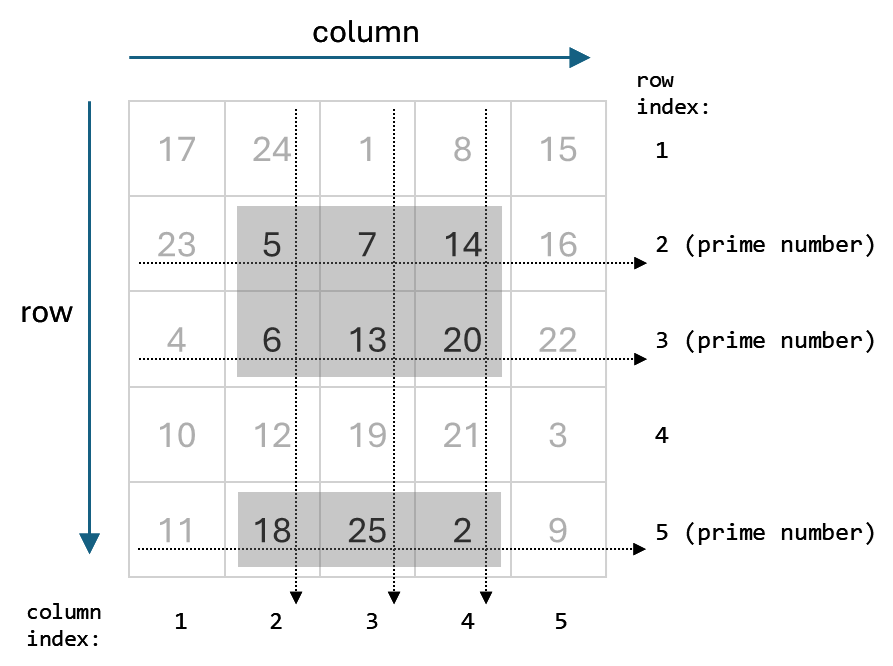
What you see is that MATLAB returns the 4 intersections, not just the first row with the first column index, and same for second. Instead we get each row index combined with each column index. To get only the two elements we originally sought, we can convert the subscripts into another form of index, a linear index. With linear indexing, we think of an array as starting with the (1,1) element, and, going down each row, stringing out the elements into a long column. Then we use the count into that column vector, which has length equal to numRows * numCols. Use sub2ind to make the transformation.
linInds = sub2ind(size(A),[2 4],[3,2])
linInds =
10 8
and then use these to index back into A,
A(linInds)
ans =
7 14
getting exactly the values expected.
At least I hope they are the values you expected, instead of 10 and 8. Remember, MATLAB stores array values columnwise, i.e., column followed by column.
Combining Styles of Indexing
Now consider another situation, where you have a matrix and you only want certain columns extracted, depending on the value in the corresponding row. Perhaps, for example, you are using NaN as a placeholder and you only want columns 2 and 4 in rows that do not start with NaN.
One function that will be useful to us here is isnan, and the output of isnan is a logical array (think true and false). If I have a vector D like this,
D = [ 1 NaN 3 -4 NaN pi]'
D =
1
NaN
3
-4
NaN
3.1416
I can identify which entries have NaN values.
nanD = isnan(D);
whos nanD
nanD Name Size Bytes Class Attributes
nanD 6x1 6 logical
nanD =
0
1
0
0
1
0
I can us logical indexing to extract the non-|NaN| entries in D.
nonNaND = D(~nanD)
nonNaND =
1
3
-4
3.1416
Combine Techniques
I am now ready to combine the ideas of logical indices and regular subscripts. Here's some data.
Data = rand(10,5)
Data =
0.81472 0.15761 0.65574 0.70605 0.43874
0.90579 0.97059 0.035712 0.031833 0.38156
0.12699 0.95717 0.84913 0.27692 0.76552
0.91338 0.48538 0.93399 0.046171 0.7952
0.63236 0.80028 0.67874 0.097132 0.18687
0.09754 0.14189 0.75774 0.82346 0.48976
0.2785 0.42176 0.74313 0.69483 0.44559
0.54688 0.91574 0.39223 0.3171 0.64631
0.95751 0.79221 0.65548 0.95022 0.70936
0.96489 0.95949 0.17119 0.034446 0.75469
Let me pull out columns 2 and 5, if the first column is at least 0.8. I'll leave the first column as well so you can trace what's happening.
extractD = Data(Data(:,1)>=0.8,[1 2 5])
extractD =
0.81472 0.15761 0.43874
0.90579 0.97059 0.38156
0.91338 0.48538 0.7952
0.95751 0.79221 0.70936
0.96489 0.95949 0.75469
Have You Combined Indexing Techniques?
If you have, what were you trying to accomplish when you mixed different kinds of indexing into a single array. Let me know here.
Get
the MATLAB code
Published with MATLAB® 7.11


I only recently “discovered” this type of indexing:
n = ndims(A); s = repmat(':',1,n-1); B = A(s{:},1); A(s{:},1) = 0;This is useful if the number of dimensions in matrix ‘A’ is not fixed. Previously, I used an explicit call to ‘subsref’ or ‘subsasgn’ for this. The comma-list expansion of the cell array is much easier to read, though still not optimal.
About the indexing with ‘isnan’:
There was a forum thread on this recently, someone wanting to substitute all NaNs with the number 56. The obvious answer was “A(isnan(A)) = 56;”. However, as people started trying to find the most convoluted and obscure method, Walter Roberson suggested “A = min(A,max(A,56));” This turned out to be the most efficient method, not using indexing at all. I find that hilarious!
http://www.mathworks.com/matlabcentral/newsreader/view_thread/291149
Cris-
I blogged some time ago about csl indexing for fftshift.
As for not using isnan, I think, while clever, it makes the code very hard to understand.
–loren
Cris,
I don’t get your example. It gives me an error.
What am I missing?
A = [1 2 3 4; 5 6 7 8; 9 10 11 12; 13 14 15 16]
n = ndims(A);
s = repmat(‘:’,1,n-1);
B = A(s{:},1);
A(s{:},1) = 0;
??? Cell contents reference from a non-cell array object.
Oleg
Oleg-
Presumably, Cris meant this (note change to definition of S):
A = [1 2 3 4; 5 6 7 8; 9 10 11 12; 13 14 15 16] n = ndims(A); s = repmat({':'},1,n-1); B = A(s{:},1); A(s{:},1) = 0;–Loren
Quick question, is it possible to index function results without creating additional(temporary) variable? e.g. corrcoef(x,y)(1,2) instead of:
The code is not really an useful example, but hope you can understand what I meant.
Thank you.
mo
Mo-
Not possible without a funky anonymous function. Development knows about the request.
–loren
Recently, I had to create a function for finding the nearest neighbors based on a distance matrix of prototype points and query points. The function should be easy to understand for students which do not know MATLAB perfectly.
Suppose, we have 4 prototype points and 5 query points and assume that their distance matrix is
> dm = [1 2 3 4 5 2 7 3 2 1 5 5 2 1 4 3 1 0 1 5];I wanted to create a function called e.g. findKNN with the following header:
i.e., a function which would find in each of the columns of the distance matrix k lowest entries and return their row indices. So, for example when calling
I expect it returns
My implementation relies on iteratively finding the minimum column-wise, storing the index of the minimal distance, and substituting the minimal distance item with infinity, e.g. like this:
function inn = findkNN(dm, k) Nquery = size(dm, 2); inn = zeros(k, Nquery); for i = 1:k, [foo, imin] = min(dm, [], 1); inn(i,:) = imin; dm( sub2ind(size(dm), imin, 1:Nquery) ) = inf; end endIn this code, the linear index is constructed for the minimal items in each row which allows me to substitute them all with the infinity.
I think this implementation is sufficiently clear and simple. Yet I wonder if there is any other, more “MATLABish” way of doing this? Any other more efficient way? Isn’t there any generalization of the min function which would allow us to find not only one minimal element, but k minimal elements?
Petr-
To find k minimal elements, you can use sort instead of min and get the first k per column and their corresponding indices.
–Loren
I tend to prefer logical indexing when possible, but I have run into several cases where I want to logically index a set of logical indices. Then I have to go back and run find on the first set, or create a subset and then index the subset. Example:
data = struct('Value1',num2cell(rand(100,1)),'Value2',num2cell(rand(100,1))); % example 100-element struct goodVals = [data.Value1] > 0.5; % first-level criterion betterVals = [data(goodVals).Value2] > 0.5; % second-level criterion % Now, I want to index data from betterVals, but betterVals is of size [nnz(goodVals),1], so I have to use find: goodIdx = find(goodVals); betterData = data(goodIdx(betterVals));The first instinct is to create betterVals based on the full set of data instead of the subset. Then, you could just do
However, let’s say you have a LARGE set of data. It would be inefficient to process each element when you already know that the first criterion will reduce the set to search over for the second criterion. Let’s also say you have more than two criteria, again you would want to make the algorithm as fast as possible with a-priori conditions.
Using find is not the “worst” thing, but I’m borderline ready to search the file exchange for some function like that (or create one).
I am relatively new to MATLAB (about 2 months) and one of the main features which I fell are most important for mastering MATLAB is the issue of indexing.
It is relatively easy to go past the first stage where one is introduced to the three basic types of indexing (normal, linear and logical), however there seems to be a large gap between that level and the one that can be found in e.g. http://home.online.no/~pjacklam/matlab/doc/mtt/doc/mtt.pdf.
After talking to other people who have used MATLAB a lot longer than me, it seems that every user has mastered some set of indexing idioms and uses that set on a regular basis. The sets used by different people vary greatly (e.g. the above paper by P.J. Acklam). This is disturbing to me (I come from structured language background where indexing is very well defined and every experienced user is well versed in all the possible indexing techniques).
Indeed, there is an almost endless variety of indexing possibilities – it is sufficient to mention indexing with multi-dimensional cell arrays containing strings (‘:’) (in the above paper by P.J. Acklam) which is also mentioned in this thread. Additionally there are ways of indexing with N-dimensional arrays, etc., etc. To make life even less boring, the behavior is different for LHS and RHS. Then there is the issue of efficiency (how to optimize indexing expressions in terms of space and time).
My problem is that I don’t understand why some of the techniques work and why they produce the results that they do. Some of this stuff seems arbitrary to me.
It would be great if there were a single reference (preferably from MathWorks) describing all the possible ways of indexing and, more importantly, a complete and formal set of rules that MATLAB employs when parsing an indexing expression.
Just my two cents.
Beni
Beni-
The documentation has a lot of the information in there. In addition, I can point you to one of my earlier posts:
http://blogs.mathworks.com/loren/2008/05/14/acting-on-specific-elements/
and the category of Indexing on my blog:
http://blogs.mathworks.com/loren/category/indexing/
–Loren
Loren,
I just recently discovered by happenstance that the following is an acceptable expression:
Z(‘AB’)
I understand what it does but was surprised that this is allowed. I can’t find anywhere in the documentation that indexing with char is allowed (or not allowed for that matter), except for the special case of ‘:’. Is this an intended feature and has it always been allowed? Is it useful for anything?
Loren,
Another indexing thing that I do a lot is what I’d call “cellfun indexing”. I have an array of objects who each have a property that is an array. For now, I have to resort to cellfun with an anoymous function (or of course a for loop) to achieve this:
memberCell = cellfun(@(A,idx)A(idx),{objArray.propName},indexCell,'UniformOutput',false); allMembers = cat(1,memberCell{:});Would a custom implementation in cellfun (like when you use ‘isempty’ or ‘class’ as the function input) improve the performance?
Jason
Steve Lord showed in interesting use of char indexing in this thread:
http://www.mathworks.com/matlabcentral/newsreader/view_thread/293730
Jason-
Regarding your post about combining logical indexes. Here is the solution I use that does not require the find function:
Assaad,
Since we are talking about indexing the following should do:
eugene