Loren on the Art of MATLAB

December 21st, 2010

Strings and Numbers as Arguments to Standalone Executables

Guest blogger Peter Webb returns with another in an occasional series of postings about application deployment.

Contents

Most MATLAB functions take input arguments. When you create a shared library or DLL from a MATLAB function with MATLAB Compiler, the generated library functions take the same number and type of arguments as the MATLAB functions. But what about a standalone executable? How do you pass arguments to a MATLAB function that you've compiled into a complete program?

On the UNIX or DOS command line, of course.

The main program generated by MATLAB Compiler examines the command line and passes any arguments to your main function, the function you listed first when you created the application with mcc. But UNIX and DOS don't understand MATLAB data types, so all they can do is pass the command line arguments to your program as strings.

For example, you might compile the function compute into a standalone executable and then run it with the argument 17:

 compute 17

Your compute function receives the string '17' as its first input. If it is expecting a number, compute probably won't produce the correct result when invoked with a string.

All is not lost, however. Simple modifications to your M-code can enable you to handle many different types of arguments. Let's begin by looking at techniques for handling strings.

String Arguments

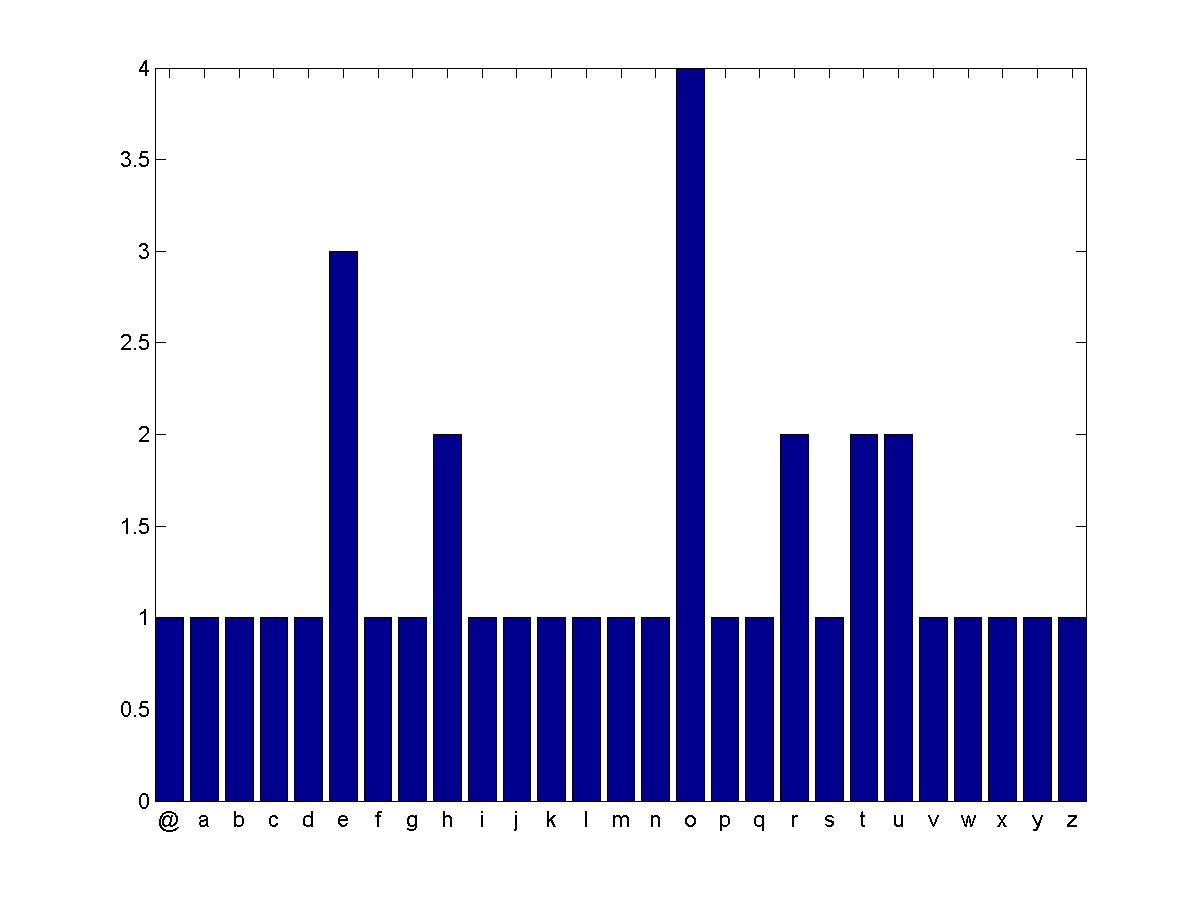
Since MATLAB Compiler generates code that passes strings on the command line to your program's main function, you don't need to modify programs that accept string inputs. For example, here's a program that plots a histogram of the number of times each letter in the alphabet appears in an input string. The function takes a single input and has zero outputs.

function freq(msg)
  % Remove spaces
  msg(msg == ' ') = [];
  % Convert to lower case, and map the letters to numbers.
  % a=1, b=2, etc.
  msg = lower(msg) - double('a') + 1;
  % Map non-letter characters to zero.
  msg(msg < 1) = 0;
  msg(msg > 26) = 0;
 % Display a histogram of the letter frequency in the message.
  count = hist(msg, 27);
  bar(0:26, count);
  labels = char([double('@'), double('a'):double('z')])';
  set(gca, 'XTick', 0:26+0.5, 'XTickLabel', labels);
 axis tight

First, compile the program to a standalone executable:

mcc -mv freq

Run it with a string argument:

freq "The quick brown fox jumps over the lazy dog!"

The histogram is surprisingly uniform.
Numeric Arguments

The Ulam spiral reveals patterns in the distribution of prime numbers. The MATLAB function ulam below, displays an Ulam spiral as an NxN black and white image.

function ulam(n)
  % Compute the NxN ulam spiral
  u = spiral(n);
  % Set p(i,j) to 1 iff u(i,j) is prime.
  p = isprime(u);
  % Display the results: primes as white pixels
  image(p);
  colormap([0 0 0; 1 1 1]);
  axis off

Create a standalone executable ulam with MATLAB Compiler:

mcc -mv ulam.m

Run the executable to display a 200x200 Ulam spiral:

ulam 200

Not so fast! ulam reports an error:

??? Error using ==> zeros
Trailing string input must be a valid numeric class name.
Error in ==> spiral at 9

If I modify the ulam MATLAB function to expect a string, by calling str2double on the input n, calling ulam in MATLAB will be awkward:

 ulam('200');

Therefore, ulam needs additional logic when it is running as a deployed application. There's a function for that -- isdeployed -- which returns true only when run in a deployed application. I can test for deployed mode, and then convert n from a string into a double, like so:

  if isdeployed
     n = str2double(n);
  end

Alternatively, I could test to see if n is a character string using ischar:

  if ischar(n)
      n = str2double(n);
  end

Add either of these tests as the first three lines of the ulam function, and recompile. Now ulam 200 generates an intriguing image. (Why do the primes seem to line up on the diagonals?)

In a later posting, I'll demonstrate how to pass cell arrays and other MATLAB data types to your standalone applications. In the meantime, if you have questions or comments, let me know here.


Get the MATLAB code

Published with MATLAB® 7.11

10 Responses to “Strings and Numbers as Arguments to Standalone Executables”

  1. Aurelien Queffurust replied on :

    I confirm using isdeployed followed by str2num is a really important thing to be aware when the standalone requires a numeric value as input argument.

    And it is well stated in the doc:
    Passing Arguments to and from a Standalone Application :
    http://www.mathworks.com/help/toolbox/compiler/f13-1005831.html#f13-1006802

    Aurélien

  2. wei replied on :

    @Peter/Loren, I know this is asked before: could you write one on interfacing Matlab, Simulink with external code and then creating exe?

  3. devin replied on :

    On my gentoo machine, when I run the compile command (mcc), I get a warning from matlab saying that it can’t find ifconfig. Why is matlab looking for ifconfig? Note, in gentoo ifconfig is in /sbin so only root can see it.

  4. Lakshmi Prasad replied on :

    Hi Loren,

    Type Initialization exception happens when trying to assign a native .NET type to MATLAB array

    Issue:
    We used MATLAB version 2010 a (64 bit) and corresponding Matlab Compiler Runtime, generated 64 bit compatible dll. While trying to instantiate the MWArray data variables
    (Newer Version of MWArray.dll is being referenced and is also added to GAC as recommended), we are ending with the Type Initialization exception.

    The application that we are using was migrated from VS 2005 to VS2008 64 bit.we have Windows Server 2008 R2.

    How do we overcome this exception?

    Thanks,
    Lakshmi Prasad

  5. Peter Webb replied on :

    Wei,

    Can you be more specific about what you’d like to see in an article about combined MATLAB and Simulink deployment? That’s a big subject, and I’d like to make sure that I address your questions or concerns.

  6. Peter Webb replied on :

    Devin,

    I haven’t seen that error myself nor can I find any documentation or support solutions that refer to it. However, Google did reveal this:

    http://newsgroups.derkeiler.com/Archive/Comp/comp.soft-sys.matlab/2008-10/msg00505.html

    That posting indicates a possible mismatch between the standard C++ library MCC expects and the default standard C++ library on your system path. I’d suggest you check your system configuration to be sure it matches the requirements for the version of MCC that you’re using. (And if you do try the suggestion in that posting, make sure to backup any files that it requires you to change, just in case it doesn’t work.)

  7. Peter Webb replied on :

    Lakshmi,

    I suspect that you’ve got a problem with your system path, that the MWArray.dll isn’t finding the MCR DLLs it expects on the path. But that’s a question better suited to support, as they have access to more versions of the OS and Visual Studio than I do. Contact our tech. support here:

    http://www.mathworks.com/support/contact_us/index.html

  8. EBS replied on :

    Peter, is there no way for the Compiler to handle this automatically so that the user code does not have to be modified? It seems to me that it might be an acceptable for the caller to have to to specify some sort of ‘numeric input’ flag on the UNIX/DOS command line call if that would mean that X different user functions don’t need to be modified to be compatible with the Compiler…

  9. Peter Webb replied on :

    EBS,

    It’s possible, but tricky. The tricky part is figuring out when to attempt to convert strings to numbers. There are at least two ways to do it:

    1) Require a user flag to MCC that changes the default (either MCC treats inputs as strings or assumes they are numbers and tries to convert them to doubles). This is a compile-time operation and would not allow you to change your mind once the application had been built.

    2) Enable some kind of runtime switch — not an environment variable, because those are evil — either heuristic analysis of the inputs, some kind of configuration file, etc.

    And, of course, you could combine the two (offering both compile time and runtime switches) for a third approach. I’ll enter this as an enhancement request, and we’ll see where it takes us.

  10. Justin Langdon replied on :

    How does one pass an Excel COM object to an executable. I need to do this because I’m already trying to do a work-around on other limitations when compiling Matlab code.

    Thanks,
    Justin


MathWorks
Loren Shure works on design of the MATLAB language at MathWorks. She writes here about once a week on MATLAB programming and related topics.

These postings are the author's and don't necessarily represent the opinions of The MathWorks.