Loren on the Art of MATLAB

December 7th, 2011

Pretty 2-Dimensional Chaotic Maps

Chaos theory has found uses across a broad set of scientific fields to explain some complicated observed behavior. In geophysics, my background, it can help explain the reversals of Earth's magnetic field, for example. Today I thought I'd share a chaotic system, called Gingerbreadman maps, whose equations make the system seem simple. That is, until you do some simulations.

Contents

Gingerbreadman Map Equations

The equations for the gingerbreadman map look simple enough. For any given point in space: , define the next point in the sequence by . I now show the same equations in this MATLAB code, accounting for some initial values x0,y0 to seed the calculation.

dbtype 17:25 gingerbreadman
17    
18    % main calculation
19    for i = 1:n
20        if i == 1
21            x(i) = 1 - y0 + abs(x0);
22            y(i) = x0;
23        else
24            x(i) = 1 - y(i-1) + abs(x(i-1));
25            y(i) = x(i-1);

Plot Results

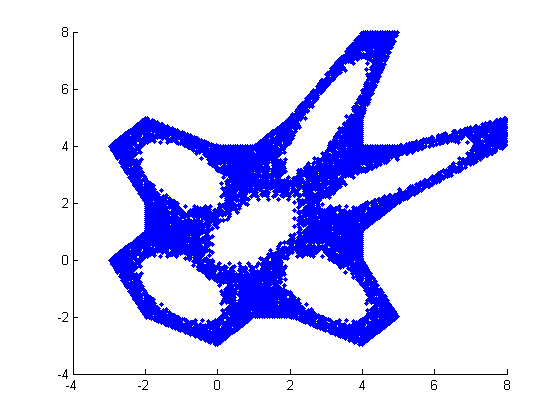
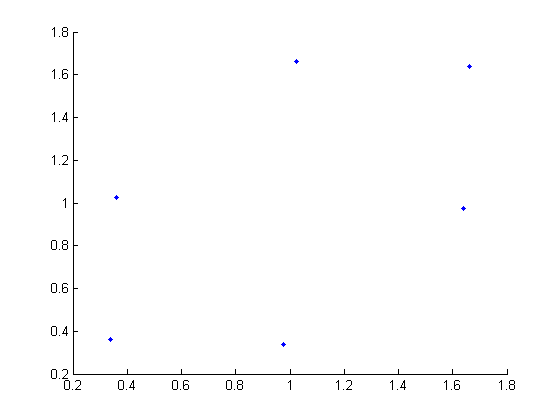
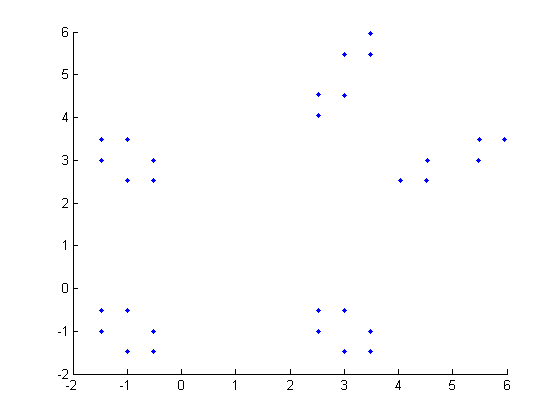
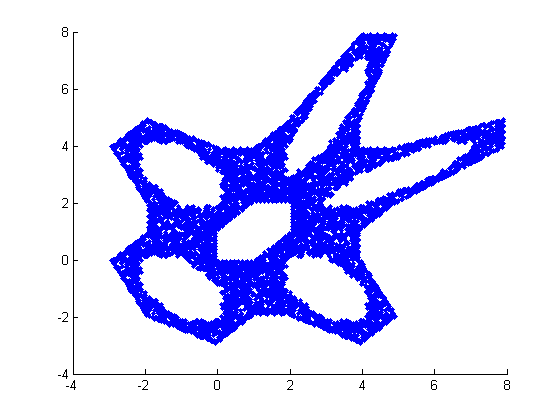
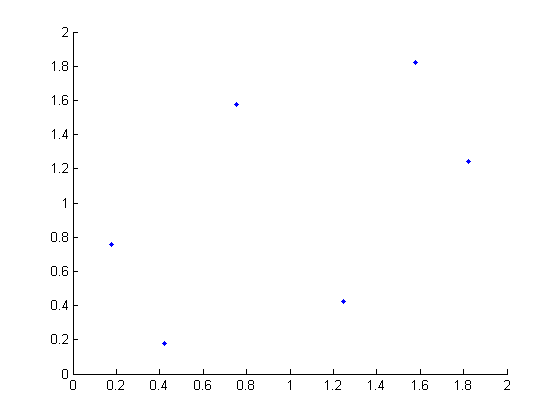
I want to show several results from different starting values for x0,y0. First I'll set the random number generator seed for repeatable results.

rng(42)
gingerbreadman
gingerbreadman
gingerbreadman
gingerbreadman
gingerbreadman
Code Listing

Here's the full code listing for gingerbreadman. You can see it allows you to specify the initial conditions, and return points and initial conditions should you choose. With no output arguments, gingerbreadman creates plots like you've been seeing.

type gingerbreadman
function [xout,yout, x0, y0] = gingerbreadman(x0,y0)
%  Gingerbreadman map producing a chaotic 2-D map.

%  Copyright 2011 The MathWorks, Inc.

% if not enough inputs, assign random numbers
if nargin < 2
    x0 = randn();
    y0 = randn();
end

% iteration counter
n = 10000;

x = zeros(n,1);
y = zeros(n,1);

% main calculation
for i = 1:n
    if i == 1
        x(i) = 1 - y0 + abs(x0);
        y(i) = x0;
    else
        x(i) = 1 - y(i-1) + abs(x(i-1));
        y(i) = x(i-1);
    end
end

% if output is requested, return gingerbread x,y values and
% x0, y0 initial conditions
%
% otherwise plot results
if nargout > 0
    xout = x;
    yout = y;
else
    scatter(x, y, '.');
end

References

Make the Plot Prettier!

Instead of using the plotting function scatter, post your thoughts (in code) here for a chance to win some MATLAB bling. I will look at entries up through (was: Sunday, November 27, 2011) Wednesday December 14, 2011 and announce the winner (the one whose plot I find most interesting) shortly after that.


Get the MATLAB code

Published with MATLAB® 7.13

14 Responses to “Pretty 2-Dimensional Chaotic Maps”

  1. Benjamin Kraus replied on :

    One option to made the plot more meaningful:
    (adjust ‘nbins’ to your liking)

    nbins = 50;
    xbin = linspace(min(x),max(x),nbins);
    ybin = linspace(min(y),max(y),nbins);
    xbin(end) = xbin(end)+eps(xbin(end));
    ybin(end) = ybin(end)+eps(ybin(end));
    c = hist3([x,y],’Edges’,{xbin,ybin});
    c(c==0) = nan;
    figure;
    pcolor(xbin,ybin,c);
    shading flat
    colorbar

  2. Adam Wachsman replied on :

    You can experiment with different initial conditions and color maps.

    %% Housekeeping
    close all
    clear all
    clc

    %% Initialize
    N=10000;
    x=zeros(N,1);
    y=zeros(N,1);

    %% Initial Conditions
    % x(1)=2*rand-1;
    % y(1)=2*rand-1;

    x(1)=-0.1;
    y(1)=0.1;

    %% Loop
    for n=2:N
    x(n)=1-y(n-1)+abs(x(n-1));
    y(n)=x(n-1);
    end

    %% Plot
    figure
    plot(x,y,’.')
    hold on
    plot(x(1),y(1),’ro’)
    axis equal
    grid on
    xlabel(‘x’)
    ylabel(‘y’)
    axis([-4 8 -4 8])

    %% Plot 2
    numPoints=128;
    colorList=jet(numPoints);
    figure
    hAgedPlot=plot(x(1),y(1),’Marker’,’.’,'LineStyle’,'none’,'Color’,…
    colorList(1,:));
    hold on
    hNewPlot=zeros(numPoints,1);
    for n=1:numPoints
    hNewPlot(n)=plot(x(1),y(1),’Marker’,’.’,'Color’,colorList(n,:),…
    ‘MarkerSize’,12);
    end
    set(gca,’Color’,'none’)
    set(gcf,’Color’,'k’)
    set(gcf,’Position’,[100 100 640 480])

    axis([-6 10 -4 8])
    set(gca,’Position’,[0 0 1 1])
    axis off

    for n=1:N
    for m=1:numPoints
    nn=n-m+1;
    brokeEarly=false;
    if nn0
    set(hAgedPlot,’XData’,x(1:nn),’YData’,y(1:nn))
    end
    drawnow
    end

  3. Loren Shure replied on :

    As Steve Lord pointed out to me, the deadline is in the past! Change that to Dec. 14, 2011. Sorry for the mistake!

    –loren

  4. Adam Wachsman replied on :

    I used tags, but when I copy my code from the web back into MATLAB, the formatting is messed up and it doesn’t work.

    (It’s not just “<" , it's also single quotes etc.)

    Any advice?

  5. Loren Shure replied on :

    I don’t have a good option for you. I copy and paste the code and then edit it myself. Sorry for the hassle.

    –loren

  6. Jonathan replied on :

    Loren,

    Here’s a suggestion for a winter themed version. The function is mostly the same. Only the plotting is different.

    Enjoy.

    ~Jonathan

    function [xout,yout, x0, y0] = gingerbreadman(x0,y0)
    % Gingerbreadman map producing a chaotic 2-D map.

    % Copyright 2011 The MathWorks, Inc.

    % if not enough inputs, assign random numbers
    if nargin 0
    xout = x;
    yout = y;
    else
    layers = 100;
    numPerLayer = ceil(n/layers);
    colors = winter(layers);

    if numel(unique(x)) < numPerLayer
    marker = '*-';
    else
    marker = '*';
    end

    hold off
    for iLayer = 1:layers
    if iLayer == layers
    plot3(x((iLayer-1)*numPerLayer+1:end), y((iLayer-1)*numPerLayer+1:end), (iLayer-1)*numPerLayer+1:n, marker, 'MarkerEdgeColor', colors(iLayer,:), 'Color', colors(iLayer,:));
    else
    plot3(x((iLayer-1)*numPerLayer+1:iLayer*numPerLayer), y((iLayer-1)*numPerLayer+1:iLayer*numPerLayer), (iLayer-1)*numPerLayer+1:iLayer*numPerLayer, marker, 'MarkerEdgeColor', colors(iLayer,:), 'Color', colors(iLayer,:));
    end
    if iLayer == 1
    hold on
    end
    end

    if numel(unique(x)) < numPerLayer
    view(0, 85)
    else
    view(0, 90)
    end
    end

  7. Jonathan replied on :

    I think part of my code listing was altered/removed in the post above.

    Here it is again.

    Yes, I had to use ‘& l t ;’ and ‘& g t ;’ (without spaces) for the less than and greater than symbols.

    ~Jonathan

    function [xout,yout, x0, y0] = gingerbreadman(x0,y0)
    % Gingerbreadman map producing a chaotic 2-D map.

    % Copyright 2011 The MathWorks, Inc.

    % if not enough inputs, assign random numbers
    if nargin < 2
    x0 = randn();
    y0 = randn();
    end

    % iteration counter
    n = 10000;

    x = zeros(n,1);
    y = zeros(n,1);

    % main calculation
    for i = 1:n
    if i == 1
    x(i) = 1 – y0 + abs(x0);
    y(i) = x0;
    else
    x(i) = 1 – y(i-1) + abs(x(i-1));
    y(i) = x(i-1);
    end
    end

    % if output is requested, return gingerbread x,y values and
    % x0, y0 initial conditions
    %
    % otherwise plot results
    if nargout > 0
    xout = x;
    yout = y;
    else
    layers = 100;
    numPerLayer = ceil(n/layers);
    colors = winter(layers);

    if numel(unique(x)) < numPerLayer
    marker = '*-';
    else
    marker = '*';
    end

    hold off
    for iLayer = 1:layers
    if iLayer == layers
    plot3(x((iLayer-1)*numPerLayer+1:end), y((iLayer-1)*numPerLayer+1:end), (iLayer-1)*numPerLayer+1:n, marker, 'MarkerEdgeColor', colors(iLayer,:), 'Color', colors(iLayer,:));
    else
    plot3(x((iLayer-1)*numPerLayer+1:iLayer*numPerLayer), y((iLayer-1)*numPerLayer+1:iLayer*numPerLayer), (iLayer-1)*numPerLayer+1:iLayer*numPerLayer, marker, 'MarkerEdgeColor', colors(iLayer,:), 'Color', colors(iLayer,:));
    end
    if iLayer == 1
    hold on
    end
    end

    if numel(unique(x)) < numPerLayer
    view(0, 85)
    else
    view(0, 90)
    end
    end

  8. Adam Wachsman replied on :

    I posted mine to File Exchange to avoid the reformatting problem.

    http://www.mathworks.com/matlabcentral/fileexchange/34116

  9. Stuart Murray replied on :

    One thing it would be nice to extract automatically from the plot is some idea of what the boundary looks like. Getting the convex hull is easy, but the edge of a gingerbreadman is certainly non-convex! There are some interesting methods for finding such boundaries, so I’ve gone off the deep end and coded up the so-called ‘swinging arm’ method as a function. Simply pass it the vectors x and y containing the fractal points, a value for the length of the swinging arm, and a number of points required on the boundary. When the swinging arm length is set to infinity, the method returns the convex hull. You have to play with values for the arm length a bit to get a meaningful boundary shape: too small and it returns disconnected polygons; too large and we get the convex hull.

    I’m not sure how pretty it is though!

    function gingerboundary(xin,yin,l,bpoints)
    % FUNCTION GINGERBOUNDARY(XIN,YIN,L,BPOINTS)
    % function to implement swinging arm algorithm for finding a footprint of
    % the gingerbreadman fractal set. XIN and YIN are vectors of the x and y
    % positions of the points in the set. L sets the radius of nearest
    % neighbours to scan, and BPOINTS is the number of boundary points.

    % sort points by y-coordinate
    p = [xin yin];
    plot(p(:,1),p(:,2),’b.’);
    n = size(p,1);
    p = rot90(sortrows(fliplr(p)),2);
    x = p(1,:); xold = x + [0 1];
    b = x;

    % scan loop
    for i=1:bpoints
    neighbours = p(sqrt(sum((p-repmat(x,n,1)).^2,2)) eps)
    neighbours2 = [neighbours2; neighbours(j,:)];
    end
    end

    % find ‘least clockwise’ point
    s2 = size(neighbours2,1);
    v = neighbours2-repmat(x,s2,1);
    a = angle(v(:,1)+1i*v(:,2));
    aprev = angle(xold(1)-x(1)+1i*(xold(2)-x(2)));
    adiff = mod(a-aprev,2*pi);

    % update
    xold = x;
    candidates = neighbours2(adiff==max(adiff),:);
    x = candidates(1,:);

    % plotting
    %{
    hold on
    plot(p(:,1),p(:,2),’b.’);
    plot(neighbours2(:,1),neighbours2(:,2),’r.’)
    plot(b(:,1),b(:,2));
    axis(‘square’);
    hold off
    drawnow
    pause(1);
    %}
    % update boundary
    b = [b; x];

    end

    % plot boundary
    hold on;
    plot(p(:,1),p(:,2),’b.’);
    plot(b(:,1),b(:,2),’r');
    axis(‘square’);

    end

  10. Michael replied on :

    I haven’t checked all the other submissions, I hope there’s not yet one too close to mine…
    With a minor change in the equation using that y(i) equals x(i-1), I simplified the calculation. However, I therefore produce one more value than can be plotted reasonably. Thus, I take the difference between consecutive values as color code.

    n = 10000;

    x = zeros(n+2,1);
    x(1:2)=randn(1,2);

    % main calculation
    for cnt = 3:n+2
    x(cnt) = 1 – x(cnt-2) + abs(x(cnt-1));
    end
    scatter(x(2:end),x(1:end-1),3,diff(x))
    set(gca,’color’,'k’)

    If you take x0 = x(2) and y0 = x(1), Loren’s equations come out with the same values (of course shifted by 2 indices).

  11. Ankur Pawar replied on :

    This function uses a different approach.The function will map x and y data onto 2d array.This 2d array can be seen as an image.The image generated is grayscale.The darker the pixel more times the formula gets near to that value of x and y.This is same as visualizing a strange attractor.The function is a slow because it stores all the value of x and y.

    function [x,y,x0,y0]=myGingerbreadManMap2(x0,y0)
    %function takes about 3 seconds to complete
    if nargin < 2
    x0=randn();
    y0=randn();
    end
    numIterate=1000000;
    x=zeros(numIterate,1);
    y=zeros(numIterate,1);

    x(1)=x0;
    y(1)=y0;
    for n=2:numIterate
    x(n)=1-y(n-1)+abs(x(n-1));
    y(n)=x(n-1);
    end

    %find bounding box
    maxX=max(x);
    maxY=max(y);
    minX=min(x);
    minY=min(y);

    %500×500 matrix as counter
    img=zeros(500,500);
    xdiff=(maxX-minX)/500;
    ydiff=(maxY-minY)/500;

    for n=1:numIterate

    indx=floor((x(n)-minX)/xdiff);
    indy=floor((y(n)-minY)/ydiff);
    if (indx>0 && indy>0 && indx < 500 && indy < 500)
    img(indx,indy)=img(indx,indy)+1;
    end
    end

    %scale data
    maxP=max(img(:));%maximum number of count
    img=255*img/maxP;%scale counts in the range of 0 to 255

    %diplay
    img=uint8(img);
    image(linspace(minX,maxX,500),linspace(maxY,minY,500),img);
    axis equal
    cmap=1-gray(256);
    colormap(cmap);

    %save image
    %imwrite(img,cmap,’gingerbreadman.png’,’png’);

  12. Nathaniel Burdick replied on :

    I was interested in which points were plotted last, so my code plots the first 3/4 of the points in white and then two other colors for the remaining 1/4. I also manually put a background around the plot for clarity.
    The function takes a single input (no outputs) which determines the number of plots produced in a single figure, so an input of ’2′ produces 4 plots in a 2×2 grid.

    function gingerbreadmansheet(N)

    hold off
    if nargin< 1
    N = 1;
    end
    n = 10000;
    for xtran = 0:(N-1)
    for ytran = 0:(N-1)
    x0 = randn();
    y0 = randn();
    x = zeros(1,n);
    y = zeros(1,n);
    for i = 1:n
    if i == 1
    x(i) = 1 – y0 + abs(x0);
    y(i) = x0;
    else
    x(i) = 1 – y(i-1) + abs(x(i-1));
    y(i) = x(i-1);
    end
    end
    x = x+15*xtran;
    y = y+15*ytran;

    xv = [-2.5 -3.5 -2.5 -2.5 -3.5 -2 0 1 2 4 5.5 4.5 4.5 5.5 8.5 8.5 5.5 4.5 4.5 5.5 4 2 1 0 -2.5]+15*xtran;
    yv = [-2.5 0 1 2 4 5.5 4.5 4.5 5.5 8.5 8.5 5.5 4.5 4.5 5.5 4 2 1 0 -2 -3.5 -2.5 -2.5 -3.5 -2.5]+15*ytran;

    ss = get(0,’screensize’);
    fill(xv,yv,[ 0.5451 0.2706 0.0745]);
    hold on
    plot(x(1:3*end/4), y(1:3*end/4),’.w’,'LineWidth’,3,’MarkerSize’,20/N^2);
    plot(x((3*end/4+1):7*end/8), y((3*end/4+1):7*end/8),’.',’MarkerSize’,20/N^2,’MarkerEdgeColor’,[.95 0 0]);
    plot(x(7*end/8+1:end), y(7*end/8+1:end),’.',’MarkerSize’,20/N^2,’MarkerEdgeColor’,[0 .5 0]);
    set(gcf,’position’,[.05 .05 .85 .85]*ss(4))
    set(gca,’xlim’,[-4 9+15*xtran],’ylim’,[-4 9+15*ytran],’color’,[.5 .5 .5])
    end
    end

  13. Rafael Oliveira replied on :

    Here is one more submission… I decided to make a pixelated gingerbread man with the output of the chaotic map, using a
    lemniscate of Gerono as his green bow tie :)

    function pixelatedGBM
    rng(42)
    [x,y] = gingerbreadman;
    %scale and rotate our gingerbread man
    r = [x y] * [cosd(135) -sind(135); sind(135) cosd(135)];
    minR = min(r); maxR = max(r);
    r = (r – repmat(minR,size(r,1),1))./repmat(maxR-minR,size(r,1),1);
    r(:,2) = r(:,2).^1.5;

    %create a pixel representation of it
    N = 25;
    b = linspace(0,1,N);
    dif = b(2)-b(1);
    [xb,yb] = meshgrid(b,b);

    C = zeros(N);
    x = r(:,1); y = r(:,2);
    for i = 1:numel(xb)
    C(i) = length(find(x >= xb(i) & x = yb(i) & y < yb(i)+dif));
    end
    C = reshape(C,size(xb));
    %smooth a little for better results
    smooth = @(A,L) ((eye(size(A,1)) + L ^ 2 * diff(eye(size(A,1)),2)' * diff(eye(size(A,1)),2) + 2 * L * diff(eye(size(A,1)))' * diff(eye(size(A,1)))) \ A);
    D = smooth(smooth(C,0.1)',0.1)';

    %let's draw it :)
    set(figure,'Position',[0 0 300 400],'Color',[1 1 1])
    movegui(gcf,'center')
    set(surf(xb,yb,zeros(size(D)),D),'ZData',xb.*0-0.01);
    view(2); shading flat; grid off; axis off equal;
    colormap([1 1 1; pink(19)])
    hold on
    t = linspace(0,2*pi,50);
    set(fill((sin(t))/9+0.5,(sin(2*t))/18+0.65,[0 .8 0]),'EdgeAlpha',0)
    set(fill((sin(t))/30+0.5,(cos(t))/30+0.65,[0 .9 0]),'EdgeAlpha',0)
    t = linspace(0,2*pi,5);
    set(fill((sin(t))/20+0.5,(cos(t))/20+0.5,[.8 0 0]),'EdgeAlpha',0)
    set(fill((sin(t))/20+0.5,(cos(t))/20+0.3,[.8 0 0]),'EdgeAlpha',0)
    plot3(r(1:10:end,1),r(1:10:end,2),r(1:10:end,1)*0-0.005,'.','MarkerSize',3,'MarkerEdgeColor',[1 1 1]);
    end

  14. Rafael Oliveira replied on :

    Nice, the < were also messed up into tags in my submission…

    here is the original code in pastebin:

    http://pastebin.com/hGjWYpji


MathWorks
Loren Shure works on design of the MATLAB language at MathWorks. She writes here about once a week on MATLAB programming and related topics.

These postings are the author's and don't necessarily represent the opinions of MathWorks.