
Reading Formatted Text
Jiro's pick this week is TEXTSCANTOOL by our very own Stuart McGarrity.
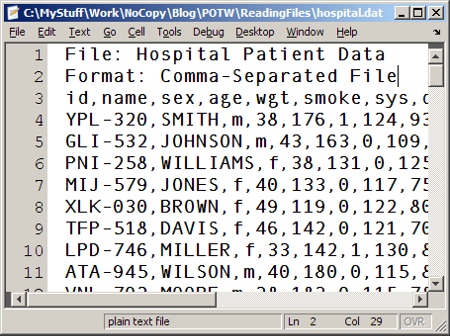 Have you ever had to deal with this type of format - comma-separated file, arbitrary number of header lines, a row with label
names, and a mix of numeric and text data? I have, quite often.
Stuart's textscantool allows you to easily bring this data in, by working in conjunction with MATLAB's textscan function. It provides a nice graphical interface to quickly parse through a formatted ascii file and construct an automated
import function for reading similar files.
Have you ever had to deal with this type of format - comma-separated file, arbitrary number of header lines, a row with label
names, and a mix of numeric and text data? I have, quite often.
Stuart's textscantool allows you to easily bring this data in, by working in conjunction with MATLAB's textscan function. It provides a nice graphical interface to quickly parse through a formatted ascii file and construct an automated
import function for reading similar files.

 And you click "Import Data" and off you go! Want to automate this process? Just click on "Generate Code", and you have a reusable
function!
And you click "Import Data" and off you go! Want to automate this process? Just click on "Generate Code", and you have a reusable
function!
Contents
In many of my projects, reading in the data files is often the first step. I utilize various methods, ranging from double-clicking on the data file to using high-level import functions (such as xlsread and load) to using low-level functions (such as textscan and fread). The more unconventional the data format is, the more I rely on low-level functions.My Data File
Let's take a look at this particular data file:
Have you ever had to deal with this type of format - comma-separated file, arbitrary number of header lines, a row with label
names, and a mix of numeric and text data? I have, quite often.
Stuart's textscantool allows you to easily bring this data in, by working in conjunction with MATLAB's textscan function. It provides a nice graphical interface to quickly parse through a formatted ascii file and construct an automated
import function for reading similar files.
Header Lines
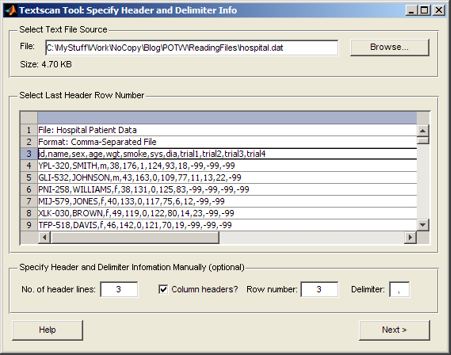
The tool takes you through a sequence of steps to import a file. First, you can indicate how many header lines there are and which row will be used for the header names:
Data Types
Next, you can individually specify the data types of the columns:
Import and Generate Code
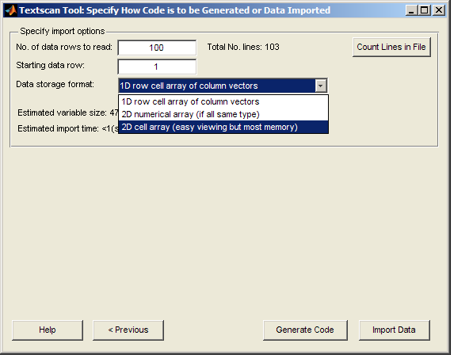
Finally, you can specify how to bring it in (array, cell, etc) and how many rows to import. This means that you can import a single portion of a large file.
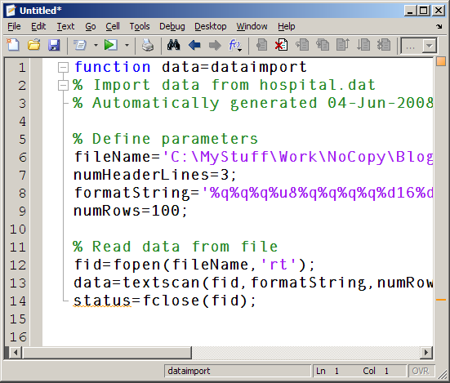
And you click "Import Data" and off you go! Want to automate this process? Just click on "Generate Code", and you have a reusable
function!
Video Tutorial
What makes this entry complete is the video tutorial that Stuart includes with his function. And yes, he's the voice of many of our shipping tutorial videos.Comments
MATLAB provides numerous functions for importing files. Tell us here how you use these functions to deal with your specific data files.- Category:
- Picks


See Also
-

readtext
Blogs
-

New MathWorks Tools
Blogs



Comments
To leave a comment, please click here to sign in to your MathWorks Account or create a new one.