File Exchange Pick of the Week

February 6th, 2009

PlotAxisAtOrigin

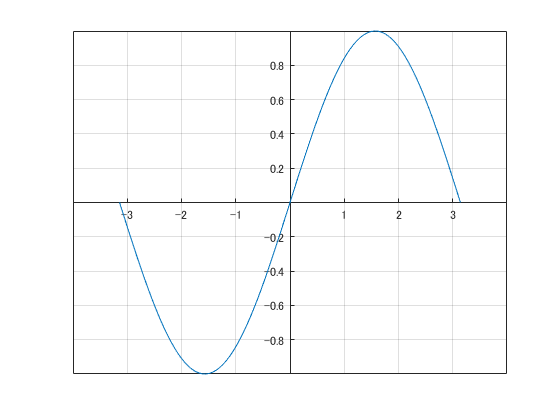
Bob's pick this week is PlotAxisAtOrigin by Shanrong Zhang.

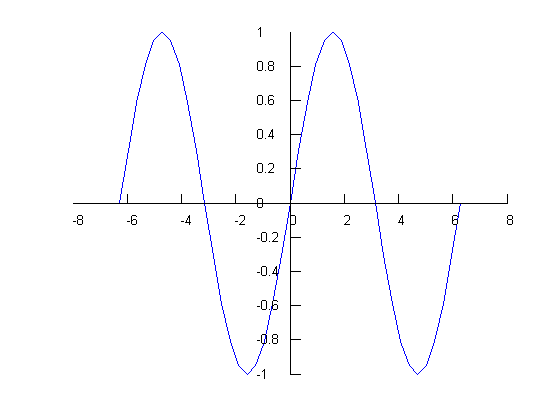
As an application engineer I showed MATLAB to a lot of people. Occasionally when I presented graphics capabilities someone would ask how to make plots where the X and Y axes lines go through the origin. You know: the way we learned to draw them in school. By default MATLAB puts the X axes on bottom and the Y axes on the left.

x = -2*pi:pi/10:2*pi;
y = sin(x);
plot(x,y)
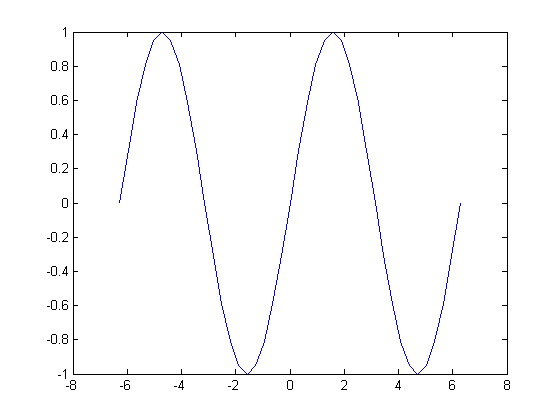
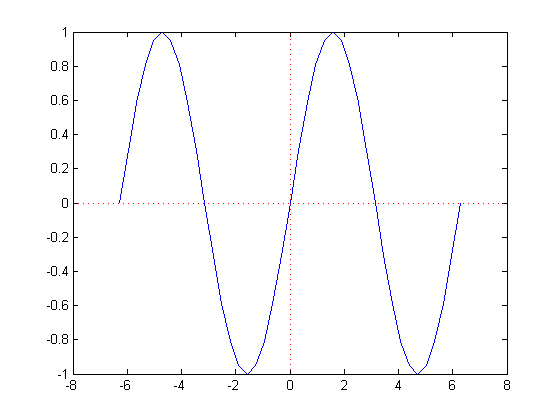
While the xAxisLocation can be set to top, and the yAxisLocation can be right, neither has an origin option for example. So, instead, I usually suggested drawing lines through the origin. In fact, prior "Pick of the Week" star Brandon Kuczenski made that trivial with hline and vline.

hline(0)
vline(0)
Not satisfied? Neither was Shanrong. Hence, PlotAxisAtOrigin.

PlotAxisAtOrigin(x,y)
Comments?


Get the MATLAB code

Published with MATLAB® 7.8

4 Responses to “PlotAxisAtOrigin”

  1. Markus replied on :

    Sorry, but I think this package is not very useful. On the first view it looks nice, but the axis will not change when zooming in etc.

    Markus

  2. Bob replied on :

    Markus, I agree that the ability to zoom/pan the plot and have its axes ticks adjust automatically would be a nice enhancement. I see more and more submissions where users collaborate to improve and build upon each others’ work. This example seems like a good opportunity to continue that trend. Any takers? :)

  3. matt fig replied on :

    I posted a file which allows more functionality, though it still has limitations.

    http://www.mathworks.com/matlabcentral/fileexchange/22956

  4. Bob replied on :

    Matt, that is an interesting solution. The pan behavior was particularly fun. Thank you very much for the contribution. I added your submission to my watch list. :)

    Solving this problem clearly involves a lot of thinking and deciding about what behaviors to support and how to implement those features. MATLAB users tend to have very different preferences. Meeting everyone’s requirements may not be possible. That may explain why AXES objects currently follow a simple model.

Leave a Reply

Wrap code fragments inside <pre> tags, like this:

<pre class="code">
a = magic(3);
sum(a)
</pre>

If you have a "<" character in your code, either follow it with a space or replace it with "&lt;" (including the semicolon).


Bob, Brett & Jiro share their favorite user-contributed submissions from the File Exchange.

  • Jon: This is a useful tool - but in fairness I have to point out that it is remarkably similar to a routine of the...
  • oleg: The author has implemented skewness, kurtosis and checks answering appropriately to the critic.
  • Ashok: how to store 10 or more random number in a loop a loop for i = 1:n mean(i) = input(’enter the mean value...
  • Ben: Doug, Thanks for the very helpful videos! Uitables seem like a convenient way to make a customized property...
  • oleg: Allstats has no checks, no comments and could also be improved (talking about prctile implementatio). Not to...
  • Todd: Additional information and a link to download free MATLAB and Simulink LEGO MINDSTORMS NXT code can be found at...
  • Doug: @Leo, Here is the “English version” of that code. “vec = []” makes an empty variable...
  • leo: Dear Doug I have a question in your code ‘October 9th, 2009 at 13:53′ vec = []; vec = [vec val]; I...
  • Shanker Keshavdas: You sir, are a gentleman and a scholar… No really, helped me out a lot. As to what is...
  • Quan Zheng: how can I get a copy of stepspecs.m?

These postings are the author's and don't necessarily represent the opinions of The MathWorks.