File Exchange Pick of the Week

July 17th, 2009

Want to get rid of your code comments?

Brett's Pick this week allows you to strip comments from your code, should you need to do so.

Several years ago--while building several large, multi-file applications--I found myself getting unwanted output scrolling to my command window. Clearly, I had omitted some line-terminating semicolons somewhere in my morass of code. Finding these instances was tedious and time-consuming (and a task that MLINT now makes trivially easy).

I decided to write a function to detect missing semicolons, but quickly found that coding to ignore comments was beyond my capacity--at least at the time.

Fortunately, Peter Acklam (whom you may know as a frequent contributor to the fine CSSM newsgroup, and as a MATLAB vectorization guru), came to my rescue and, in response to my queries, posted his Comment-Stripping Toolbox.

I haven't had to use my missingsemicolons function in quite a while, but every now and then I still have occasion to strip comments from some MATLAB code. And when I do, I still turn to Peter's submission.

The Comment-Stripping Toolbox allows you to strip comments from a string, or from a file specified by name or by file I.D. One of the things that impressed me the most about Peter's submission was that it reflected his mastery of regular expressions:
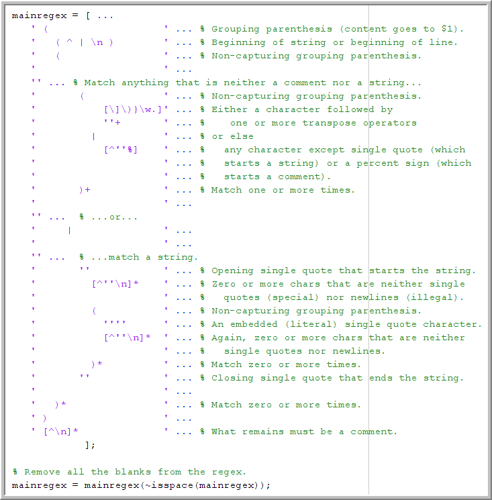
If you ever need to strip comments, or just want to see some impressive code, try out Peter's file, and let us know about it here.


Get the MATLAB code

Published with MATLAB® 7.8

2 Responses to “Want to get rid of your code comments?”

  1. Marcelo replied on :

    I would like to have some kind of special highlighting for missing semi-colons in Vim, where I like to edit my m-files.

  2. Mike Katz replied on :

    Marcelo,

    Are you talking about the highlighting provided by M-Lint in the MATLAB editor when a semicolon is left off an expression? That is feature particular to the MATLAB editor. However if you have a MATLAB session you can connect to and know how to build a highlighting plug-in for your editor you can implement it yourself with the output of the mlint function. It gives the line and column numbers of all its warnings.

Leave a Reply

Wrap code fragments inside <pre> tags, like this:

<pre class="code">
a = magic(3);
sum(a)
</pre>

If you have a "<" character in your code, either follow it with a space or replace it with "&lt;" (including the semicolon).


Bob, Brett & Jiro share their favorite user-contributed submissions from the File Exchange.

  • Zach: Hi Doug and Les, I didn’t have a lot of time to mess with this, but I did find a work-around. I plotted...
  • hamed: k
  • Les: @Zach This isn’t exactly what you are looking for but at least it puts all three parameters on the same...
  • Zach: Thanks for your suggestions Doug. I’ll give that a shot and see what happens. I’ve seen many of...
  • Doug: @Zach, I would say to use plotYYY, because that is close to what you want, but using depth as Y makes sense....
  • Doug: @Teja, I think this will work: http://www.mathworks .com/access/helpdesk /help/techdoc/ref...
  • Gify: merry christmas :) nice christmas tree! Regards, Janet Gify
  • Teja: Dear Doug Is there anyway to plot a surface from nonuniform data without meshgrid and griddata? Basically i...
  • Zach: I’m working with geophysical data, so I’d like to produce a depth profile. The y-axis would be...
  • Doug: @Ashok First, please do not use variable names that are MATLAB commands (std and mean). Second, p(j) should be...

These postings are the author's and don't necessarily represent the opinions of The MathWorks.