Loren on the Art of MATLAB

October 18th, 2006

Controlling Warning Messages and State

There are occasional posts on the MATLAB newsgroup, such as this one, where people ask how to control when they see various warnings. One reason people might want this is to control what a user sees during some calculation. For example, you may know that a particular warning is likely to crop up during the calculation, but for the purposes of this specific calculation, it is not a worry. You'd like to turn this particular warning off in the context of your calculation, but not necessarily for the remainder of your MATLAB session.

Contents

Evolution of Warnings

In older versions of MATLAB, you couldn't control the warnings at all. We followed this with the ability to control seeing warnings or not, an all or nothing deal. So warning had a global state. More recently, we added message identifiers and the ability to control warnings more finely. We introduced these message ids was specifically so you could control the messages you see. In addition, they help us supply translated messages for the Japanese version of MATLAB on Windows.

Capture warning state for later use.

sw = warning;

Poor Programming Pattern

Let me illustrate one of the programming patterns I've seen. Here's a line of code that normally gives a warning in MATLAB R2006b:

1/0
Warning: Divide by zero.
ans =
   Inf

Suppose I don't want to see that message. I can turn all warnings off and then enable them after I finish.

warning off
1/0
warning on
ans =
   Inf

The reason this is problematic is that I may have some other warnings in some non-default state. But by typing warning on, I have obliterated that information. Let me look at the state of warnings now:

swn = warning
swn = 
2x1 struct array with fields:
    identifier
    state

We can see there are two elements to my warning state and they are

swn(1)
swn(2)
ans = 
    identifier: 'all'
         state: 'on'
ans = 
    identifier: 'MATLAB:nonScalarConditional'
         state: 'off'

Compare this to the original warning state I saved at the beginning of this article.

sw
sw = 
8x1 struct array with fields:
    identifier
    state

The original settings were

for ind = 1:length(sw)
    sw(ind)
end
ans = 
    identifier: 'all'
         state: 'on'
ans = 
    identifier: 'MATLAB:intConvertNonIntVal'
         state: 'off'
ans = 
    identifier: 'MATLAB:intConvertNaN'
         state: 'off'
ans = 
    identifier: 'MATLAB:intMathOverflow'
         state: 'off'
ans = 
    identifier: 'MATLAB:intConvertOverflow'
         state: 'off'
ans = 
    identifier: 'MATLAB:nonScalarConditional'
         state: 'off'
ans = 
    identifier: 'MATLAB:mir_variable_with_script_name'
         state: 'error'
ans = 
    identifier: 'MATLAB:mir_warning_unrecognized_pragma'
         state: 'off'

Return warning state to initial one.

warning(sw)

Better Code : First Option

If you know the message id for the warning you want to suppress, simply turn that warning off. To find the id, if it exists, use lastwarn. Then set the state explicitly for that id.

1/0
[msg, msgid] = lastwarn
Warning: Divide by zero.
ans =
   Inf
msg =
Divide by zero.
msgid =
MATLAB:divideByZero

Note that the state s captured below is the state prior to resetting the warning state. In this way, you can preserve the original state and set to a new state in one statement. Later, you can use s to restore to the original state.

s = warning('off',msgid);
1/0
warning(s)  % restore state
ans =
   Inf

Better Code : Second Option

Not all warning messages have identifiers associated with them. If you know of a warning you don't want to see, but it does not have an associated id, you can do this.

s = warning('off','all'); % turn all warnings off
if true,
    disp('I am running this code!')
    warning('Here is a warning that doesn''t have an id.')
end
warning(s)  % restore the warning state
I am running this code!

I turned all the warnings off so you didn't see the message. So, did I actually trigger the warning? Yes, and here's how I know.

[msglast, msgidlast] = lastwarn
msglast =
Here is a warning that doesn't have an id.
msgidlast =
     ''

Summary

There are set of functions in MATLAB that allow you control the state of warnings for your work without disrupting how all functions behave. Any thoughts on when and how you use this set of features? Let me know.

Loren Shure

Copyright 2006 The MathWorks, Inc.


Published with MATLAB® 7.3

23 Responses to “Controlling Warning Messages and State”

  1. Oliver A. Chapman, PE replied on :

    Loren,

    After reading this posting, I’m just as confused as before. Although, maybe in a different way.

    I certainly understand the concept that the MatLab warnings are implemented as data structures. And I understand the hazard of turning off all warnings, rather than just the pesky one. Finally, I understand the advantage of re-setting the warnings to an original state after doing something custom with them.

    But, when I look at the size of the warning structure, I get a 12×1, rather than the 8×1 in your example. For extra ones, I’ve got:

    ‘MATLAB:max:mixedIntegerScalarDoubleInputs’
    ‘MATLAB:min:mixedSingleDoubleInputs’
    ‘MATLAB:min:mixedIntegerScalarDoubleInputs’
    ‘MATLAB:max:mixedSingleDoubleInputs’

    But, where in the MatLab help system do I find THE list of these warnings? i.e., what they mean & how they are set.

    If I look at the field names for the warnings structure, I get two fields: identifier & state. But after that, I can’t query the values very easy. For example:

    warning(1)
    ??? Error using ==> warning
    First input must be a string or a structure.

    sw = warning;

    sw(1)

    ans =

    identifier: ‘all’
    state: ‘on’

    This doesn’t make sense. Why can’t warning(1) give me the answer?

    There must be something else that I’m missing because this seems very cumbersome. I’ve got to approach this from many different angles to find out all the details of these warnings. And, I still don’t know what has to happen for MatLab to change the state of one of these.

  2. Loren replied on :

    Oliver-

    warning(1) isn’t a valid usage of warning. It looks like you are trying to index into an array, which warning is not, or to call it with the argument 1 which isn’t a valid calling syntax.. If called with an output argument, the output is a structure array with each warning set. So you need to assign the output and then work with that. This is usual for MATLAB, since you cannot index into output from function calls without assigning to a variable first.

    As to why you get your struct as 12 instead of 8, it might be version differences or different startup.m or what you did before you fiddled with warning. Mine was run in R2006b before doing anything else in MATLAB.

    –Loren

  3. Sheldon Danielson replied on :

    I have a warning problem of a slightly different sort. When a Matlab program under development that uses e.g., serial line callbacks crashes, a warning message is delivered by instrcb to the effect that the bytesavailablefcn is being disabled. After the error is fixed and the program is running properly, the warning keeps being issued on every callback. The only way I’ve found to stop this is to quit Matlab and restart it. How can I stop this?

    Sheldon Danielson

  4. Trent Jarvi replied on :

    Hello Sheldon

    What you found is a bug resolved in the 2007a release of MATLAB. For further information, please see our bug report.

    http://www.mathworks.com/support/bugreports/details.html?rp=309961

    I hope that helps.

  5. Sheldon Danielson replied on :

    Thanks much for the quick reply. The workaround works, however the problem is not restricted to the Instrument Control Toolbox, which we don’t have.

    Many thanks,
    Sheldon

  6. Trent Jarvi replied on :

    Thank you Sheldon,

    In response, I’m getting a second report published for users of core MATLAB which also has basic serial support.

  7. P. S. replied on :

    Hi, I refere to your columns frequently, with much benefit. Thanks for the very useful tips. I have an additional question. In a program, I am getting multiple instances of the same warning (MsgID:”MATLAB:nearlySingularMatrix”), as a loop goes through a long series of matrix inversions on subsets of a large data set. I would like to have only the first instance of this warning show up, (as that would tell me the data is not rightly scaled), but suppress all the subsequent instances. I tried this code , which should work, I think:

    [msglast, msgidlast] = lastwarn;
    if strcmp(msgidlast,’MATLAB:nearlySingularMatrix’)
    s = warning(’off’,msgidlast);end

    But I am not sure this is working! I think it has to do with where to place this code. Your advice would be greatly appreciated!

  8. Loren replied on :

    P.S.,

    Is something not working as you expect? The one thing I would say is that you might consider resetting the warning state after you finish your loop.

    –Loren

  9. P. S. replied on :

    Hi Loren, thanks for the response. I have had time to think more deeply about this (of course you are right about resetting the warning at the end- I was doing that, just didn’t mention here). I now realize that my program structure is pretty complex, and though this will be a bit long, I will outline it in case someone else finds it useful. The main program 1 (for Kernel Regression) calls another program 2(for minimizing the cross-validation errors) which partitions the data into subsets, carries out a series (with different parameters)of regressions (program 3) on each subset, and then invokes a minimization routine (built in Matlab program) to locate the optimal parameter. The warning is actually generated in Program 3, which might typically be invoked a few hundred times. So I have a choice of placing the “warning off code” somewhere (where should it be?) in either of the 3 programs. So far, I get either no warnings at all, or a whole lot (fewer with one option). But I would like it to issue just ONE warning! (I suspect I need to also check the warning state for this warning ID somewhere).

    As a simpler alternative, could I, for instance, have the program keep count of the number of times this warning is issued, and turn it off after one?

    Thanks a lot for your time and attention.

  10. Loren replied on :

    P.S. -

    I’d probably go with your latter suggestion. Is it your code that issues that warning or is it deeper in code you didn’t write. If it’s in code you didn’t write, I can only see complicated ways to manage this for now and would discourage you from doing so. If it’s from your code only, write a wrapper function to throw the warning that keeps the state (best if you do it with a nested function and then pass the handle around) and use that to issue warnings. There would be a call to warning inside the nested function, but you would control whether or not it got called.

    –Loren

  11. Shilpa Gandhi replied on :

    Re: Suppressing a warning works at command line, but not within function

    I’m having problems suppressing a warning in my code. When I run warning(’off’,'MATLAB:load:variableNotFound’) at the command line and test it out, it works just fine. But when I run it in my function (which loads variables from different mat files within a loop), it doesn’t suppress the warning. Naturally, it just shows the warning message over and over until the loop if completed. Moreover, when I query the state of the warning after attempting to load variables and turning the warning off, it says that the warning has been turned off. Am I missing something?

  12. Loren replied on :

    Shilpa-

    Are you sure it’s not just a similar warning? Or one has a typo with the identifier?

    –Loren

  13. Bowen Kerins replied on :

    Hi Loren, recently someone asked me if it is possible to record the message or identifier for several warnings that might occur during a longer execution, and produce a report of all the warnings generated.

    I didn’t find any such way to use LASTWARN or any function on Central to perform this. DIARY could be used to track visible warnings, but is there another way?

    - Bowen

  14. Loren replied on :

    Bowen-

    There is no such function. You could send in an enhancement request for one.

    –Loren

  15. Jan Kristian Jensen replied on :

    When writing new functions I try to embedd errors/warnings wherever appropriate - it’s a good habit. Are there any guidelines or naming convention for constructing new MSGID’s?

    For errors in input data, I would typically write something like
    error( ‘functionName:inputerr’, ‘Error in input data’)

  16. Loren replied on :

    Jan-

    The doc I think covers message ids. They should be something identifiable for you, e.g.,

    JanKJSignalToolbox:NoFileFound

    or even more levels from the root one like

    JanKJSignalToolbox:DataGUIImport:NoFileFound

    –Loren

  17. QIANG LI replied on :

    How do I know there is a warning?

    I am using “nlinfit”. Sometimes the data is ill conditioned, so matlab show a warning but it still runs. If data is ill conditioned, the result of nonlinear fit is not good. I want to indicate it, like 1 for nlinfit is good and 0 for nlinfit is not good.

    How could I do that? I cannot find something like “isnan” or “isempty” for warning.

    Thanks.

  18. Loren replied on :

    Qiang-

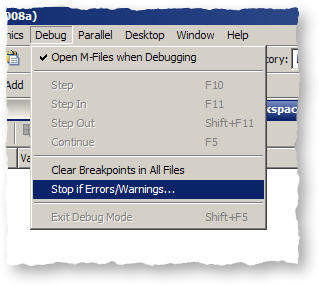
    In MATLAB, you don’t “catch” warnings like you do errors. You can trace this one down by issuing a debug command (something like dbstop if warning) before starting the optimization call.

    –Loren

  19. Stacius Sakato replied on :

    As a more general question, I was wondering what the best way is to systematically keep track of a library of custom MSG IDs to use for errors and exceptions. For example, if I’m writing a custom application and I want to keep a library of all my possible MSG IDs in one place, what’s the best way to do this?

    I thought about using a global MATLAB map, but I get an error when trying to access the map variable from within methods defined in my custom classes.

  20. Loren replied on :

    Stacius-

    I don’t have a great answer for you. You could try this: put them in a function that returns a struct, with the id as fieldname. Then you could call that function from your methods. You could use varargin to allow flexibility in the interface (whether to return all IDs or just the one you want).

    Maybe others will add some good ideas here.

    –Loren

  21. SAM replied on :

    I want to know that how can we supress the warnings and error messages in vb.net code?

    I recieve an error message like “could not copy” or “failed to copy” when I create an instance of the class “ContourPlot_Lib_NETclass”, when application runs in command prompt, and I want to supress this error message.

    Thanks,
    Sam.

  22. Loren replied on :

    SAM-

    I have no idea. It’s possible that putting the code inside a try/catch will be part of the solution. I don’t know VB so I don’t know if you can call make a call and get the status - if that’s available, it may also help.

    –Loren

  23. SAM replied on :

    Loren-

    The code is already in Try/Catch block and the message still prompts on command prompt.

    I have tried to set the following property:
    MCRComponentState.MCC_ContourPlot_Lib_NET_set_warning_state

    But its not working.

    It would really help me if I can find out the appropriate syntax for suppressing all error messages.

    Thanks,
    Sam.

Leave a Reply

Wrap code fragments inside <pre> tags, like this:

<pre class="code">
a = magic(3);
sum(a)
</pre>

If you have a "<" character in your code, either follow it with a space or replace it with "&lt;" (including the semicolon).


Loren Shure works on design of the MATLAB language at The MathWorks. She writes here about once a week on MATLAB programming and related topics.

  • Jun: I totally can not believe it, Loren. You are really helpful. Thank you so much, MATLAB master!
  • Loren: Wow folks- Always lots of interest when there’s a quickie to try out! I will only make 2 general...
  • Loren: Jun- ismember is your friend here: >> [aa,ind] = ismember(Array2,Arra y1) aa = 1 1 1 1 1 1 1 ind = 1 2 1 4 4 3...
  • Dan: I like the first way better than the second way. Combining the arrays into one and running any is nice, although...
  • James Myatt: How about I = (a == 0 | b == 0); a(I) = []; b(I) = [];
  • Tunc: Hello Loren, love your blog because of such inspiring and challenging comments to such ’small’...
  • Pekka Kumpulainen: Here is my tradeoff. I usually want to keep the original variables as they are most probably...
  • Iain: Followup: Of course, to allow NaNs (counting them as non-zero): mask = (a~=0) & (b~=0); The mask says “a...
  • Matt Fig: I would usually go with something like this: y = a&b; x = a(y); y = b(y); But I was surprised to find...
  • kk: c=all([a;b]) a(c) a(b)

These postings are the author's and don't necessarily represent the opinions of The MathWorks.