 Cleve’s Corner: Cleve Moler on Mathematics and Computing
 The MATLAB Blog
 Guy on Simulink
 MATLAB Community
 Artificial Intelligence
 Developer Zone
 Stuart’s MATLAB Videos
 Behind the Headlines
 File Exchange Pick of the Week
 Hans on IoT
 Student Lounge
 MATLAB ユーザーコミュニティー
 Startups, Accelerators, & Entrepreneurs
 Autonomous Systems
 Quantitative Finance
 MATLAB Graphics and App Building
ODEs, from Symbolic to Numeric Code
In a recent post on solving ODEs, the reader Jason wondered if there was a way to do away with the manual algebraic steps using Symbolic Math Toolbox. There currently isn't a canned way to do it so the result is a MATLAB program, but you can do so in MuPAD, the symbolic engine for Symbolic Math Toolbox. For now, I want to show you how you might generate the ODE solution in the case where MuPAD finds a closed-form solution.
Contents
Define Symbolic Variables
Let's first define the variables we need to describe the equations for a simple harmonic oscillator, using the same notation as the post linked above.
syms x t m k
Solve the System
Using the function dsolve, we find the solution.
sol = dsolve('m*D2x+k*x(t)','x(0) = 0','Dx(0) = 1','t');
Reformat the solution display suitable for posting.
csol = char(sol);
disp(csol(1:45))
disp(csol(46:end))
(m*exp((t*(-k*m)^(1/2))/m))/(2*(-k*m)^(1/2))
- m/(2*exp((t*(-k*m)^(1/2))/m)*(-k*m)^(1/2))
Convert Solution from MuPAD
Using matlabFunction, I next generate a function handle to a MATLAB version of the solution.
f = matlabFunction(sol);
Again, reformat expression to display more nicely in post.
cf = func2str(f);
disp(cf(1:65))
disp(['       ', cf(66:end)])
@(k,m,t)m.*exp((t.*sqrt(-k.*m))./m).*1.0./sqrt(-k.*m).*(1.0./2.0)
-m.*exp(-(t.*sqrt(-k.*m))./m).*1.0./sqrt(-k.*m).*(1.0./2.0)
Set Values for Mass and Spring Constant
I'm using the same values for k and m that I used in the referenced post.
k = 10;
m = 1;
I'm now creating a short-hand function with the values for k and m set so I can plot the result.
fnew = @(t) f(k,m,t);
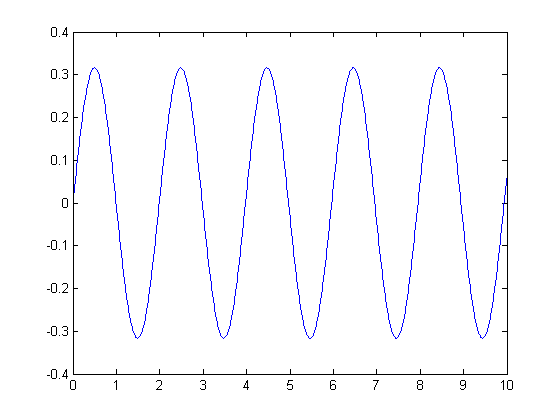
Plot the Solution
t = 0:0.01:10;
plot(t,fnew(t))
All Well and Good IF ...
That's all well and good if MuPAD can find an analytic solution to the differential equation. For now, there is not a way to automatically generate a MATLAB program for the system of equations defining the ODE suitable for solving numerically. MuPAD itself has numerical ODE solvers which may be suitable. Do you have problems that straddle the symbolic and numerical worlds? How do you handle them? Let me know here.
- Category:
- Education,
- Solving Equations,
- Symbolic





Comments
To leave a comment, please click here to sign in to your MathWorks Account or create a new one.